33
33
Index
Contents
Index
Contents
CUSTOMIZING THE TABLET FUNCTIONS
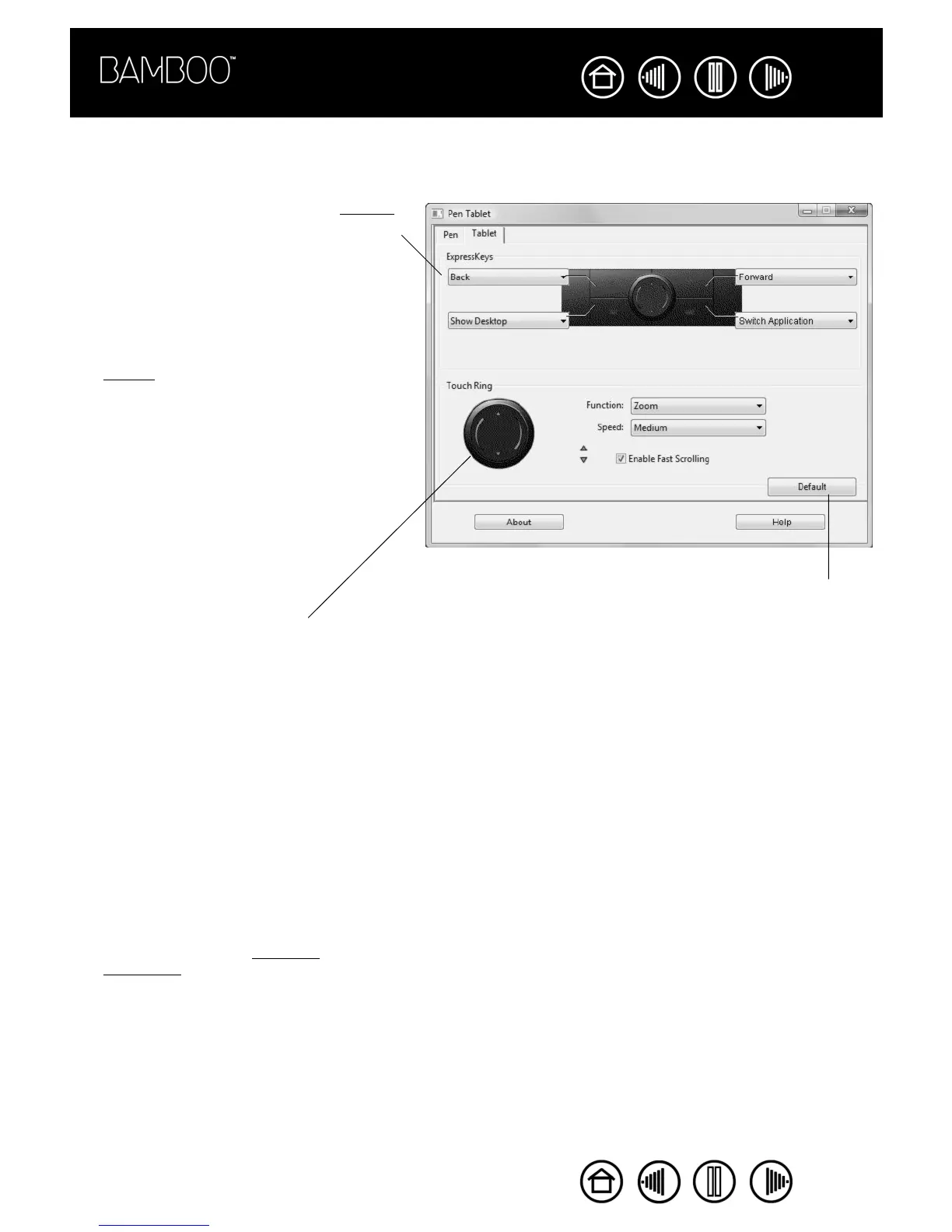
The TABLET tab is used to customize the ExpressKeys and Touch Ring.
Use the pull-down menus to choose a function
that will be performed when the key is pressed.
Your choice will be displayed either within the
pull-down menu or beneath the menu.
• By default, you can use the upper keys to
move BACK and FORWARD within Internet
browsers.
• On Windows Vista systems the lower left
button defaults to JOURNAL when the
Journal application is available. Otherwise,
the button is set to SHOW DESKTOP.
• The default condition for the lower right
button is SWITCH APPLICATION on Windows
systems and EXPOSÉ on Macintosh
systems.
Returns the tab settings to their
factory default conditions.
To customize the Touch Ring:
• Choose a FUNCTION to perform
when the Touch Ring is in use.
ZOOM is the default setting. When
selected, the Touch Ring enables
you to zoom in or out of
documents and images in the
active window. You can also set
the ring to SCROLL, or disable it.
• Choose an option from the pull-
down menu to set the SPEED at
which you would like to zoom or
scroll.
• Decide if you want to enable fast
scrolling. When checked (the
default setting), ENABLE FAST
SCROLLING allows you to scroll
simply by tapping the upper or
lower portion of the Touch Ring
with your finger. See using the
Touch Ring for details on working
with this function.










 To Next Page