55
Maintenance Instructions CLEANING
IMPORTANT: Prior to removing the safety lter,
make sure the inside surface of the air cleaner
canister is clean. This will minimize the risk of
dirt entering the outlet tube which can cause pre
mature engine wear.
7. After removing the safety lter, use a clean,
damp cloth and wipe the interior of the air clean
er canister clean. Use special care to clean
both the inside and outside surfaces of the
outlet tube.
IMPORTANT: Any dust left on the inside of the
outlet tube will go into the engine and cause
wear.
8. Check the outside surface of the outlet tube for
smoothness and cleanness (this is the sealing
surface).
9. Insert and seat the safety lter and primary lter
el ement carefully into the canister, applying
pres sure at the outer rim of the lter; not at the
exible center. Make sure the lter element is
completely in place before installing the cover.
NOTE: DO NOT use petroleum based lubri
cants on the sealing surfaces of the lters; use
tal cum powder or dry silicone lubricants if re
quired for lter installation.
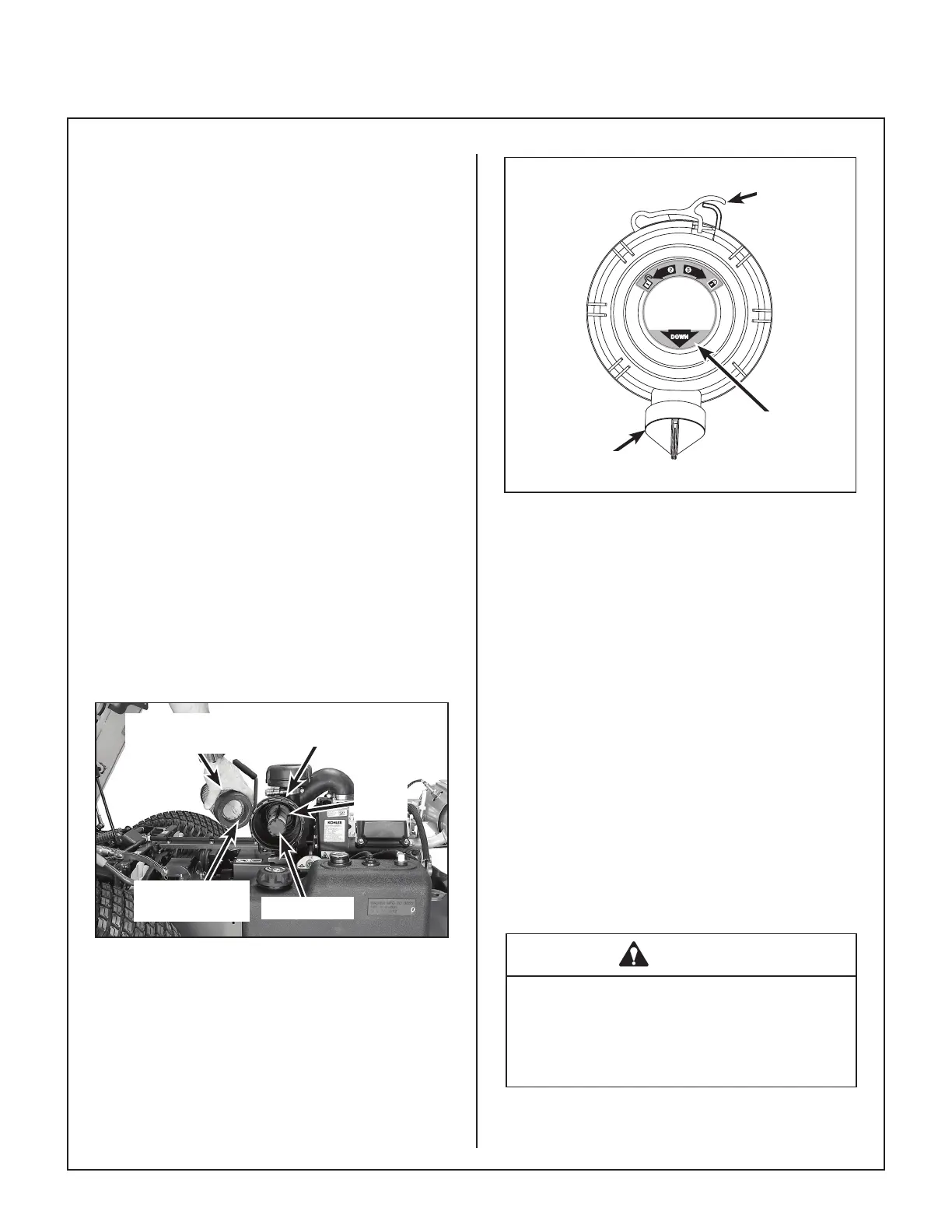
Primary
Filter Element
Radial Sealing
Surface
Canister
Safety Filter
Outlet
Tube
Air Filter Element Replacement
10. Install the cover with the word “DOWN” prop
erly oriented to the bottom of the canister. Twist
the OptiAir™ cover to the right and put into the
“closed” position.
3
DOWN
2
Mono Latch
Twist Lock™
Dust Ejection
Valve
Orient to Bottom
of Canister
Proper Orientation of Air Cleaner Cover
11. Check the air intake hose for cuts, nicks, cracks,
etc., and the hose clamps for tightness.
12. Reset the air lter restriction gauge (press but
ton on the end of the indicator).
Engine Cooling System
Cooling Air Intake Screen
To prevent engine overheating and possible engine
damage, clean grass clippings, cha, and dirt from
the rotating engine cooling air intake screen after
every 8 hours of operation. In certain mowing
conditions (dry grass, leaves, tree “cotton”, etc.), it
may be nec essary to check and clean the screen
several times each day to prevent engine overheat
ing. Also, visually check inside cylinder head
shroud and between cylinder head ns for material
packed in this area which would prevent cooling
airow; remove shroud and clean as required.
CAUTION
Operating the engine with a blocked air
intake screen, dirty or plugged cooling
ns, and/or cooling shrouds removed will
cause engine damage from overheating.


 To Next Page