76
Maintenance Instructions ADJUSTMENTS
Step 2 - Blade Brake Band Adjustment
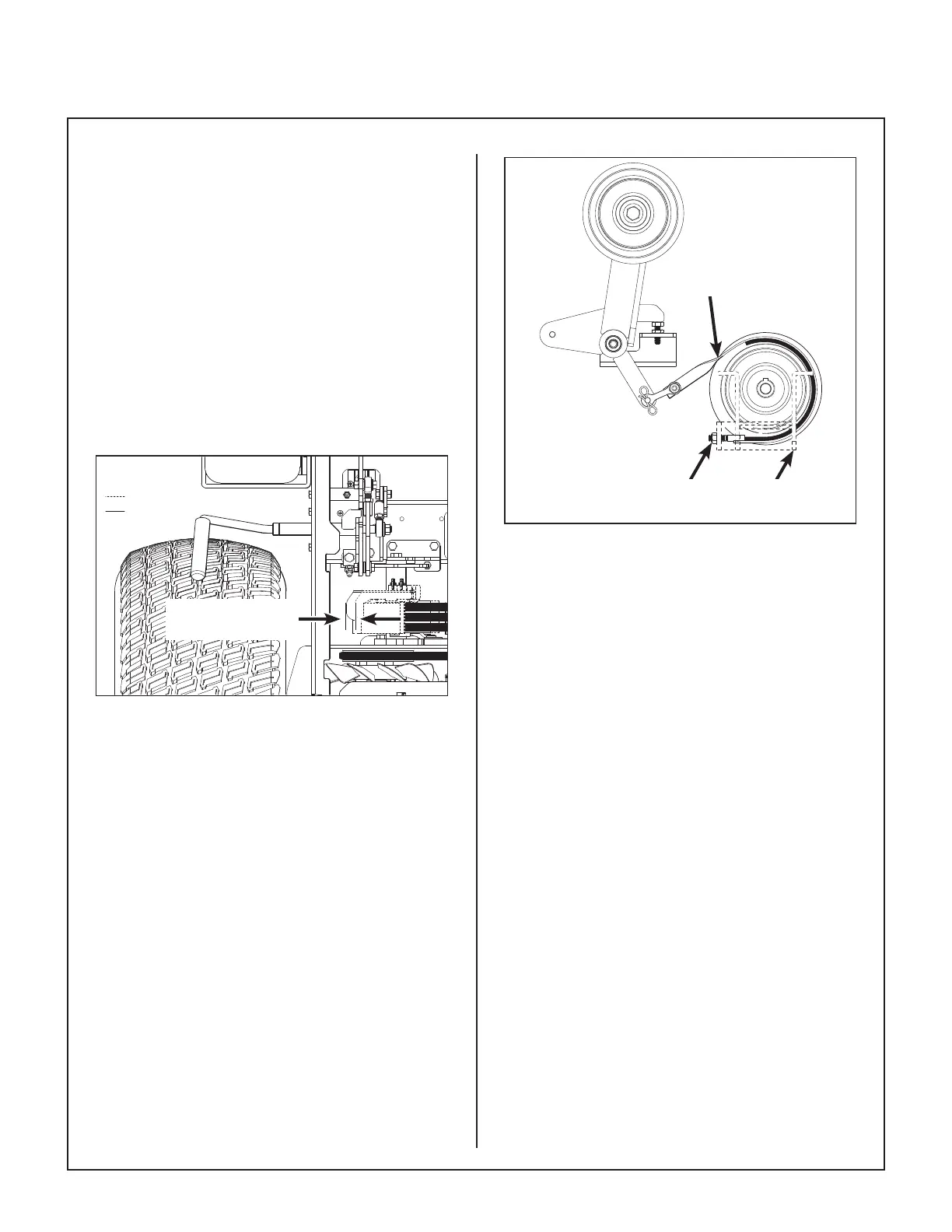
After the maximum pulley travel is set, adjust the
working travel of the clutch idler pulley by adjusting
the brake band nut and make the following adjust
ment as needed:
1. Adjust the blade brake band, using the adjust
ment nut until pulley travel is approximately
5/8 in. to 3/4 in. (16 mm to 19 mm) from en
gaged to disengaged.
NOTE: As blade brake band/drum wears,
pulley travel will increase and it will be nec
essary to adjust the blade brake band nut to
maintain these dimensions.
CLUTCH DISENGAGED
CLUTCH ENGAGED
5/8 in. to 3/4 in.
(16 mm to 19 mm)
Clutch Idler Pulley Travel Adjustment
Blade Brake
Band
Blade Brake
Band Adjustment Nut
Chassis Mount
(Ref)
Blade Brake Band Adjustment
2. After adjustments are complete, check blade
brake action as described in CHECKING/SER-
VICING the Blade Brake Action in this section.
If blades do not stop within ve (5) seconds,
check the following:
a. Make sure clutch and brake linkage are
working freely (no binding).
b. Check the brake band lining for wear.
c. Check the brake drum on the pulley. If ex
cessive wear is present, it will be neces
sary to replace worn parts.


 To Next Page