WK-WS-28-015
(CVV)
WK-WS-28-015
(CCW)
Brushless
ESC(CW)
Brushless
ESC(CCW)
Brushless
ESC(CCW)
Brushless
ESC(CW)
WK-WS-28-015
(CCW)
WK-WS-28-015
(CVV)
FURIOUS
320
Quick Start Guide
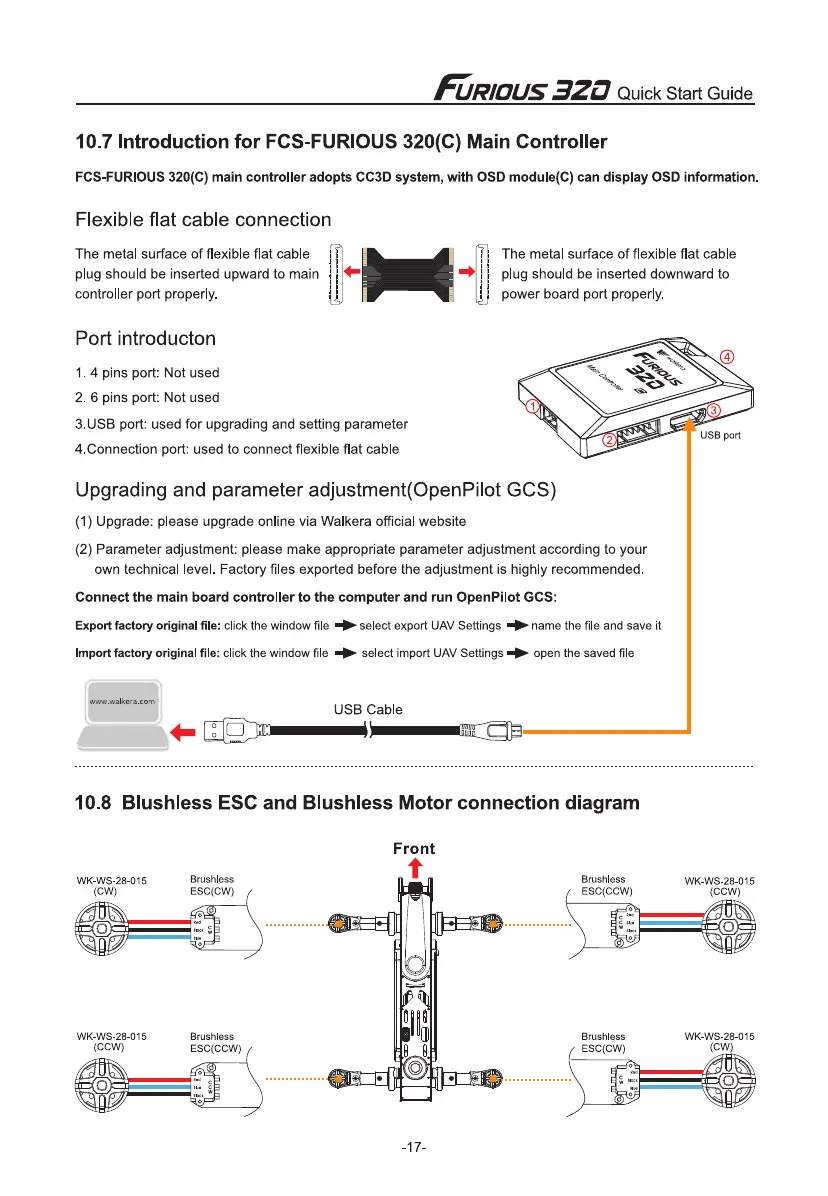
10.7 Introduction for FCS-FURIOUS 320(C) Main Controller
FCS-FURIOUS 320(C) main controller adopts CC3D system, with OSD module(C) can display OSD information.
Flexible flat cable connection
The metal surface of flexible flat cable
plug should be inserted upward to main
controller port properly.
Port introducton
The metal surface of flexible flat cable
plug should be inserted downward to
power board port properly.
1.4 pins port: Not used
2. 6 pins port: Not used
3.USB port: used for upgrading and setting parameter
4.Connection port: used to connect flexible flat cable
Upgrading and parameter adjustment(OpenPilot GCS)
(1)
Upgrade: please upgrade online via Walkers official website
(2)
Parameter adjustment: please make appropriate parameter adjustment according to your
own technical level. Factory files exported before the adjustment is highly recommended.
Connect the main board controller to the computer and run OpenPilot GCS:
Export factory original file:
click the window file + select export UAV Settings 40-name the file and save
it
Import factory original file:
click the window file
■
111 select import UAV Settings 40. open the saved file
www.walkera.com
USB Cable
.
1=
Z0)1
10.8 Blushless ESC and Blushless Motor connection diagram
-17-


 To Next Page