Primary
Intermediate
Flight Mode
Flight Mode
Advanced
Flight Mode
V
2
•
2
A
•
2
MDC Switch to "1"
MIX Switch to "2"
MIX Switch to "0"
Left stick
MODE 2
(Throttle stick
Right stick
on the left)
Left trim
THRO/RUDD stick
ELEV/AILE stick
THRO trim
MODE 1
(Throttle stick
on the right)
Right trim
Left stick
Right stick
Left trim
Right trim
ELEV trim
ELEV/RUDD stick
THRO/AILE stick
ELEV trim
THRO trim
-3-
AUX4 Knob
adjust the angle of
aircraft arm
FURIOUS 320
Quick Start Guide
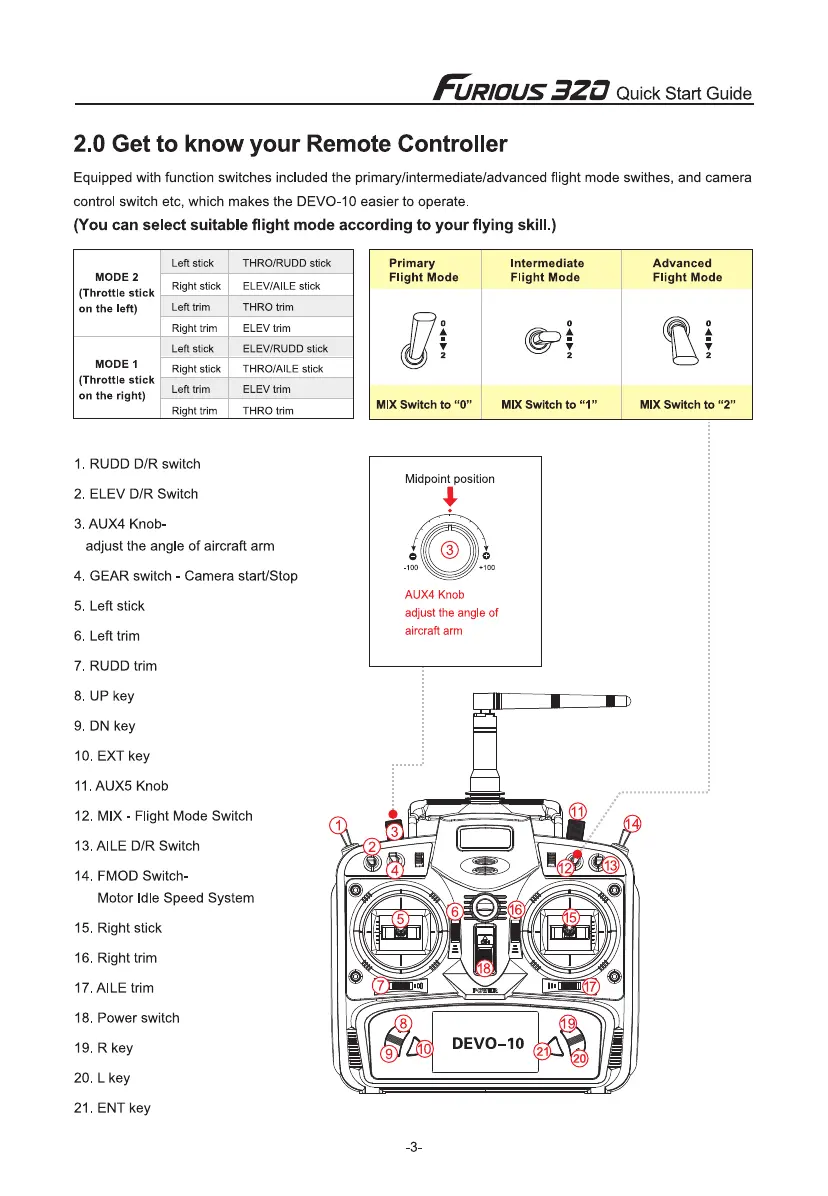
2.0 Get to know your Remote Controller
Equipped with function switches included the primaryfinterrnediate/advanced flight mode swithes, and camera
control switch etc, which makes the DEVO-10 easier to operate.
(You can select suitable flight mode according to your flying skill.)
1.
RUDD D/R switch
2.
ELEV D/R Switch
3.
AUX4 Knob-
adjust the angle of aircraft arm
4.
GEAR switch - Camera start/Stop
5.
Left stick
6.
Left trim
7.
RUDD trim
8.
UP key
9.
DN key
10.
EXT key
11.
AUX5 Knob
12.
MIX - Flight Mode Switch
13.
AILE D/R Switch
14.
FMOD Switch-
Motor Idle Speed System
15.
Right stick
16.
Right trim
17.
AILE trim
18.
Power switch
19.
R key
20.
L key
21.
ENT key


 To Next Page