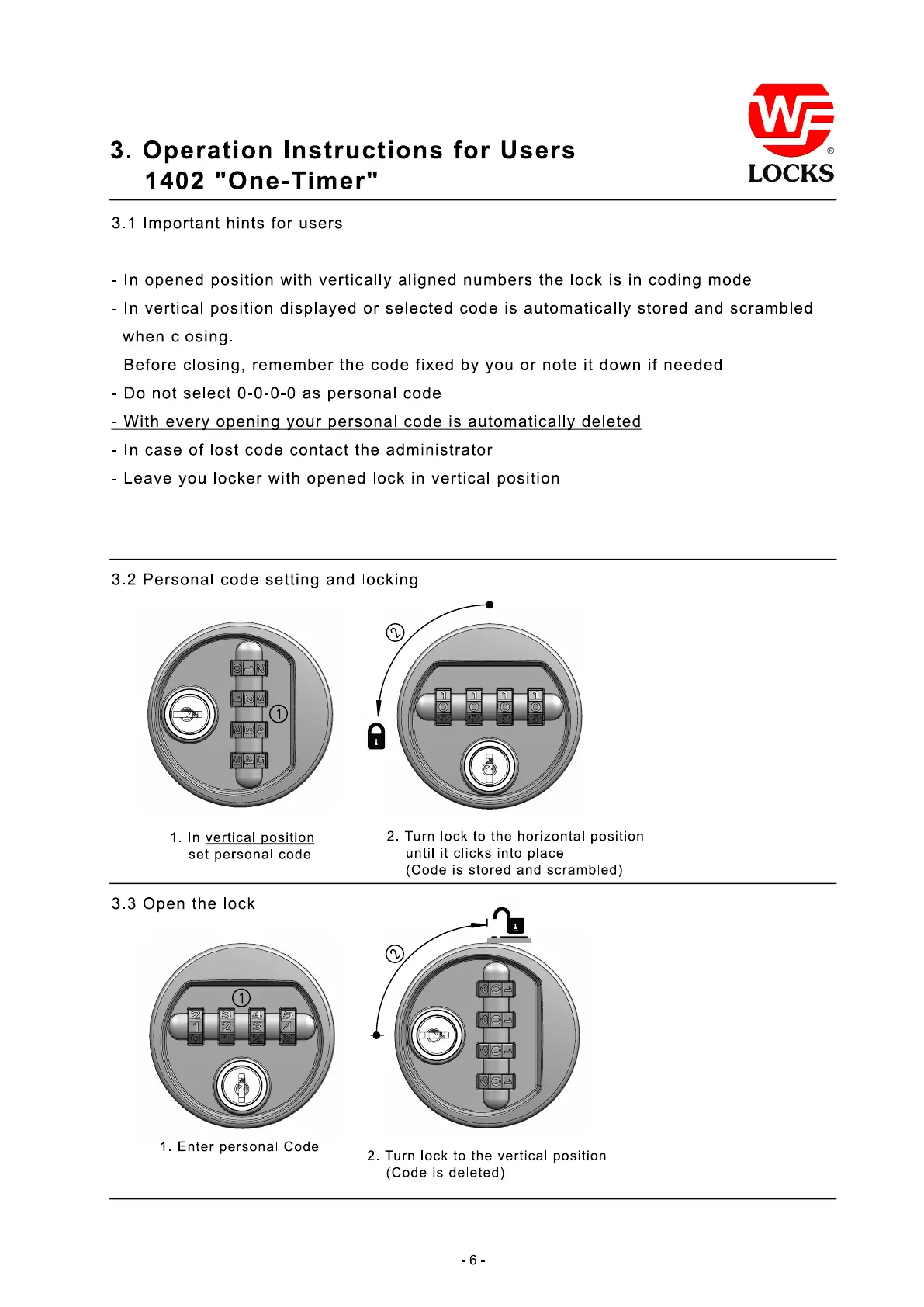
3.2 Personal code setting and locking
3.3 Open the lock
1. In
vertical position
set personal code
2. Turn lock to the horizontal position
until it clicks into place
(Code is stored and scrambled)
1
2
2
1
- 6 -
1. Enter personal Code
2. Turn lock to the vertical position
(Code is deleted)
3. Operation Instructions for Users
1402 "One-Timer"
3.1 Important hints for users
- In opened position with vertically aligned numbers the lock is in coding mode
- In vertical position displayed or selected code is automatically stored and scrambled
when closing.
- Before closing, remember the code fixed by you or note it down if needed
- Do not select 0-0-0-0 as personal code
- With every opening your personal code is automatically deleted
- In case of lost code contact the administrator
- Leave you locker with opened lock in vertical position


 To Next Page