ON FIRST POWER UP
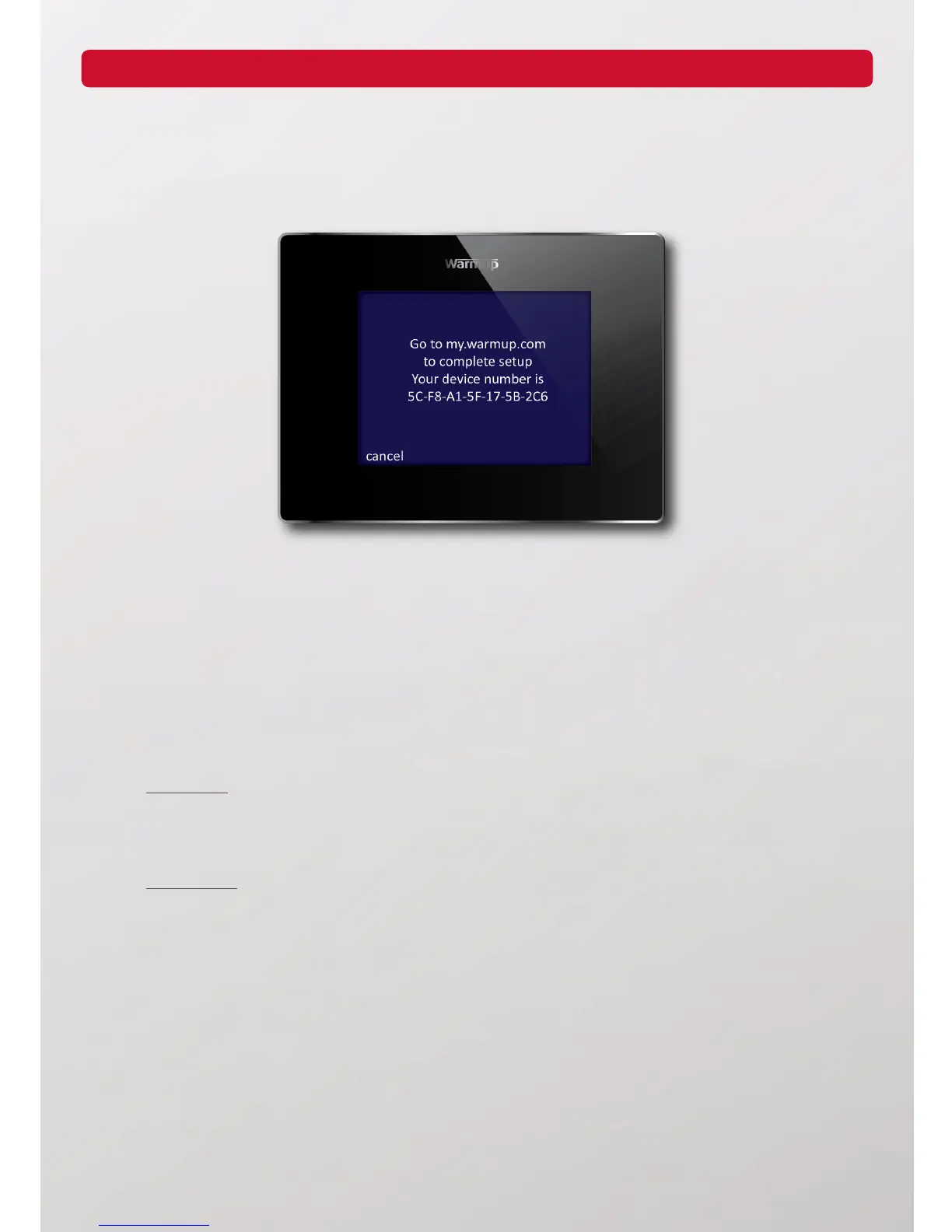
On rst power up the 4iE will display the Device Number. Make a note of this number as it will be needed when
registering the 4iE online. If you lose this number you can nd it once the 4iE has been set up by going to settings,
advanced settings, about and info.
After you have noted your device number you need to set up your 4iE.
(1) Language - Set your language preference
(2) Set WiFi Network - SSID Name must be less than 11 characters and password must be less than 10
characters. Check with your internet provider for help with changing the SSID & password if they exceed
character limit
(3) Heater Type
Electric oor
The power settings have to be entered. Voltage is defaulted to 120V and the power is the total wattage of
the heaters which the 4iE is controlling. The wattage ratings of the heaters can be found in the heater
manual or online at warmup.com or warmup.ca
Hydronic oor
The power settings have to be entered. If you do not know the eciency percentage and kW rating of your
hydronic system, please consult your installer
(4) Set time - Set the current time
(5) Set date - Set the current date
(6) Set daylight savings - Set Europe, N.America, Australia or switch o
(7) Temperature format - Set the format as degrees Celsius or Fahrenheit
(8) Home screen style - Set your home screen style
(9) Background image - Set your background style
(10) Display brightness - Set the display and standby brightness
Step 1 - Note your Device Number
Step 2 - Setting Up Your Thermostat
1



 To Next Page