103484A3
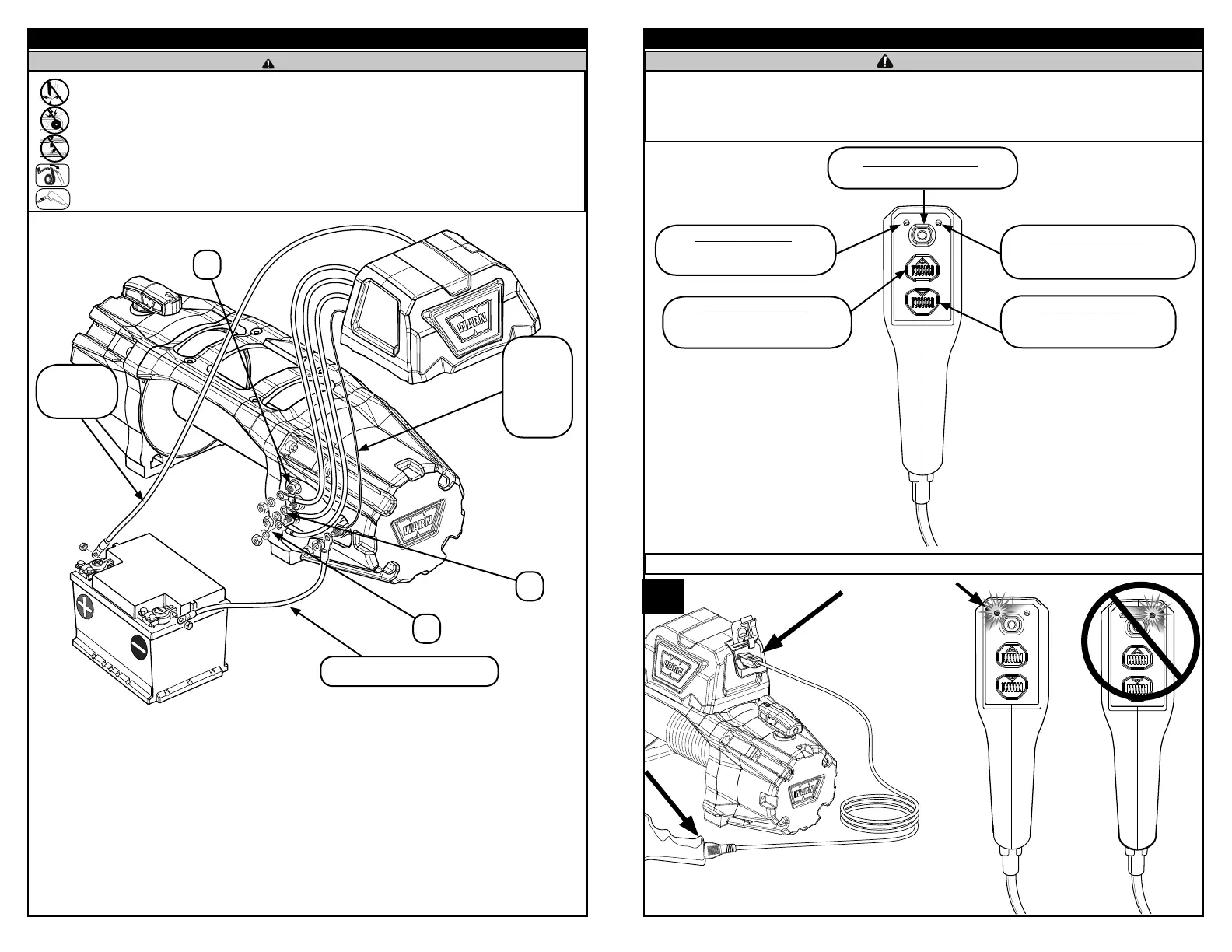
WIRING
• Always remove jewelry and wear eye protection when making battery connections.
• Never route electrical cables across sharp edges.
• Never route electrical cables near parts that get hot.
• Never route electrical cables over battery terminals.
• Never route electrical cables through or near moving parts.
• Always insulate and protect all exposed wiring and electrical terminals.
• Always place the supplied terminal boots on wires and terminals.
WARNING
Power
(72” long red)
Cable
Ground (Black)
Wire
Negative (72” long black) Cable
F2
A
F1
103484A3
REMOTE CONTROL
• Never engage or disengage clutch if winch is under load, winch rope is in tension or drum is moving.
• Never leave winch remote control where it can be activated during free spooling, rigging, or when the winch is not being used.
• Never leave the wireless winch remote control turned on when installing, freespooling, rigging or servicing winch, or when the winch
is not being used.
WARNING
Winch Power-Out Button:
Press to control the power-out operation
of the winch.
Winch Power-in Button:
Press to control the power-in operation
of the winch.
Wireless Activation Light:
Blue light on when wireless mode is
activated.
Wired Activation Light:
Red light on when wired mode is
activated.
Wired Function
1.
=
Wireless Activation Button:
Press and hold to activate wireless mode.


 To Next Page