4Andrew+ Robot User Manual
[ ANDREW+ ROBOT USER GUIDE ]
The potential exists for bodily harm if you interfere with
the work area of the instrument while it is running.
■
DO NOT put any part of your body into the working area of
the Andrew+ Robot when it is moving.
■
DO NOT put hands or fingers into this area when the
Andrew+ Robot is gripping or releasing a tool.
■
DO NOT put hands or fingers inside the vertical movement
compartment of the Andrew+ Robot.
■
Consumables can be moved only when the Andrew+
Robot is switched off or when its arm is folded back into
the idle position. The hand should be close to the shoulder.
■
The laboratory tools compatible with the Andrew+ Robot
can be removed or placed on the tool stand only when the
Andrew+ Robot is in the idle position.
■
DO NOT stay close to the arm when it is opening.
■
DO NOT place anything inside the Optical Location
Module aperture.
■
DO NOT try to manually open the aperture of the Optical
Location Module.
■
DO NOT place your fingers in front of the light or in front
of the camera tlocated on the underside of the hand of the
Andrew+ Robot.
DANGER:
Potential injuries
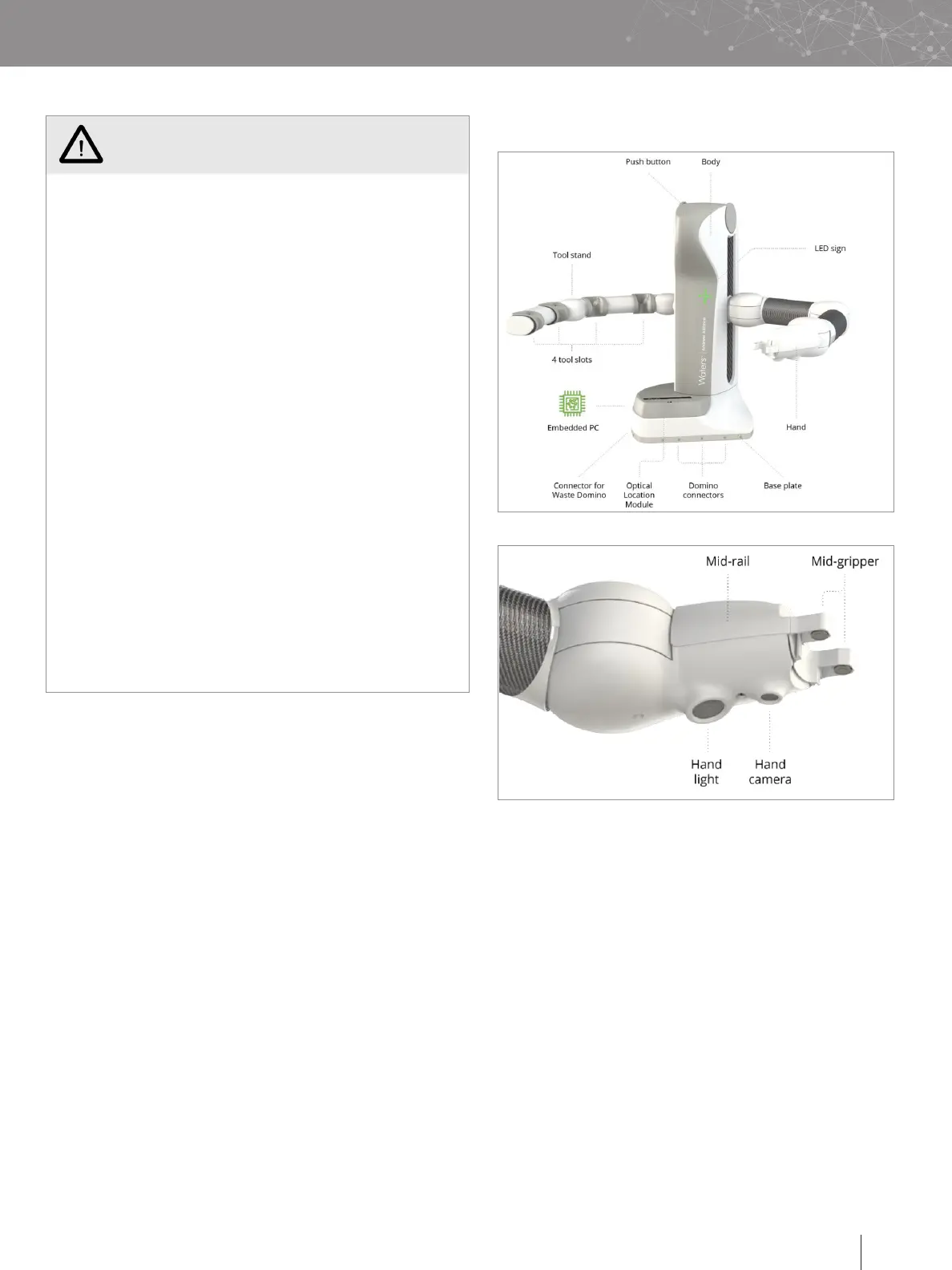
D. OVERVIEW OF THE HARDWARE


 To Next Page