
 Need help?
Do you have a question about the Waters Andrew+Robot and is the answer not in the manual?
Indicates a situation that could cause injury to yourself and others.
Highlights situations that could cause damage to your device or other equipment.
Provides usage tips or additional information.
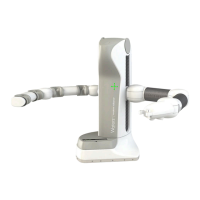
Details the Andrew+ Robot as a laboratory benchtop robot for executing experiments via OneLab software.
Provides essential instructions for safe and correct use of the Andrew+ Robot.
Highlights potential dangers for users and damage to the robot if instructions are not followed.
Details the main components of the Andrew+ Robot, including the tool stand, hand, and base plate.
Lists key technical details such as warranty, power, interfaces, operating temperature, and dimensions.
Specifies the required space for the Andrew+ Robot to operate effectively, including dimensions.
Provides step-by-step instructions for safely removing the Andrew+ Robot from its packaging.
Guides users through connecting the Andrew+ Robot to the OneLab software via Wi-Fi or Ethernet.
Describes the various tools compatible with the Andrew+ Robot and their functionalities.
Explains how to equip Andrew Alliance pipettes with the necessary pipette adaptor.
Details the Labware gripper, a Bluetooth-controlled device for manipulating labware.
Describes the different types of tip box Dominos available for hosting pipette tips.
Details tip rack holder Dominos designed for 5 mL and 10 mL high-volume tip racks.
Explains the Waste Domino, its features, and capacity for pipette tips.
Provides instructions for correctly placing and connecting the Waste Domino to the robot's base.
Guides users on selecting the correct Domino and installing the tip rack for automated use.
Describes the optional docking station for hosting additional tools beyond the robot's standard capacity.
Defines key volume terms like maximum, working, and dead volume for consumables.
Explains how to control the Andrew+ Robot's status (e.g., Pause, Resume, Standby) using the push button.
Details the LED and sound indicators for various instrument states like Booting, Idle, Running, and Error.
Describes conditions triggering errors, communication loss, and the Standby status.
Covers firmware updates and the 'Locate Me' function for identifying the robot's position.
States that the robot requires no periodic maintenance but suggests periodic checks.
Recommends cleaning the silicone mat and bench after moving the Andrew+ Robot.
Lists tested compatible solvents like Isopropanol, Ethanol, and bleach solution for cleaning.
Advises against stickers on pipettes and recommends monthly cleaning of electromagnets.
Instructs users to contact Waters for directions and information on end-of-life policy.
Lists electrical safety and EMC certifications according to relevant standards.
Details FCC and Canadian compliance statements for Class A digital apparatus.
Provides information on how to contact the Andrew+ Robot support team via OneLab or email.
 General
| Manufacturer | Waters |
|---|---|
| Category | Robotics |
| Applications | Sample preparation |
| Compatibility | Compatible with various laboratory instruments and systems |
| Connectivity | Ethernet |

 To Next Page