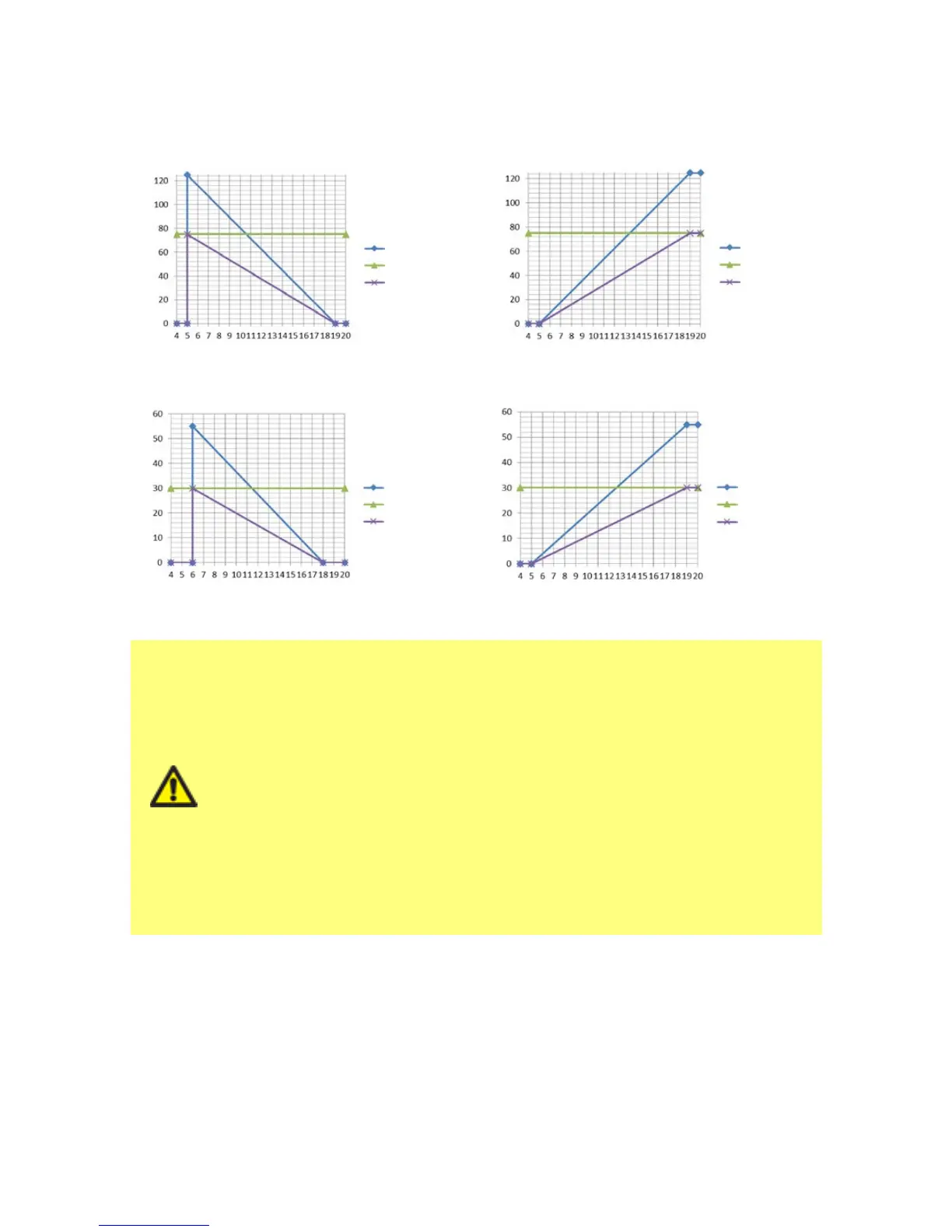
Applying a speed limit automatically re-scales the analog speed control response.
This speed limit will be applied to all operating modes.
The effect of a 75rpm speed limit on user- defined 4- 20mA response profiles
calibrated 4-20mA calibrated 4-20mA
user_max_ow user_max_ow
recalibrated recalibrated
mA mA
rpm
rpm
If you purchased your pump prior to 9 February 2017
Check your software version before using this the speed limit setting
Check the software version of the “main processor code” by following
the instructions in section 18.6 Help.
If the software version is less than 2.0 then do not use this setting as
an intermittent fault condition can result in the pump resetting the
speed limit to 125rpm when the power is turned off to the pump.
If you require this functionality on a software version lower than 2.0
please use the 4-20mA calibration method described in Section 15 or
contact Watson-Marlow aftersales department to discuss other control
methods.
If the version is MKS-2.0 or higher, the speed limit setting may be
used.
m-qdos-en-02 99










 To Next Page