EasyManua.ls Logo

wattstopper PW-301 - User Manual

wattstopper PW-301
12 pages
Print Icon
To Next Page IconTo Next Page
Loading...
Santa Clara, CA 95050
800.879.8585
Installation Instructions
Specifications
Voltages:
PW-301 & PW-302. . . . . . . . . . . . . . . . 120/277VAC, 50/60Hz
PW-301-347 & PW-302-347. . . . . . . . . . . . 347VAC, 50/60Hz
Load Limits for relay 1:
@120VAC..1000W tungsten, ballast, E-ballast, LED, 1/4 HP
@277VAC.......... 1200W ballast, E-ballast, LED, 1/4 HP
@347VAC................... 1500W ballast, LED, 1/4 HP
Load Limits for relay 2:
@120VAC...800W tungsten, ballast, E-ballast, LED, 1/6 HP
@277VAC.......... 1200W ballast, E-ballast, LED, 1/6 HP
@347VAC................... 1500W ballast, LED, 1/6 HP
Time Delay Adjustment ....................5 to 30 minutes
Walk-Through Mode .... 3 minutes if no activity after 30 sec.
Test Mode .................. 10 min. with 5 sec. time delay
PIR Adjustment ..............................High or Low
Light Level Adjustment ......................8fc to 180+fc
Alerts ......................Selectable Audible & Visual
Optional Neutral . . . . . . . . . . . . . . . . . . . . . . . . . . . . .All models
Multi-Way Capability . . . . . . . . . . . . . . . . . . . . . . . . . All models
Terminal screw torque . . . . . . . . . . . . . . . . 16 lbf-in (18 kgf-cm)
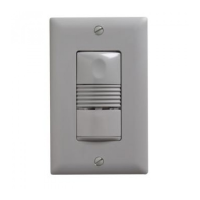
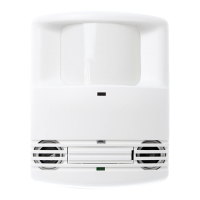
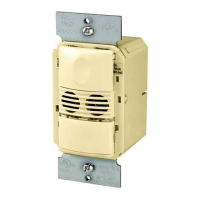
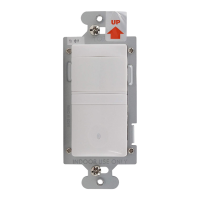
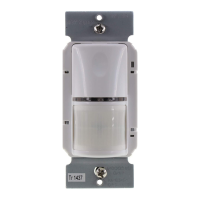
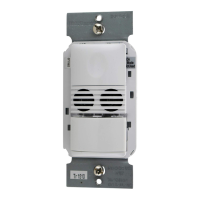
PW-301 PW-301-347 PW-302 PW-302-347
PW-301/PW-301-347
PW-302/PW-302-347
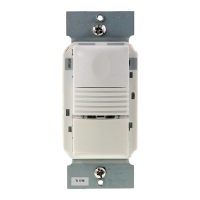
Passive Infrared Multi-Way Wall Switch
Occupancy Sensor
Question and Answer IconNeed help?

Do you have a question about the wattstopper PW-301 and is the answer not in the manual?

Summary

Product Specifications

Voltages and Load Limits

Details operating voltages and maximum load capacities for relays 1 and 2.

Time Delay and Walk-Through Modes

Configures automatic shut-off delays and brief occupancy modes.

PIR Sensitivity and Light Level

Adjusts motion detection sensitivity and ambient light threshold.

Alerts, Neutral, and Multi-Way

Covers warning signals, neutral wiring, and multi-sensor capabilities.

Installation Guide

Wiring Diagrams

Provides wiring instructions for PW-301/347 and PW-302/347 models.

Unit Operation and Modes

Sensor Operating Modes

Details Auto-ON and Manual-ON configurations for sensor operation.

Turning Loads ON

Explains how to turn loads ON in Auto ON and Manual ON modes.

DIP Switch Settings

Time Delay and Walk-Through Settings

Configuration of time delay and walk-through modes via DIP switches.

Sensitivity, Alerts, and Mode Settings

Adjusting PIR sensitivity, alerts, and relay operational modes.

Adjustments and Troubleshooting

Sensor and Light Level Adjustments

Guides for sensor calibration and light level threshold setting.

Resetting to Default

Procedure to restore factory default settings for the sensor.

Troubleshooting Motion Detection

Resolving issues with lights not turning ON or OFF with motion.

Cover Plates and Warranty

Cover Plate Compatibility

Information on compatible industry standard decorator-style cover plates.

Warranty Information

Details on product warranty against defects in materials and workmanship.

Summary

Product Specifications

Voltages and Load Limits

Details operating voltages and maximum load capacities for relays 1 and 2.

Time Delay and Walk-Through Modes

Configures automatic shut-off delays and brief occupancy modes.

PIR Sensitivity and Light Level

Adjusts motion detection sensitivity and ambient light threshold.

Alerts, Neutral, and Multi-Way

Covers warning signals, neutral wiring, and multi-sensor capabilities.

Installation Guide

Wiring Diagrams

Provides wiring instructions for PW-301/347 and PW-302/347 models.

Unit Operation and Modes

Sensor Operating Modes

Details Auto-ON and Manual-ON configurations for sensor operation.

Turning Loads ON

Explains how to turn loads ON in Auto ON and Manual ON modes.

DIP Switch Settings

Time Delay and Walk-Through Settings

Configuration of time delay and walk-through modes via DIP switches.

Sensitivity, Alerts, and Mode Settings

Adjusting PIR sensitivity, alerts, and relay operational modes.

Adjustments and Troubleshooting

Sensor and Light Level Adjustments

Guides for sensor calibration and light level threshold setting.

Resetting to Default

Procedure to restore factory default settings for the sensor.

Troubleshooting Motion Detection

Resolving issues with lights not turning ON or OFF with motion.

Cover Plates and Warranty

Cover Plate Compatibility

Information on compatible industry standard decorator-style cover plates.

Warranty Information

Details on product warranty against defects in materials and workmanship.

Overview

The WattStopper PW-301/PW-301-347 and PW-302/PW-302-347 are Passive Infrared Multi-Way Wall Switch Occupancy Sensors designed to automatically control lighting based on occupancy. These devices utilize advanced passive infrared (PIR) technology to detect motion within a controlled environment, offering a range of features for efficient and customizable lighting management.

Function Description

The primary function of these sensors is to turn loads ON and OFF automatically based on occupancy detection. When motion is detected, the sensor turns the connected load ON. The load remains ON until no motion is detected for a user-defined time delay. The PW-301 models feature a single relay and one ON/OFF button, controlling a single load. The PW-302 models, on the other hand, include two relays and two ON/OFF buttons, allowing for independent control of one or two loads. Pressing a button toggles the state of its corresponding relay.

The sensors can be configured for either Auto ON or Manual ON operation for each relay independently. In Auto ON mode, the load turns ON and OFF automatically based on occupancy. If the load is manually turned OFF in Auto ON mode, the unit enters "Presentation Mode," preventing the load from turning ON automatically until the button is pressed again. In Manual ON mode, the occupant must press the ON/OFF button to turn the load ON. Once ON, the sensor keeps the load ON until no motion is detected for the selected time delay. Both modes incorporate a re-trigger delay, allowing the sensor to turn the load back ON if occupancy is detected within a specific timeframe after the initial time delay has elapsed.

A key feature is the "Presentation Mode," which activates when both relays are manually turned OFF in Auto ON mode. In this state, the PW holds the lights OFF until no motion has been detected for the duration of the Time Delay. Upon subsequent occupancy, the PW turns the load ON. If both relays are ON and one relay is manually turned OFF, that relay remains OFF until both the Time Delay and retrigger delay expire for the relay that is ON, after which the ON Mode control settings apply again.

The sensors also incorporate a light level sensor. If sufficient daylight is present, the sensor can hold the load OFF even if the area is occupied, preventing unnecessary lighting. In the PW-302 models, light level control specifically affects the load on Relay 2. Users can override this "hold OFF" function by pressing the ON/OFF button.

Usage Features

The PW sensors offer extensive customization through DIP switch settings, allowing users to tailor the device's behavior to specific needs.

  • Time Delay Adjustment: Users can select a time delay for how long the load remains ON after the last detected motion. Options range from 5 to 30 minutes. A "Test Mode" is also available, providing a short 5-second time delay for initial setup and testing, which automatically reverts to a 20-minute delay after ten minutes or when a fixed time delay is set.
  • Walk-Through Mode: This feature shortens the time delay to reduce the amount of time the load is ON after brief occupancy. When enabled, the sensor turns the load OFF three minutes after initial occupancy if no motion is detected after the first 30 seconds. If motion continues beyond 30 seconds, the set time delay applies. This is useful for situations where someone quickly enters and exits a space.
  • PIR Sensitivity Adjustment: The sensor continuously monitors the environment and automatically adjusts its PIR sensitivity to avoid false detections while maintaining maximum coverage. Users can set the sensitivity to "High" (default) or "Low" (50% reduction). Low sensitivity is beneficial when the PIR is detecting movement outside the desired area or when heat sources cause unwanted activation.
  • Alerts: The PW can provide audible and/or visible warnings before the load turns OFF.
    • Visible Alert: When one minute remains in the time delay, the connected load turns OFF for one second, providing a visual warning.
    • Audible Alert: The unit can beep at one minute, 30 seconds, and 10 seconds before turning OFF the load. In Walk-Through mode, it beeps three times at 10 seconds before the load goes OFF. If a Visible Alert is also ON, it replaces the one-minute audible warning.
  • Multi-Way Capability: All models support multi-way wiring, allowing multiple 300 series sensors to control a common load. In a multi-way setup, all units respond to each other's push button and PIR trigger events. The response is influenced by the Light Level setting and conditions of the detecting sensor. The time delay for all units in a multi-way system is determined by the unit with the smallest time delay.
  • Optional Neutral Wiring: For applications requiring neutral wiring, a breakaway tab can be removed to expose terminals. If connected, the unit operates in full function mode; otherwise, it functions as a two-wire device.
  • Coverage Patterns: The sensor features a two-tiered, multi-cell viewing Fresnel lens with a 180-degree field of view. A red LED on the sensor flashes when PIR detects motion, indicating activity.

Maintenance Features

The device is designed for straightforward adjustment and troubleshooting.

  • Sensor Adjustment: To access DIP switches and make adjustments, the wall plate and button cap can be removed. The button cap is reinserted by aligning its hinges with the tabs on the main unit and pressing it into place.
  • Light Level Adjustment: The light level threshold can be set with loads ON or OFF. This involves putting the sensor into Test Mode, pressing and holding the ON/OFF button (Relay 1 on PW-302) for 3 seconds until a beep sounds, and then stepping away. After 10 seconds, another beep confirms the threshold is set. This setting is retained even if power is lost. Light level control can be disabled by pressing and holding the Relay 1 button for 7 seconds until a double beep sounds.
  • Reset to Default: The sensor can be reset to factory settings by pressing and holding the Relay 1 button for 10 seconds until a triple beep sounds. This also disables light level control.
  • Troubleshooting: The manual provides guidance for common issues:
    • Lights do not turn ON with motion (LED flashes): Check wire connections (especially Load), verify On Mode settings (DIP switches 8 and 9), and check if light level control is enabled (cover the lens).
    • Lights do not turn ON with motion (LED does not flash): Check wire connections (especially Line), verify Sensitivity is on High, and ensure connections are secure.
    • Lights do not turn OFF: Check for a long time delay (up to 30 minutes), verify proper Test Mode operation (lights should turn OFF in ~5 seconds), ensure the sensor is mounted away from heat sources (heating/ventilating/air conditioning devices, high wattage light bulbs) that could cause false detection.
    • Sensing motion outside desired areas: Adjust PIR Sensitivity to Low or mask sections of the PIR sensor's lens using the supplied opaque adhesive tape to eliminate unwanted coverage.
    • Red LED is OFF all the time and sensor features don't work: Check DIP switches 1, 2, 3 to ensure the unit is not in Service Mode (all ON). Set DIP switches to a valid Time Delay setting.

The PW series wall switches are compatible with industry-standard decorator-style switch cover plates (not included) and are available in various colors indicated by a suffix in the catalog number.

wattstopper PW-301 Specifications

General IconGeneral
Product TypePower Pack
Voltage120/277VAC
Output Voltage24VDC
Operating Temperature0°C to 50°C
Weight113 g

Related product manuals