CHAPTER 9 CLICK 110 99
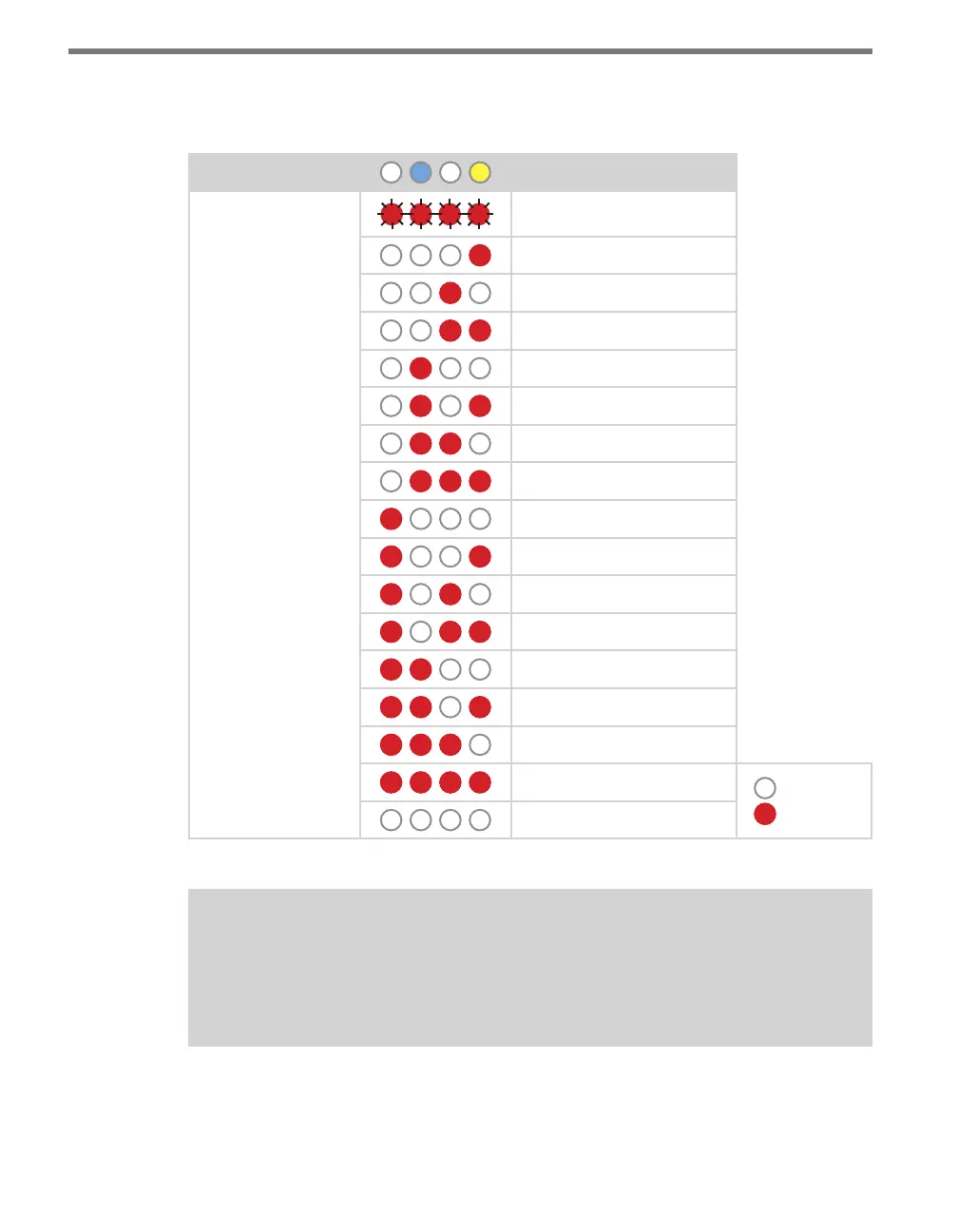
not all combinations of enabled and disabled channels are listed. A complete table is shown
below.
Level 1 LEDs
Channel Enable
Level 2 LEDs
All o (default)
Channel 4 on
Channel 3 on
Channels 3 and 4 on
Channel 2 on
Channels 2 and 4 on
Channels 2 and 3 on
Channels 2, 3, and 4 on
Channel 1 on
Channels 1 and 4 on
Channels 1 and 3 on
Channels 1, 3, and 4 on
Channels 1 and 2 on
Channels 1, 2, and 4 on
Channels 1, 2, and 3 on
Channels 1, 2, 3, and 4 on
LED o
LED on
Cancel and exit menu
Table 9.11 – Front Panel Menu Channel Enable Settings
Note
If you are configuring the device with the front panel menu, it’s vital that you set up
your enabled channels; if you don’t, as you can see in the table, it will default to all
channels being disabled and the device will not work.
See the earlier Navigating through the Menu and the Menu Operation Example sections for
how to congure this parameter.



 To Next Page