CHAPTER 2 T-BUS BASICS 19
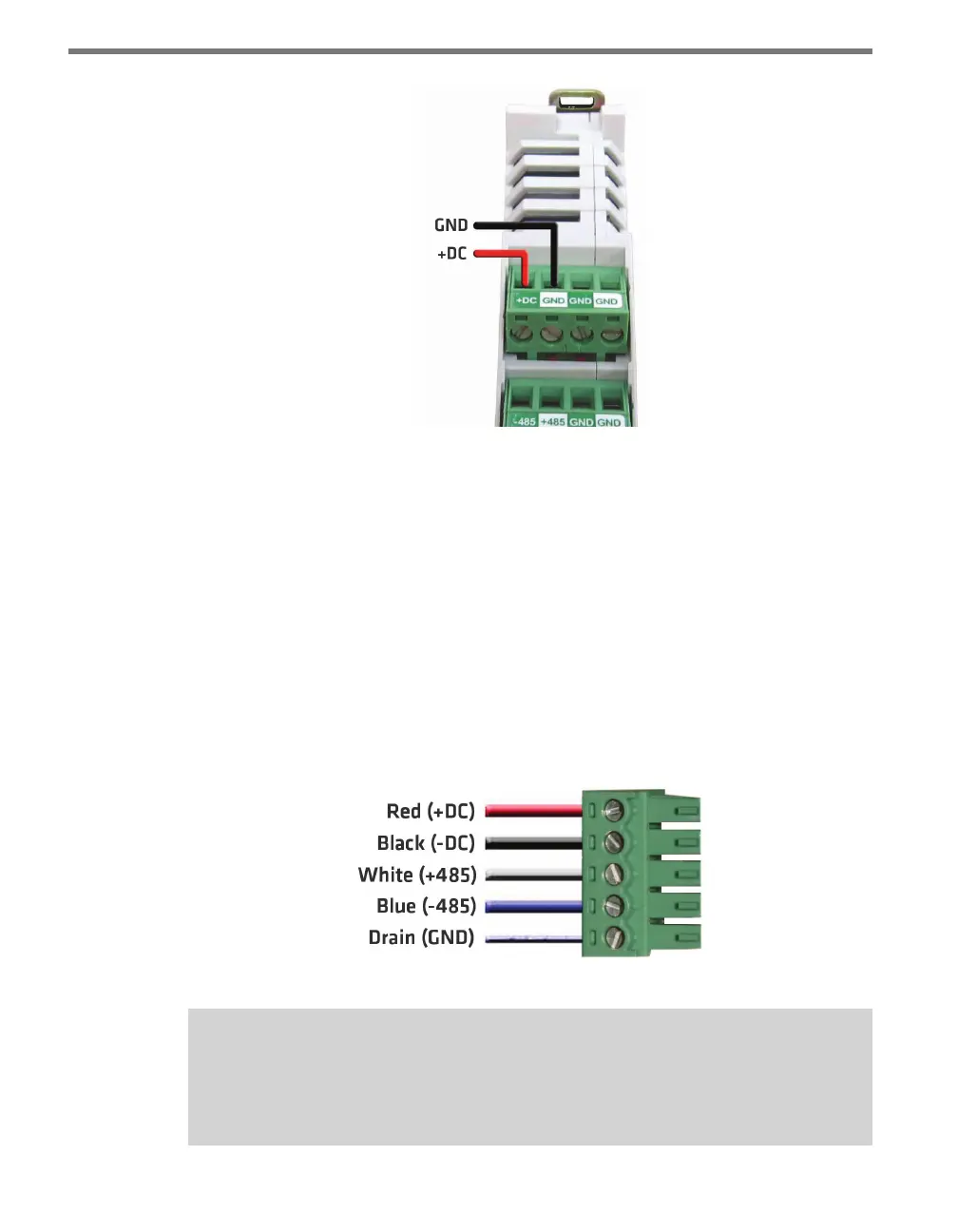
Figure 2.1 – Wiring Power into the Click 200
Wiring through a 5-screw Terminal
If you choose not to use a Click 200, or if you have one but prefer not to wire through it,
you can also connect power through a 5-screw terminal block connected to the end of the
T-bus.
To provide power to a T-bus through a 5-screw terminal block, follow these steps:
1 Attach a male 5-screw terminal block to the le end of the T-bus by aligning it with the
rst connector and pushing the modules together.
2 Connect the black (ground) and red (+24 VDC) wires from the Click 201/202/204
into the top two screw terminals in the 5-screw terminal block (see Figure 2.2 for the
5-screw terminal block pinout).
Figure 2.2 – 5-screw Terminal Block Pinout
Note
To disconnect a 5-screw terminal block from a T-bus connector, use a small, thin item,
such as a small screwdriver, to gently pry the two modules apart.



 To Next Page