EasyManua.ls Logo

Weathermatic smartline SL1624 - User Manual

Weathermatic smartline SL1624
38 pages
Print Icon
To Next Page IconTo Next Page
Loading...
Controller Models
SL800
SL1600
SL1620
SL1624
SL4800
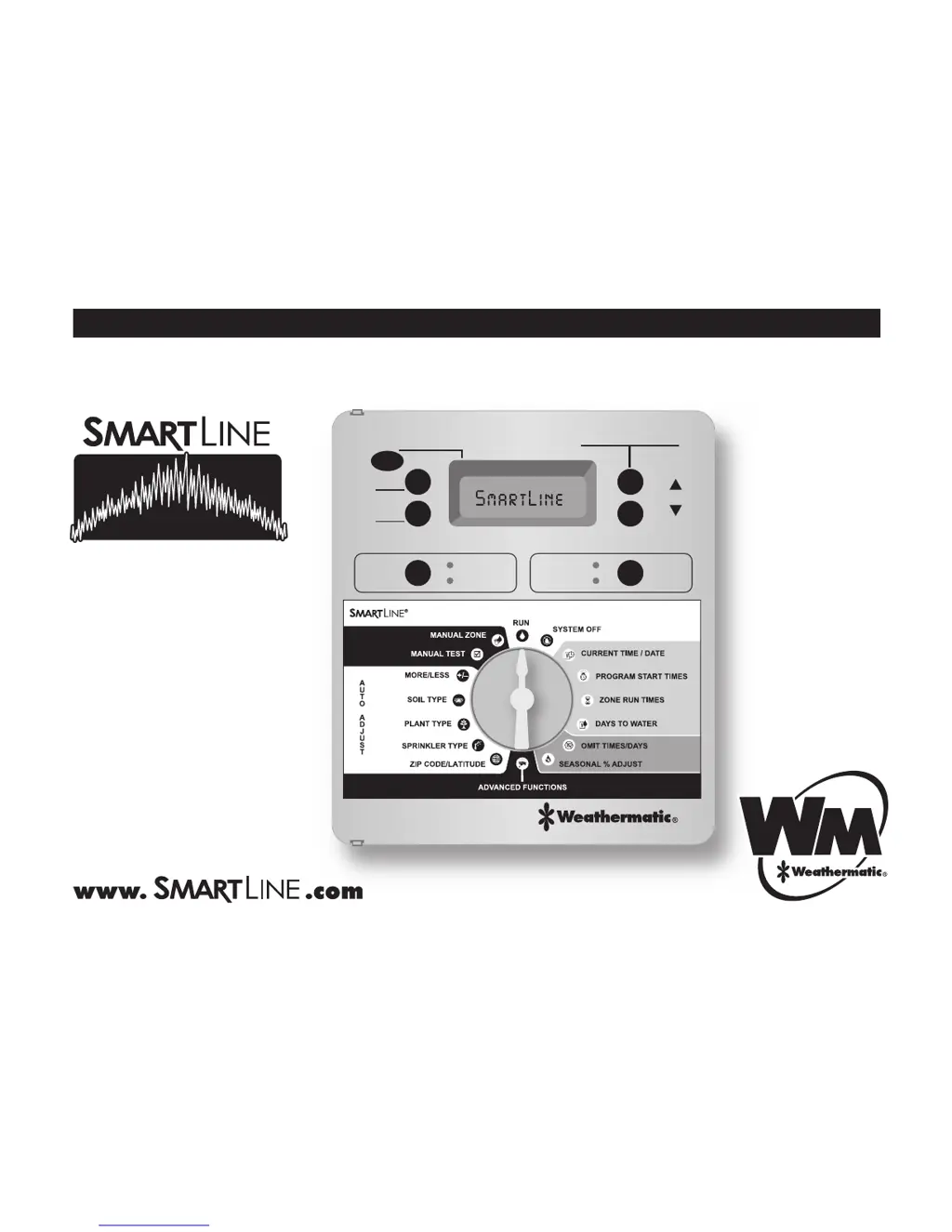
Owner’s Manual
®
AUTO ADJUST
STANDARDSTANDARD
SENSORSENSORMODEMODE
NEXTNEXT
BACKBACK
ADJUST VALUEADJUST VALUE
RUN MANUAL PROGRAMRUN MANUAL PROGRAM
ACTIVEACTIVE
BYPASSBYPASS
ADJUST VALUEADJUST VALUE
®
PGM

Questions and Answers

  • B
    Bradley MillsAug 17, 2025
    How to fix a Weathermatic smartline SL1624 with no display?
    • K
      Kathy DelgadoAug 17, 2025
      If your Weathermatic Controller has no display, it could be due to: * No power to the controller: Check the power wiring and breaker, and ensure the control panel is firmly closed. * No 24V power from the transformer: Replace the transformer, as the likely cause is power surge damage.
  • S
    Steven HunterAug 19, 2025
    Why does my Weathermatic SmartLine® controller not turn on zone when expected?
    • B
      Brian CameronAug 20, 2025
      Your Weathermatic SmartLine® controller might not be turning on a zone as expected for several reasons. The zone might be set to OFF; in this case, set the zone run time position. The dial might be set to SYSTEM OFF; turn the dial to RUN. It's possible that no zone run time or daily start time has been set, so program these settings. Omit times/days may be activated, so verify these settings. A rain or freeze sensor might have stopped watering, indicated by a red Sensor LED; if the sensor is faulty, replace it.
  • M
    Michael FischerAug 25, 2025
    What to do if the FAULT icon appears on my Weathermatic smartline SL1624 Controller display?
    • C
      Catherine EwingAug 26, 2025
      If the FAULT icon is displayed, it indicates a problem with your Weathermatic Controller. This could be due to: * A shorted or open condition on a zone(s). Check the solenoid(s) and wiring. You can find fault information in Advanced Functions. * A shorted MV/P. Check the solenoid(s) and wiring. * Insufficient watering opportunity. Review your programming watering days, make sure omit settings are not excessive, and verify the accuracy of Auto Adjust settings for sprinkler and plant type.
  • M
    Micheal BarnesSep 2, 2025
    What to do if my Weathermatic Controller displays the FAULT icon?
    • A
      Arthur StewartSep 2, 2025
      If your Weathermatic Controller is showing a FAULT icon, it could indicate a shorted or open condition on a zone. Check the solenoids and wiring. A shorted MV/P could also be the problem, so check the solenoids and wiring. Another cause might be insufficient watering opportunity; check programming watering days, verify omit settings are not excessive, and review the accuracy of SMART settings for sprinkler and plant type.
  • C
    Catherine ReeseSep 5, 2025
    What to do if my Weathermatic Controller display shows zone is running but no sprinklers are operating?
    • N
      Nicole ChavezSep 5, 2025
      If your Weathermatic Controller display indicates a zone is running but the sprinklers aren't operating, first ensure that the water supply to the system is turned on. If the water supply is on, verify valve operation. Also, check for an open or disconnected wire by running a MANUAL TEST. Verify if the FAULT icon is shown on the display and turn the dial to the Advanced Menu to determine the location of the fault.
  • M
    michellemartinezSep 7, 2025
    Why does my Weathermatic Controller keep repeating a watering cycle?
    • D
      Dr. Tracy RamirezSep 7, 2025
      If your Weathermatic Controller keeps repeating a watering cycle, it's likely due to extra start times being set at the Program Start Times position on the dial. Turn the dial to Program Start Times, use the NEXT button to view all start times, and hold down the UP or DOWN button to change the start times or advance to the OFF position. Each Program will start and run all zones assigned to that program in consecutive order.
  • M
    Michele FreemanSep 12, 2025
    What to do if my Weathermatic smartline SL1624 Controller has no display?
    • B
      Brandon RaySep 12, 2025
      If your Weathermatic Controller has no display, first check the fuse on the SL1600 with the inline fuse holder. Also, check for 24V power from the transformer; inspect the fuse holder on the SL800 or SL4800. The replacement fuse should be a 1 amp slow blow for SL1600 and SL800, and a 1.5 AMP slow blow for SL4800. If necessary, replace the transformer, as the issue is likely due to power surge damage.
  • W
    William PhillipsSep 13, 2025
    What to do if my Weathermatic smartline SL1624 display shows 0 ZONES?
    • N
      Nicholas HarrisonSep 13, 2025
      If your Weathermatic Controller display shows '0 ZONES', the cause may be a defective or loose module. Replace the module in zone 1-4 position.
  • S
    Samuel WaltonNov 21, 2025
    How to fix a Weathermatic SmartLine® controller that does not turn on zone when expected?
    • P
      Paul FrankNov 22, 2025
      If your Weathermatic SmartLine® controller isn't turning on a zone when expected, several factors could be the cause. Check if the sensor jumper is removed and no sensor is connected, indicated by a red Sensor LED; if so, install a jumper wire between the SEN terminals. Also, check if the sensor wires have been cut, also indicated by a red Sensor LED, and repair them if necessary. Examine whether the zone comes on at an unexpected time due to daily start times not set properly or multiple start times set. Review and set the time of day and date correctly. Ensure watering days or omit days/dates are properly set. A Run/Soak feature might have extended the watering window, so pause for Run/Soak in progress. If the controller doesn't operate the zone for the expected run time, check the seaso...
  • J
    Joseph HuffNov 26, 2025
    Why won't my Weathermatic smartline SL1624 Controller allow entry to Auto Adjust?
    • J
      Jeffrey ThompsonNov 26, 2025
      If your Weathermatic Controller won’t allow entry to Auto Adjust, here are some possible causes and solutions: 1. The SLW weather station might not be initialized. Initialize the SLW weather station according to the instructions in the Auto Adjust section. 2. Required Auto Adjust settings might be missing. Push and hold down the MODE button for a scrolling message indicating needed information. Enter the needed information for time, date, and ZIP Code or Latitude. 3. The 9V battery in the SLW weather station may be drained. Replace the battery. 4. There may be a communication cable problem. Check the cable and connections at the controller. 5. The SLW weather station may be defective. Replace the SLW weather station. Note: If the SmartLine® controller has no communication for 5 days,...

Weathermatic smartline SL1624 Specifications

General IconGeneral
BrandWeathermatic
Modelsmartline SL1624
CategoryController
LanguageEnglish

Related product manuals