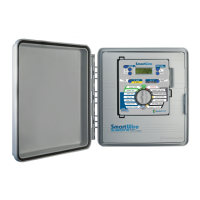
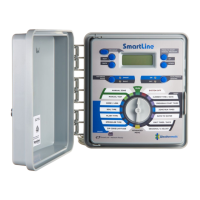
The SmartLine® Controller is an advanced irrigation system designed for water conservation and landscape maintenance. It offers both basic and smart watering modes to cater to various user needs and environmental conditions.
Function Description
The SmartLine® Controller serves as the central control unit for an irrigation system, managing watering schedules, zone operations, and responding to environmental factors. Its primary function is to automate the watering process, ensuring plants receive adequate water while minimizing waste. The controller features a Real Time Clock/Calendar, eliminating the need for a backup battery to maintain time during power outages. It supports up to four independent watering programs (A, B, C, D), allowing for flexible scheduling of different zones. Programs A, B, and C are typically used for standard sprinkler zones, while Program D is optimized for micro-irrigation with low flow and long run times. Programs can operate concurrently, and the display will alternately show all active running programs. The controller also includes a fault indicator that appears when a problem is detected, helping users diagnose and resolve issues.
Usage Features
The SmartLine® Controller offers a comprehensive set of features for programming and managing irrigation.
Control Panel and Display:
The control panel includes a dial for selecting various programming menus, along with UP, DOWN, NEXT, and BACK buttons for navigation and value adjustment. The LCD display provides real-time information, including the current time, next watering day(s), and program status. When a program is running, the display shows the operating program, zone number, and remaining run time. An orange LED indicates a pause due to programmed delays (run/soak, master valve delay, zone-to-zone delay, or omit time). In SYSTEM OFF mode, the controller retains all program values in non-volatile memory, and the Mode Selection LED displays red. If the dial is left in any position other than RUN or SYSTEM OFF for an hour without activity, it automatically returns to RUN mode.
Watering Modes:
The controller supports two main operating modes: BASIC and SMART.
- BASIC Mode: This mode uses user-assigned zone run times. Users manually set start times, watering days, and omit times/days.
- SMART Mode: This patented mode overrides user-assigned zone run times and calculates optimal run times based on site location, zone-specific inputs, and weather readings from an optional SLW Weather Sensor. SMART mode calculates evapotranspiration (ET), the landscape's daily water loss, and schedules irrigation to replace this loss, aiming to reduce water waste.
Programming the Controller:
- Current Time/Date: Users can set the current time and date using the UP/DOWN and NEXT buttons. The controller has a 100-year calendar and automatically adjusts for leap years and USA daylight savings time.
- Program Start Times: Up to three start times can be set for each program (A, B, C, D) in 10-minute increments. Additional start times (up to 8) can be enabled through the Advanced Menu. Unused start times should be set to OFF.
- Zone Run Times: Run times can be set for each zone from 1 minute to 9 hours and 55 minutes. Run times from OFF to 59 minutes are in 1-minute increments, while 1 hour to 9 hours 55 minutes are in 5-minute increments. Unused zones should be set to OFF to prevent issues like pump overheating.
- Days to Water: Users can select DAYS (specific days of the week), EVEN, ODD, or INTERVAL watering schedules. For DAYS, individual days can be toggled ON/OFF. For INTERVAL, users set the interval (1 to 30 days) and a start day.
- Omit Times/Days/Dates: This feature allows setting blackout periods to restrict watering. OMIT:TIME sets daily blackout periods (e.g., 10:00 am to 6:00 pm). OMIT:DAYS allows omitting specific days of the week. OMIT:DATES allows omitting up to 15 specific dates during the year.
- Monthly % Adjust (BASIC Mode only): This feature allows users to modify zone run times by program for each month, adjusting watering for seasonal climate changes. Settings range from 0% to 300% in 5% increments. In SMART mode, this feature is voided as adjustments are made daily.
Manual Start Functions:
- Manual Zone: Allows watering a single zone for a specified period, overriding watering day settings, omit settings, and rain/freeze events.
- Manual Test: Runs all zones with an assigned run time for a test period, from 10 seconds to 10 minutes. It also detects open circuits or shorts.
Smart Watering Mode Programming:
- Set ZIP Code or Latitude: For SMART mode, the controller needs to know its location. Users in the USA can enter a 5-digit ZIP Code, while others can enter latitude (60 degrees south to 60 degrees north).
- Enter Smart Data for Zones: For each zone, users must enter:
- Sprinkler Type: Select from Spray, Rotor, Drip, Bubbler, or enter a specific precipitation rate. Lower precipitation rates result in longer run times.
- Plant Type: Select from CTurf (cool turf), WTurf (warm turf), Shrubs, Annuals, Trees, or Native plants. These selections influence the watering needs, with higher percentages leading to longer run times.
- Soil Type: Select Clay, Loam, or Sandy soil type. This, along with the degree of slope (1-25 degrees), helps the controller calculate Run/Soak times to prevent runoff.
- More/Less: In SMART mode, this feature allows fine-tuning run time calculations by zone from -50% to +25% to account for factors like shade, sprinkler efficiency, or wind.
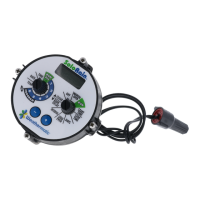
- Activating SLW Series On-Site Weather Sensor: The controller communicates with SLW5 wireless or SLW1 wired weather stations via an SLHUB transceiver. Pressing and holding the Rain Sense test tab on the sensor for 15 seconds activates it.
- WATERING MODE Button: Pressing this button on the control panel places the controller in SMART mode. A green LED confirms communication with the SLW Weather Sensor. If SMART mode is unavailable due to missing data (e.g., no sensor, ZIP Code, or latitude), the LED will flash red, and a message will indicate the reason.
The Advanced Menu provides access to technical settings and diagnostic functions, typically used by professional installers.
- TESTS: Includes OUTPUTS (view AC Amp readings for valves), 24V PWR (read transformer output voltage), and LOCATOR (chatter a selected valve to locate it).
- FAULTS: Displays detected problems like insufficient watering opportunity, remote battery failure, no weather sensor contact, open circuits, or shorts. Users can clear faults, but they will reappear if the underlying problem is not corrected.
- OPEN CIRCUIT FAULT: A user-selectable alert for zones with no electrical load.
- LANGUAGE: Select English, Spanish, Italian, Portuguese, or French.
- UNITS: Choose between STANDARD (US customary) or METRIC units.
- DEFAULT/STORE/RETRIEVE: Allows storing and retrieving program settings.
- GROW IN: Sets a temporary "Grow-In" program for new plantings, after which the long-term program is automatically retrieved.
- ABOUT: Displays controller information such as model, software version, build version, serial number, hardware version, number of zones, EEPROM availability, and weather sensor/aircard versions.
- MODBUS: Displays a static address for integration with third-party software.
- CLR ALL/CLR PGM: Clears all programmed data for all programs (CLR ALL) or specific programs (CLR PGM).
- CON PGM: Prioritizes programs based on start times.
- NC/NO MV: Selects between normally open or normally closed master valves.
- MV/ZONE: Assigns master valve(s) to each zone.
- MV/ZN DLY: Sets a delay between master valve opening and first zone valve opening, and between last zone valve closing and master valve closing.
- MV2 ZONE: Enables a second master valve circuit.
- ZN/ZN DLY: Sets delay times between zone starts for systems with slow-closing valves or pump systems.
- NUM STRT: Adjusts the number of visible program start times (1 to 8).
- DS TIME: Configures automatic Daylight Saving Time (DST) adjustments, including custom schedules.
- RUN/SOAK (BASIC Mode only): Breaks up long run times to prevent runoff. Users can set RUN and SOAK values for each program.
- SENSOR: Toggles ON/OFF override for rain/freeze sensor functions on selected zones.
- MIN DEF: Sets a minimum deficit threshold (0.00 to 0.50 inches) that a zone deficit must exceed to run in SMART mode.
- FLOW (with SmartLink Flow Aircard): Accesses flow parameters, including HIGH PK (highest flow value history), CLR FLOW (clears flow data), SETTINGS (FLOW PPG, SENSOR, SHUTDOWN, LINEFILL, SAMPLE T, LEAK DET, LOW LMT, HIGH LMT), TOTL FLOW (daily total flow history), and LOW PK (lowest flow value history).
- SLW: Configures SLW sensor features, including RAIN (on/off toggle for rain sensor override), FREEZE (on/off toggle for freeze sensor override), and DELAY (adjusts the 48-hour watering delay after a rain event shutdown).
- RAIN DLY: Globally suspends watering for a selected number of days (1 to 14) in both BASIC and SMART modes.
- SKIP CUR: Adjusts the skip circuit threshold for accessories like pump start relays.
- REVIEW: Allows reviewing various system data:
- TEMP/DATA: Daily high/low temperature readings from the SLW Weather Sensor for the past 7 days.
- SLW: LASTCOM (time since last successful communication with weather station) and BATTERY (wireless weather station battery status).
- NEXT RUN: Total run time calculated by SMART mode based on ET deficits and system audit information.
- RUN/SOAK: Expected Run/Soak schedules in SMART mode, showing maximum RUN time before SOAK and minimum SOAK time.
- DEFICIT: Amount of water (in inches) needed to be replaced due to evapotranspiration.
- RUNTIME: Computed run time based on the deficit for the next scheduled run.
- TOTL RUN: Total run time for each zone since a default date (January 1, 2000).
- CLR TOTL: Clears and resets total run time for each zone.
- CLR DEF: Clears deficits.
Maintenance Features
The SmartLine® Controller includes several features to aid in maintenance and troubleshooting:
- Fault Indicator: The display shows a fault icon when a problem is detected, guiding users to the FAULTS menu in Advanced Functions for diagnosis.
- OUTPUTS Test: Allows viewing AC Amp readings for each valve, helping to identify electrical issues like open circuits or shorts.
- 24V PWR Test: Displays the output voltage of the transformer, useful for checking power supply health.
- LOCATOR Function: Creates a "chatter" for a selected valve, assisting in locating buried valves (requires turning off system water pressure).
- Fault Clearing: Users can clear fault messages from the display, but the controller will continue to skip watering a faulty zone and the fault icon will reappear if the problem is not corrected.
- CLR ALL/CLR PGM: These functions allow resetting all or specific program data to factory defaults, which can be useful for troubleshooting or reconfiguring the controller.
- Battery Status (SLW): The REVIEW menu provides information on the battery status of the wireless weather station, allowing for timely replacement.
- Communication History (SLW): The LASTCOM feature in the REVIEW menu shows the time elapsed since the last successful communication with the weather station, helping to diagnose connectivity issues.
- Flow Data (with SmartLink Flow Aircard): The FLOW menu provides historical flow data (HIGH PK, TOTL FLOW, LOW PK), which can be used to monitor system performance and identify potential leaks or inefficiencies.
- Deficit Adjustment: Users can manually reduce the latest deficit for a zone to 0 inches, which can be helpful after manual watering or specific maintenance activities.
The SmartLine® Controller is designed to be a robust and intelligent system, providing users with the tools to manage their irrigation efficiently and effectively, while also offering diagnostic capabilities to ensure the system operates smoothly.

 Need help?
 General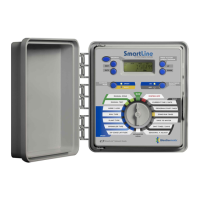




 To Next Page