EasyManua.ls Logo

Weco 4K4LT - DIP Switch Block Settings

Weco 4K4LT
38 pages
Print Icon
To Next Page IconTo Next Page
To Previous Page IconTo Previous Page
Loading...
28
WeCo Srl Italy www.wecobatteries.com 4K4LT V1.00 24/01/2023
Attention: The BMS CAN interface is an RJ45 port with the definition ofthe CAN Bus pins as shown below
8 ····1
Pin 8 7 6 5 4 3 2 1
Definition GND CAN_L CAN_H
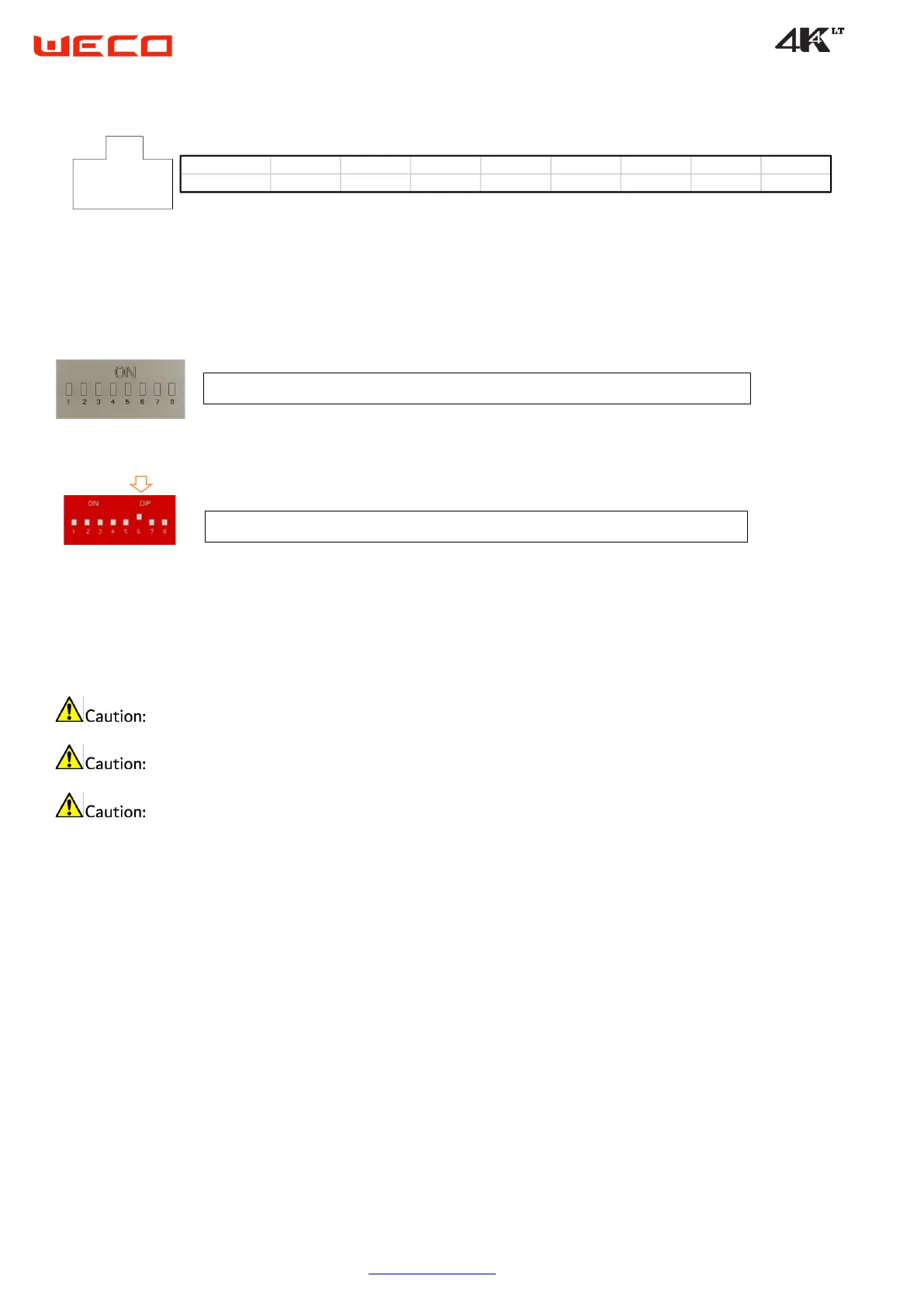
5.5 DIP Switch Block Settings
ATTENTION
Always configure the DIP switch settings BEFORE connecting the power cables to the B+ and B- battery terminals.
The battery module must be restarted for the DIP switch settings to take effect.
When connecting to an inverter that has BMS-CAN communication, switch #5 on the master battery module should always be set to "ON".
DIP SWITCH SETTING FROM FIRST TO PENULTIMATE MODULE 00000000 (ALL OFF)
SETTING DIP SWITCH LAST MODULE 00000100 (DIP 6 ON)
ON
ON
OFF
ON
OFF

Related product manuals