CFW100 | 7
5 INDICATIONS ON THE DISPLAY OF
THE ACCESSORY
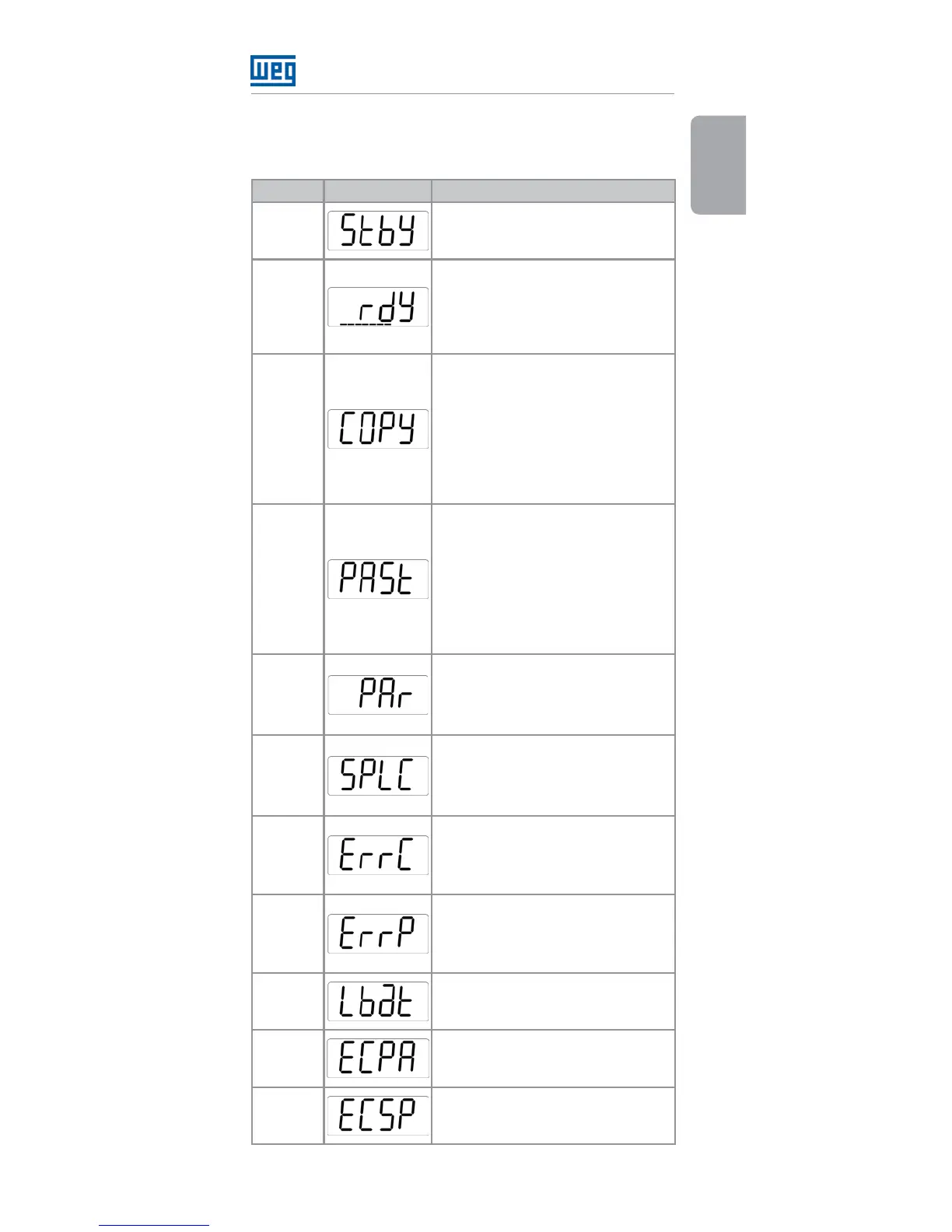
State HMI Description
STANDBY
Indicates that the accessory is
disconnected from the inverter.
READY
Indicates that the system (inverter +
accessory) is ready to perform the
transfer or it has already done it.
The variable monitoring bar
indicates the battery level.
COPY
Indicates that the copy function
(CFW100 → CFW100-MMF) was
selected.
When the OK key is pressed,
the PAR and SPLC modes will
be accessed. If no errors occur,
the display will indicate the
READY state.
PASTE
Indicates that the paste function
(CFW100-MMF → CFW100) was
selected.
When the OK key is pressed,
the PAR and SPLC modes will
be accessed. If no errors occur,
the display will indicate the
READY state.
PAR
It indicates the parameter tables
are being transferred. The variable
monitoring bar will indicate the
transfer process.
SPLC
It indicates the SoftPLC application
is being transferred. The variable
monitoring bar will indicate the
transfer process.
COPY
ERROR
Indicates that there was an error
in the copy
(CFW100 → CFW100-MMF) of
the inverter parameter table.
PASTE
ERROR
Indicates that there was an error
in the download
(CFW100-MMF → CFW100) of
the inverter parameter table.
LOW
BATTERY
Indicates that the charge of the
three AAA batteries (3 x 1.5 V) is
below 3.4 V.
PARAM
COPY
ERROR
Indicates an error occurred in
copy (CFW100 → CFW100-MMF)
of the inverter parameter table.
SOFTPLC
COPY
ERROR
Indicates an error occurred in the
copy (CFW100 → CFW100-MMF)
of the inverter SoftPLC application.





 To Next Page