22
This section explains how to adjust the weight system. See the EXERCISE GUIDELINES on page 27
for important information about how to get the most benefit from your exercise program. Also, refer to the
accompanying exercise guide to see the correct form for several exercises.
Make sure that all parts are properly tightened each time the weight system is used. Replace any worn
parts immediately. Use only manufacturer-supplied parts.
CHANGING THE WEIGHT SETTING
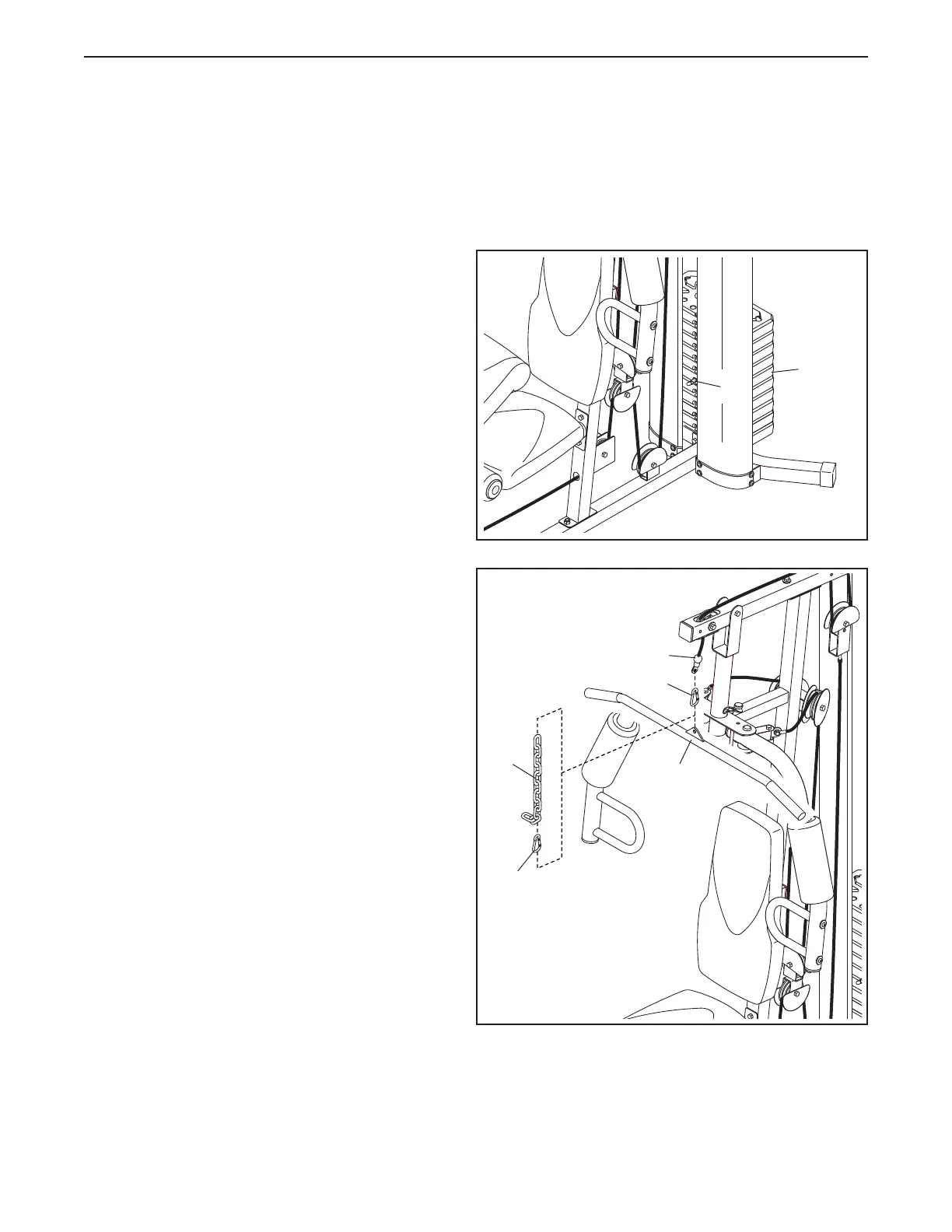
To change the setting of the weight stack, insert
a Weight Pin (26) under the desired Weight (22).
Insert the Weight Pin so that the bent end touches
the weight stack. Turn the bent end downward.
Note: Due to the cables and pulleys, the amount
of resistance at each exercise station may
vary from the weight setting. Use the WEIGHT
RESISTANCE CHART on page 24 to find
the approximate amount of resistance at each
weight station.
37
22
83
ATTACHING THE ACCESSORIES
Attach the Lat Bar (35) to the High Cable (55) at the
high pulley station with a Cable Clip (37).
For some exercises, attach the Chain (83) between
the Lat Bar (35) and the High Cable (55) with two
Cable Clips (37). Adjust the length of the Chain
between the Lat Bar and the High Cable so that
the Lat Bar is in the correct starting position for
the exercise to be performed.
The Lat Bar (35) or the Handle Strap (not shown)
can be attached at either pulley station in the
same way.
35
ADJUSTMENT
55
37
26


 To Next Page