CONSOLE OPERATION
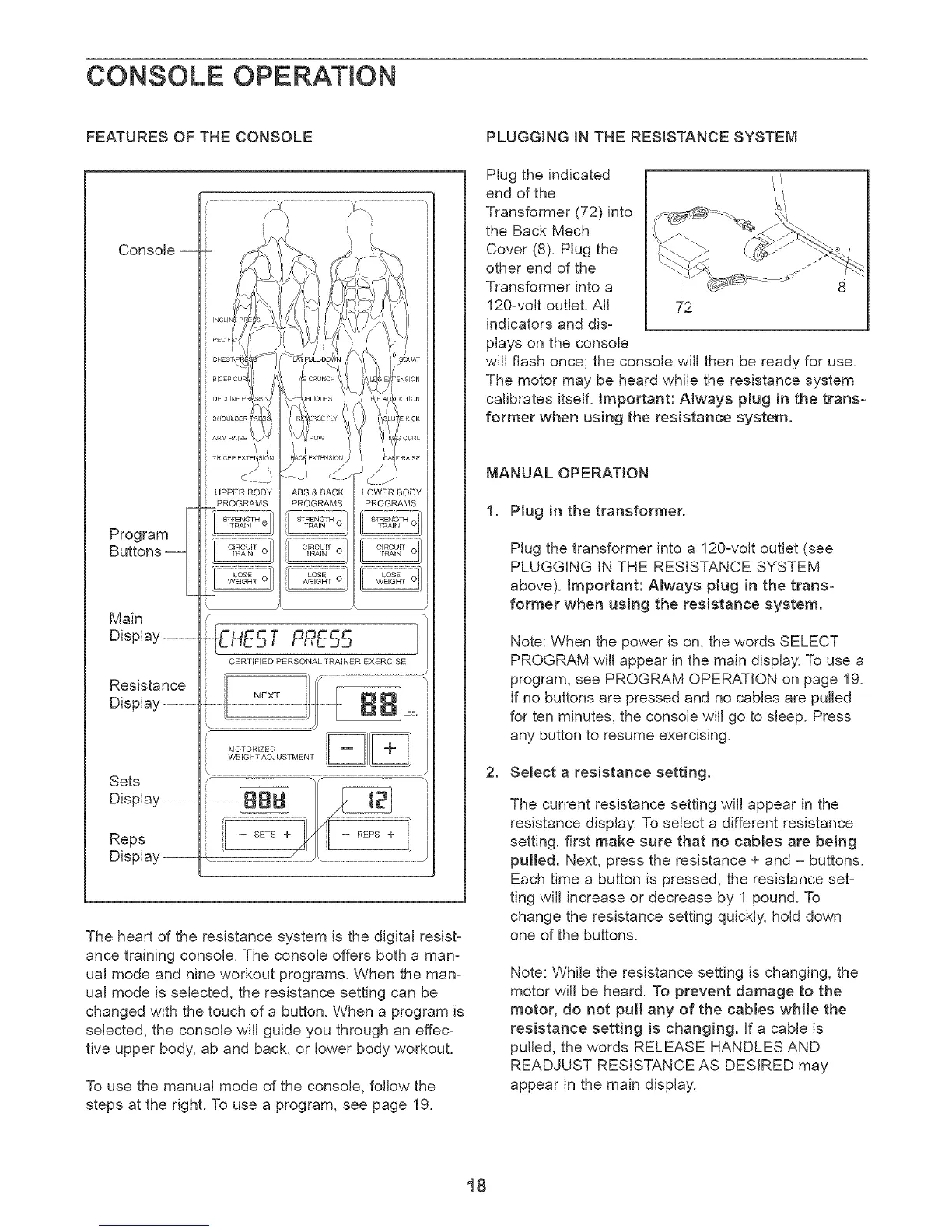
FEATURES OF THE CONSOLE
Console --
Program _-
Buttons __
Main
Display--
Resistance
Display--
Sets
Display
Reps
Display
UPPERBODY ABS&BACK LOWERBODY
PROGRAMS PROGRAMS PROGRAMS
EHEST PPE55
CERTiFiED PERSONALTRAINER EXERCISE
f
MOTORIZED
WEIGHTADJUSTMENT
\ J
f
The heart of the resistance system is the digital resist-
ance training console. The console offers both a man-
ual mode and nine workout programs. When the man-
ual mode is selected, the resistance setting can be
changed with the touch of a button. When a program is
selected, the console will guide you through an effec-
tive upper body, ab and back, or lower body workout.
To use the manual mode of the console, follow the
steps at the right. To use a program, see page 19.
PLUGGING IN THE RESISTANCE SYSTEM
Plug the indicated i
end of the 'i'/
Transformer (72) into
the Back Mech
Cover (8). Plug the
other end of the
Transformer into a 8
120-volt outlet. All 72
indicators and dis-
plays on the console
will flash once; the console will then be ready for use.
The motor may be heard while the resistance system
calibrates itself. Important: Always plug in the trans-
former when using the resistance system.
MANUAL OPERATION
1. Plug in the transformer.
Plug the transformer into a 120-volt outlet (see
PLUGGING IN THE RESISTANCE SYSTEM
above), important: Always plug in the trans-
former when using the resistance system.
Note: When the power is on, the words SELECT
PROGRAM will appear in the main display To use a
program, see PROGRAM OPERATION on page 19.
If no buttons are pressed and no cables are pulled
for ten minutes, the console will go to sleep. Press
any button to resume exercising.
2. Select a resistance setting.
The current resistance setting will appear in the
resistance display. To select a different resistance
setting, first make sure that no cables are being
pulled. Next, press the resistance + and = buttons.
Each time a button is pressed, the resistance set=
ting will increase or decrease by 1 pound. To
change the resistance setting quickly, hold down
one of the buttons.
Note: While the resistance setting is changing, the
motor will be heard. To prevent damage to the
motor, do not pull any of the cables while the
resistance setting is changing. Jfa came is
pulled, the words RELEASE HANDLES AND
READJUST RESISTANCE AS DESIRED may
appear in the main display.
18


 To Next Page
 Loading...