11
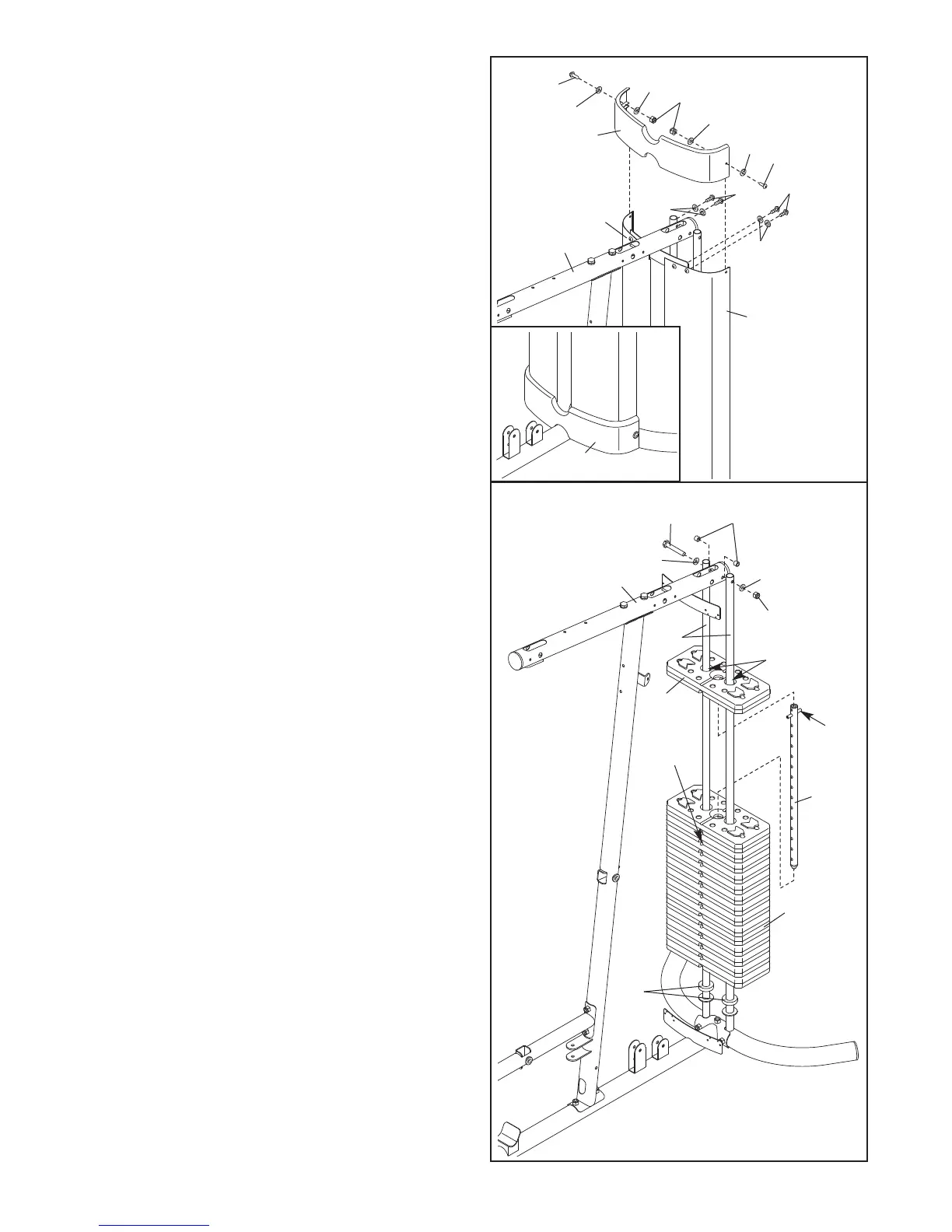
7. Attach a Shroud Cover (23) to the Left and Right
Shrouds (21, 22) with two M6 x 28mm Bolts (94),
four M6 Washers (114), and two M6 Nylon
L
ocknuts (107).
A
ttach the Shroud Cover (23) to the Top Frame
(4) with four M4 x 16mm Self-tapping Screws
(110) and four M4 Washers (104).
See the inset drawing and attach the other
Shroud Cover (23) in the same manner.
7
23
22
21
4
114
114
114
114
110
110
104
104
94
94
107
8. Note: Some parts have been removed to show
this step clearly.
Slide the two Weight Bumpers (71) onto the
Weight Guides (18). Orient fourteen Weights (19)
with the pin holes on the bottom as shown. Slide
the Weights onto the Weight Guides.
Insert the Weight Tube (20) into the fourteen
Weights (19). Make sure the pin on the Weight
Tube is oriented as shown.
Lubricate the indicated holes in a Weight (19)
with the included grease packet. Slide the Weight
onto the Weight Guides (18).
Attach the Weight Guides (18) to the Top Frame
(4) with an M10 x 155mm Bolt (96), two M10
Washers (80), two 13mm Steel Spacers (109),
and an M10 Nylon Locknut (77).
8
4
80
80
109
77
96
23
71
19
20
18
19
Pin
Pin
Hole
Grease








 To Next Page