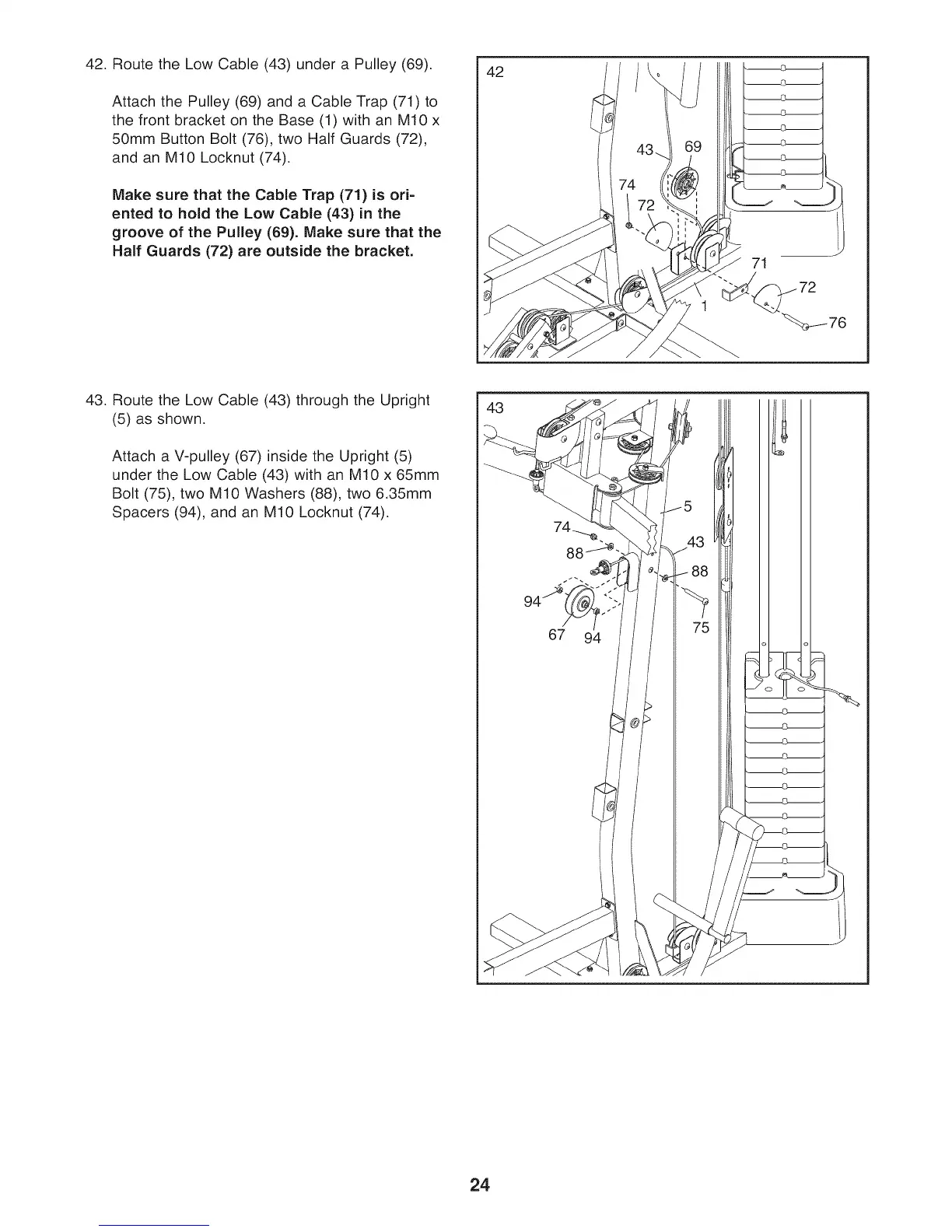
42. Route the Low Cable (43) under a Pulley (69).
Attach the Pulley (69) and a Cable Trap (71) to
the front bracket on the Base (1) with an M10 x
50mm Button Bolt (76), two Half Guards (72),
and an M10 Locknut (74).
Make sure that the Cable Trap (71) is ori-
ented to hold the Low Cable (43) in the
groove of the Pulley (69). Make sure that the
Half Guards (72) are outside the bracket.
42
71
43. Route the Low Cable (43) through the Upright
(5) as shown.
Attach a V-pulley (67) inside the Upright (5)
under the Low Cable (43) with an M10 x 65mm
Bolt (75), two M10 Washers (88), two 6.35mm
Spacers (94), and an M10 Locknut (74).
43
24



 To Next Page