4. Press PROG
5. You will hear 1 short beep
6. Enter the new User Code
7. Press PROG
8. You will hear 1 beep if successful. If unsuccessful, you will hear 3 short beeps. Repeat from step 1 slowly.
Deleting a User Code
1. Press PROG
2. You will hear 2 long beeps
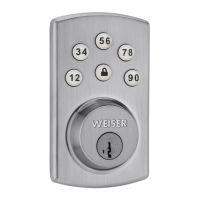
3. Press 3 4
4. Press PROG
5. You will hear 1 short beep
6. Enter the User Code you wish to delete
7. Press PROG
8. You will hear 1 beep if successful. If unsuccessful, you will hear 3 short beeps. Repeat from step 1 slowly.
How to Set Up Silent Mode
Note: Beeper is still active for “low battery” alarms.
1. Press PROG
2. You will hear 2 long beeps
3. Press7 8
4. Press PROG
5. You will hear 1 beep if successful. If unsuccessful, you will hear 3 short beeps. Repeat from step 1 slowly.
How to Reset the Lock
1. Make sure the door is open and unlocked.
2. Press PROG -(for 30 seconds). You will hear 1 long beep.
3. Release PROG button
4. Press PROG again.
5. You will hear 3 long beeps
Note: To use the lock, you will have to go through the door handing process and add User Codes.
System Alerts


 To Next Page