Gontrol
Panel
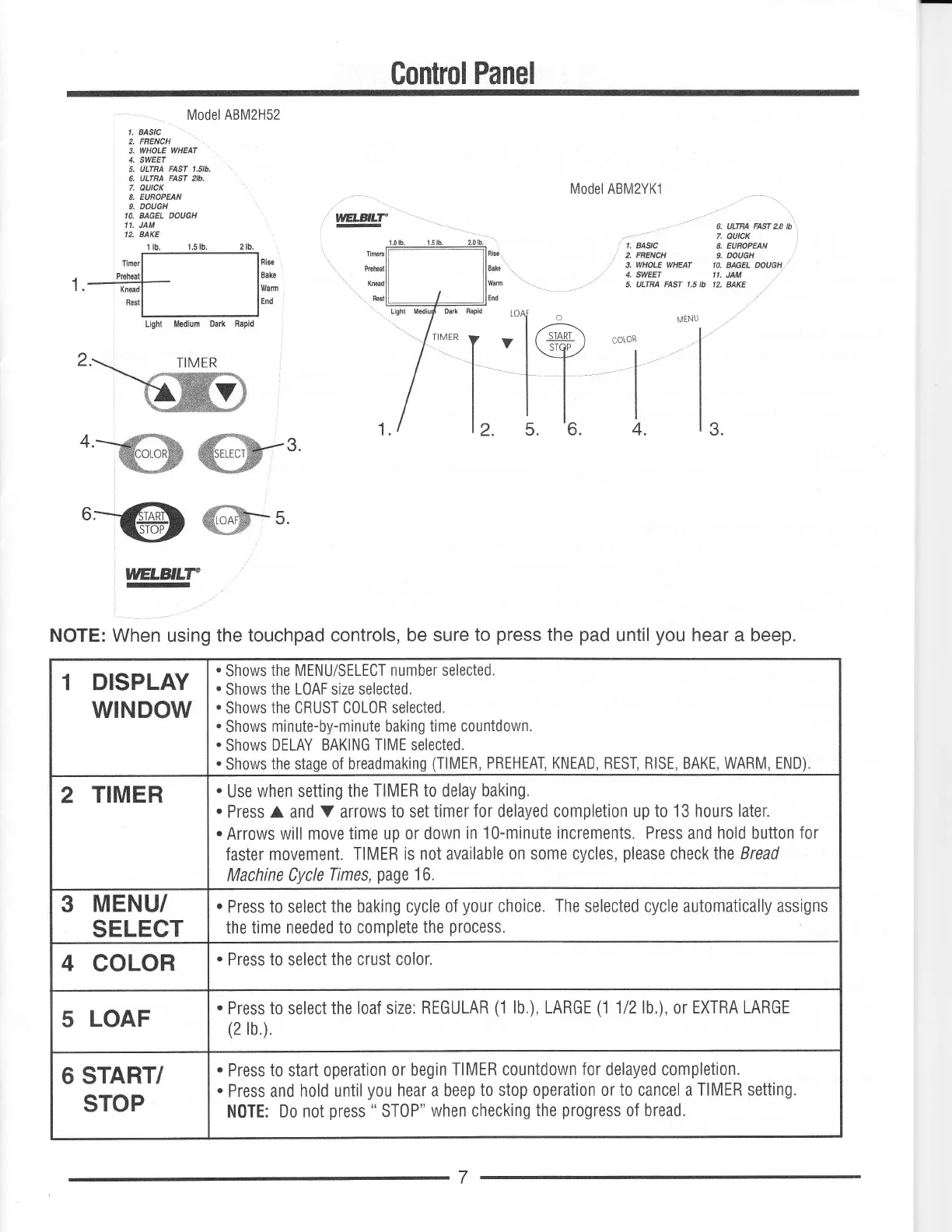
Model ABM2H52
1. BASTC
2. FRENCH
3, WHOLE
WHEAT
4, SWEET
5.
ULTBA FAS| 1.51b.
6. ULTRA
FAST zlb.
7.
QUICK
8. EUROPEAN
9. DOUGH
IO. BAGEL DOUGH
''.
JAM
12. BAKE
cotoR
4.
3.
.=@
m-t
w
NOTE:
When
using
the touchpad controls,
be sure
to
press
the
pad
until
you
hear a beep.
Model ABM2YKl
6. ULIBA FAST 2.0 Ib
7.
eutcK
l
1. BASIC
8. EUHOPEAN
|
2. FRENCH
L
DOUGH
3.
WHOLE
WHEAT IO. BAGEL DOUGH
./
4, SWEET 11.
JAM
5. ULfnA FASI 1.5 lb 2. AAKE
DISPLAY
WINDOW
.
Shows
the MENU/SELECT number selected.
.
Shows
the LOAF size selected.
.
Shows
the CRUST C0L0R selected.
.
Shows
minute-by-minute baking
time countdown.
.
Shows
DELAY BAKING
TIME
selected.
.
Shows
the
stage of
breadmaking
(TlMER,
PREHEAT, KNEAD, REST, RISE, BAKE, WARM, END).
TIMER
.
Use
when setting
the TIMER
to
delay
baking.
.
Press A and
V
arrows
to set
timer for delayed completion up to 13 hours later.
.
Arrows
will move
time
up
or down
in 10-minute increments. Press
and
hold button for
faster movement.
TIMER is not available
on some cycles,
please
checklhe Bread
Machine Cycle
Times,
page
16.
3
MENU/
SELECT
.
Press to select
the baking cycle
of
your
choice.
The
selected cycle automatically assigns
the
time needed to complete
the
process.
4
COLOR
.
Press
to
select
the crust color.
5
LOAF
.
Press
to selectthe
loaf
size.
REGULAR
(1
lb.), LARGE
(1
112lb.),
or
EXTRA LARGE
(2tb)
6 START/
STOP
.
Press
to
start operation
or
begin
TIMER countdown for delayed completion.
.
Press and
hold
until
you
hear a beep
to stop operation or
to
cancel a
TIMER setting.
N0TE:
Do not
press
"
ST0P"
when checking
the
progress
of
bread.



 To Next Page