CMP203 User Guide
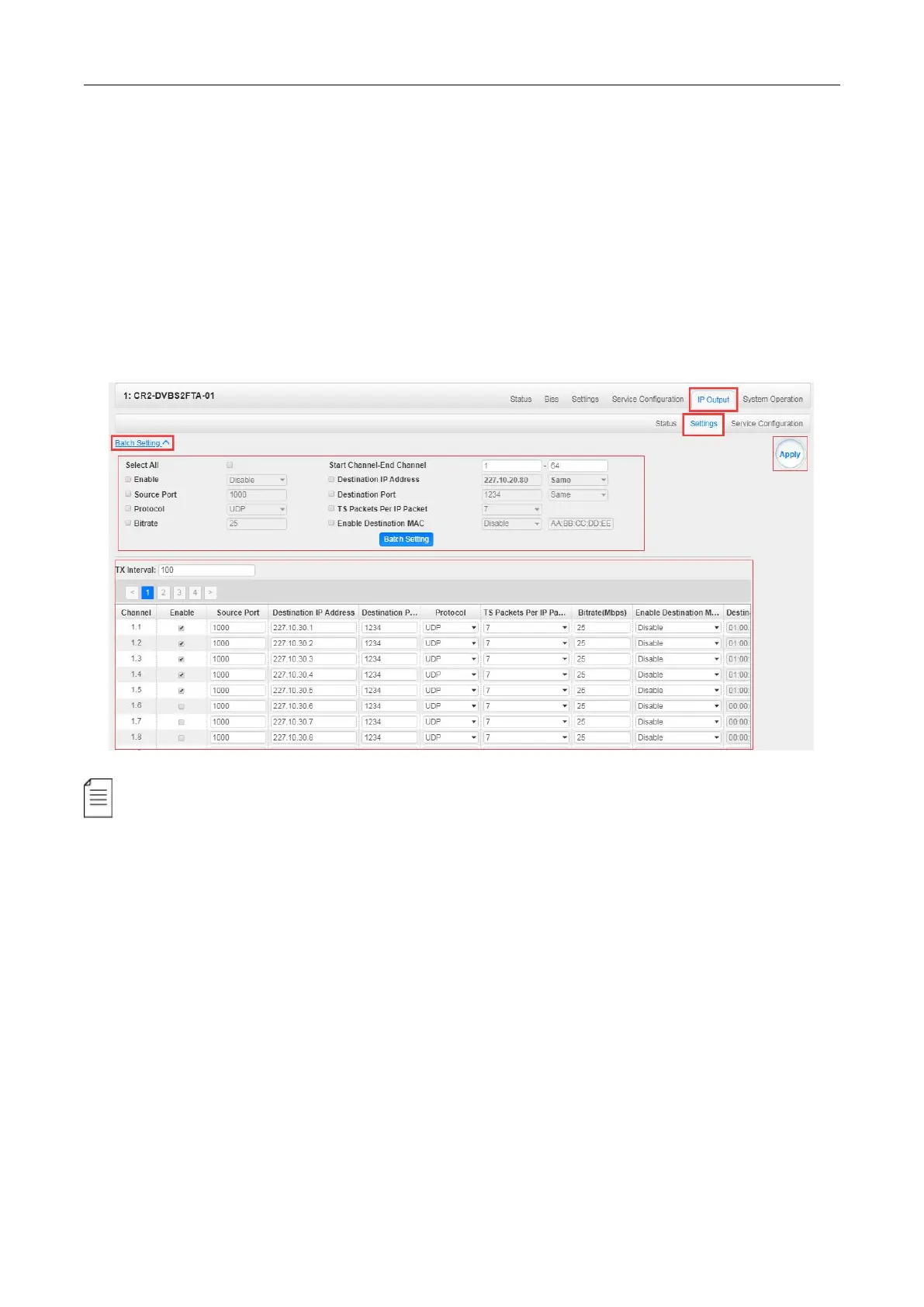
IP Output > Settings > On this page, there are three tabs where you can modify the multicast IP,
ports and parameters of IP Output. There is also Batch Setting. The destination IP address can be
multicast IP address or unicast IP address.
There are 64 IP output channels. Mark the Enable checkbox in front of each channel. Input the
correct Multicast/Unicast IP address, port and appropriate output bitrate, and select a correct output
protocol. Click Apply to make the changes take effect.
Batch Setting is where you can input the IP output parameters in batch. See the image below for
reference.
If you want to use IP output channels in the receiver module and baseboard IP output channel
at the same time, you should avoid multicast IP addresses conflicts. If there are two identical IP
addresses enabled concurrently, both the multicast transport streams will be affected.
IP Output > Service Configuration> Users can make configuration for output services .
TS setting: Click TS line (the blue area) to make the modification of Original Network ID, TS ID
and each Service ID, Service Name, and Service Provider, etc.


 To Next Page