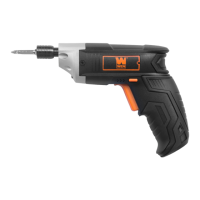
This document is an instruction manual for the WEN 4V Max Lithium-Ion Cordless Screwdriver, Model 49140.
Function Description
The WEN Cordless Screwdriver is designed for fastening and removing screws from wood, plastic, and light-gauge metal. It is intended for household tasks and provides a convenient, portable solution for various screwing applications. The tool features a magnetic chuck for easy bit changes, a direction and safety switch for controlling rotation and locking the power switch, an LED work light to illuminate the workpiece, and a built-in flashlight for additional utility. The handle can be rotated to adjust the tool's position for maximum comfort and control during operation.
Important Technical Specifications
- Model Number: 49140
- Battery: 4.0V (max), 3.6V (nominal), 1.5Ah
- Chuck Size: Ø 1/4 inch
- Rated Speed: 180 RPM
- Rated Torque: 48.7 in. lbs
- Charger Output Voltage: 5V (max)
- Weight: 0.8 lbs
The screwdriver is powered by a lithium-ion battery, which requires charging via a micro USB cable connected to any 5V USB port. The power indication light on the tool indicates the charging status (red for charging, green for fully charged).
Usage Features
Charging:
The battery must be fully charged before first use. The charging cable connects to a micro USB port on the screwdriver. The power indication light shows charging status. It is recommended to allow the tool to cool to room temperature before charging to extend battery life. Charging should occur between 32 to 86 °F (0 to 30 °C), with an ideal range of 64 to 75 °F (18 to 24 °C).
Locking the Power Switch:
To prevent accidental starting, the direction and safety switch can be placed in the center position to lock the power switch. This is crucial when installing or removing bits and making adjustments.
Installing and Removing Bits:
The screwdriver uses 1/4-inch hex bits. To install a bit, lock the power switch, then insert the bit into the magnetic chuck until it clicks into place. To remove a bit, ensure the power switch is locked, then pull the bit out.
Turning On and Direction Change:
To operate the screwdriver, select the desired direction of rotation (clockwise or counter-clockwise) using the direction and safety switch, then press the power switch. Releasing the power switch stops the tool. It is important never to change the direction of rotation while the power switch is pressed down; always release the switch and wait for the chuck to stop first.
Charging Indicator Light:
The light near the charging port indicates the battery's charging status: red means charging is in progress, and green means charging is complete.
LED Work Light:
An LED work light is located on the front of the screwdriver to illuminate the workpiece, enhancing visibility in dimly lit areas.
LED Flashlight:
A multi-purpose flashlight is located at the bottom of the screwdriver handle. It can be turned ON or OFF using the flashlight power switch.
Rotating the Handle:
The screwdriver features a rotating handle that allows it to be used in either a pistol-grip or standard straight position. To rotate the handle, ensure the power switch is locked, push the rotation lock button forward with your thumb, and twist the upper portion of the screwdriver. Release the lock button once the desired position is achieved.
Accessories:
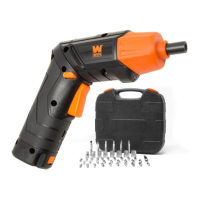
The tool comes with a variety of bits, including:
- 1 Bit Holder (60 mm)
- 6 Long Bits (50 mm)
- 27 Short Bits (25 mm)
- 1 Socket Adapter (25 mm)
- 8 Sockets
- Flat bits: 5 (25 mm), 2 (50 mm)
- Phillips bits: 4 (25 mm), 2 (50 mm)
- Pozidriv bits: 4 (25 mm), 2 (50 mm)
- Torx bits: 8 (25 mm)
- Hex bits: 7 (25 mm)
Maintenance Features
Routine Inspection:
Before each use, inspect the tool for loose hardware, improper mounting, misalignment or binding of moving parts, damaged cord/electrical wiring, cracked or broken parts, or any other condition that might affect safe operation. Do not use the tool if any parts are missing or damaged.
Cleaning & Storage:
- Wipe tool surfaces clean with a soft cloth or brush, ensuring no water enters the tool.
- The tool is permanently lubricated at the factory and requires no additional lubrication.
- There are no user-serviceable parts; do not attempt to open or disassemble the screwdriver or replace the battery cell.
- Keep ventilation slots clean and free of debris.
- Avoid contact between plastic parts and brake fluids, gasoline, petroleum-based products, penetrating oils, or other chemicals, as these can damage or weaken the plastic.
- Store the tool in a dry, frost-free location, away from temperatures above 104°F (40°C) to protect the battery.
Disposal:
At the end of its lifetime, the product should not be disposed of with household waste. Electrical and electronic products are hazardous to the environment and human health. Take the product to a local recycling facility for responsible recycling.
Troubleshooting:
The manual provides a troubleshooting guide for common issues such as the trigger not working, LED light/flashlight not working, handle not rotating, and battery not charging, along with corresponding causes and solutions. For complex issues or repairs, contact customer service.
Safety:
The manual emphasizes general safety rules, specific safety rules for the screwdriver, and safety rules for batteries and chargers. It highlights the importance of wearing eye protection, avoiding loose clothing, keeping the work area clean, and proper handling of the tool and battery. It also includes a California Proposition 65 warning regarding exposure to certain chemicals.


 To Next Page
 General