WD ELEMENTS PLAY MULTIMEDIA DRIVE
USER MANUAL
FEATURES AND FUNCTIONS – 6
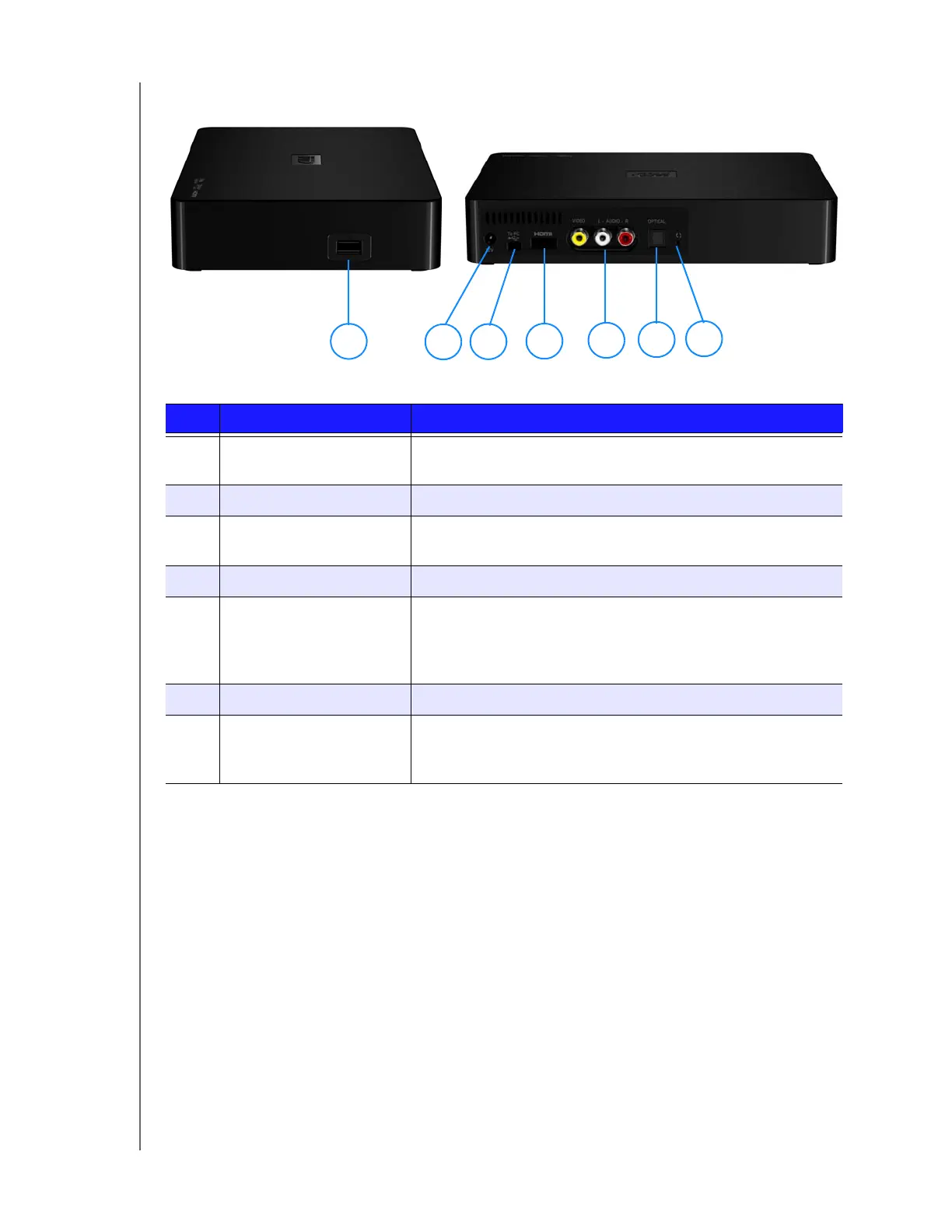
Connections
Item Component Description
1 USB port Supports connection of removable storage devices, portable
multimedia drives, and digital cameras with USB connectors
2 Power jack Connects the power adapter
3 Mini USB port Supports connection of the multimedia drive to a computer as
an external USB storage device for content transfer.
4 HDMI port Connects to your TV’s HDMI port (HDMI cable sold separately)
5 Composite jacks Connect to your TV’s analog video and audio jacks
(composite cable sold separately).
Note: When making an audio connection through the S/PDIF
(optical) port, only the composite video connection is required.
6 S/PDIF(optical) audio port Connects to your AV receiver (S/PDIF cable sold separately)
7 Reset switch Reset the multimedia drive to factory settings using a fine-
tipped stylus or the unfolded end of a paperclip. Do not use
any sharp objects that may damage the switch.
1
2
3
4
5
6
7












 To Next Page