3-6
REMOVING THE POWER CORD AND CAPACITOR
MODELS ACM052MM, ACM062MM, & ACD052MM
Electrical Shock Hazard
Disconnect power before servicing.
Replace all parts and panels before
operating.
Failure to do so can result in death or
electrical shock.
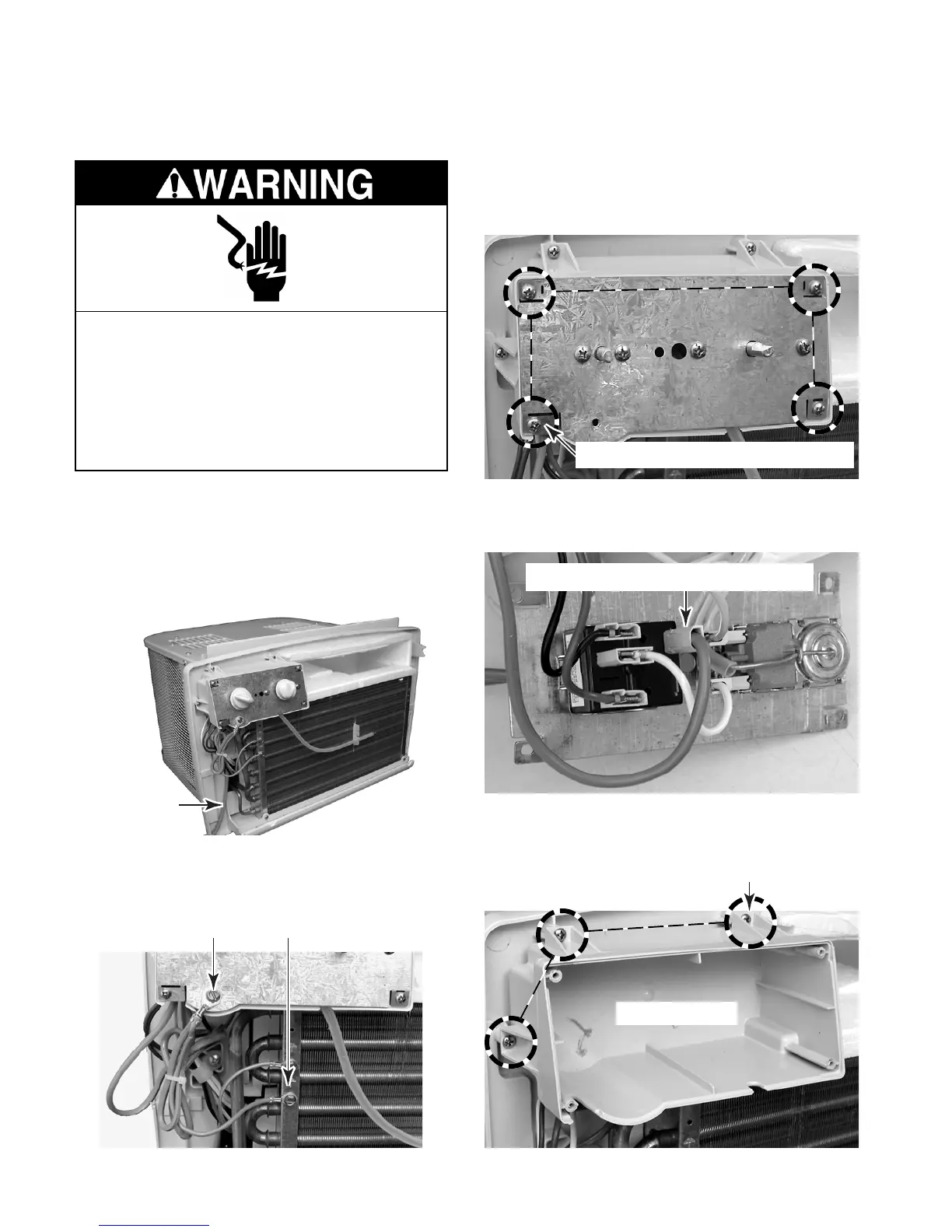
5. Remove the four screws from the control
mounting plate and position it so that you
can access the wiring.
6. Disconnect the smooth power cord lead con-
nector from fan speed control terminal 1.
7. Remove the three screws from the control
housing and and remove the housing.
Screw 1 of 3)
Control Housing
Smooth Power Cord Lead At Terminal 1
Control Mounting Plate Screw (1 of 4)
1. Unplug air conditioner or disconnect power.
2. Remove the air conditioner from the win-
dow.
3. Remove the side curtains and the front
grille (see page 3-2 for the procedures).
Power Cord
4. Remove the power cord green ground
wire screws from the control mounting
plate and the evaporator frame.
Ground Screws
Model ACD052



 To Next Page