29
06 HMI INTEGRATED
6.3 Data Clearance & Assist Modes
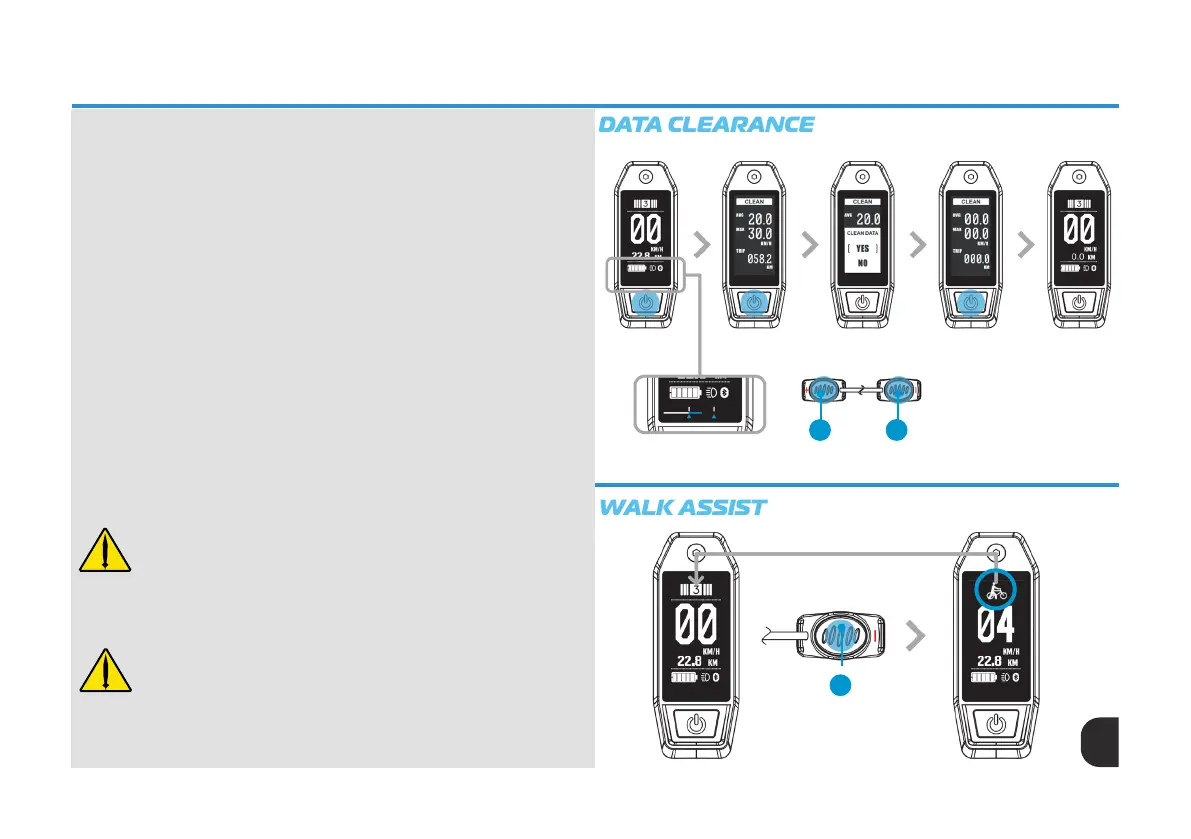
Data Clearance
You can clear and reset the subtotal mileage (TRIP), average speed (AVG), and
maximum speed (MAX). After the HMI controller has been powered on, press
down the Power/Mode button (1), at the bottom of the screen a timing bar will
appear and track across the screen. When the loading bar moves between
two vertical line markers, release the Power/Mode button (1). Upon release
between the markers a CLEAR DATA window will pop up.
By quick pressing the Power/Mode button (1) a pop up box offering two
options “YES” or “NO” will appear. Using the Up (3) & Down (4)
button select your command and conrm by a quick press of the Power/
Mode button (1). After conrmation, you will automatically return to the Home
Screen. Please refer to the ‘DATA CLEARANCE’ illustration to the right.
Walk Assist
When bike is stationary, press and hold the down button (4) to activate Walk
Assist mode. The display will show the Walk Assist icon (circled) and the real
time speed shown below the Walk Assist icon. To stay in walk mode the down
button (4) must be held down.
To exit Walk Assist mode release the down button (4). The motor will
disengage operation, and the HMI screen will return to the Home screen.
Please refer to the ‘WALK ASSIST’ illustration to the right.
WARNING - Proper use of walk-assist mode is important to prevent
loss of control and injury.
• Only use when dismounted.
• Keep both hands on the grips and ngers on one or both brake
levers so the motor power can be stopped immediately if necessary.
• Keep clear of the pedals while walking the eBike.
WARNING - Make sure the eBike system is turned off so that the
walk-assist mode cannot be accidentally activated when:
• Pushing the eBike without the walk-assist mode turned on.
• Transporting the eBike (lifting onto a car, bike rack or a train).
• Carrying the eBike up and down stairs.
• Performing any maintenance or service (e.g., placing the chain on a
chainring) or other drivetrain parts, pedals or xing a at tyre.
Press & hold power/
mode button 1-2
seconds
Quick Press power/
mode button
Quick Press
up/down button for
selection
Quick Press
power/mode button
to conrm
Home screen
3 4
Pedal assist mode restored after release of
down button (4)
Press & Hold down button (4)
4
Timing bar. Release bottom between
vertical line markers



 To Next Page