30
06 HMI INTEGRATED
6.3 Data Clearance & Assist Modes
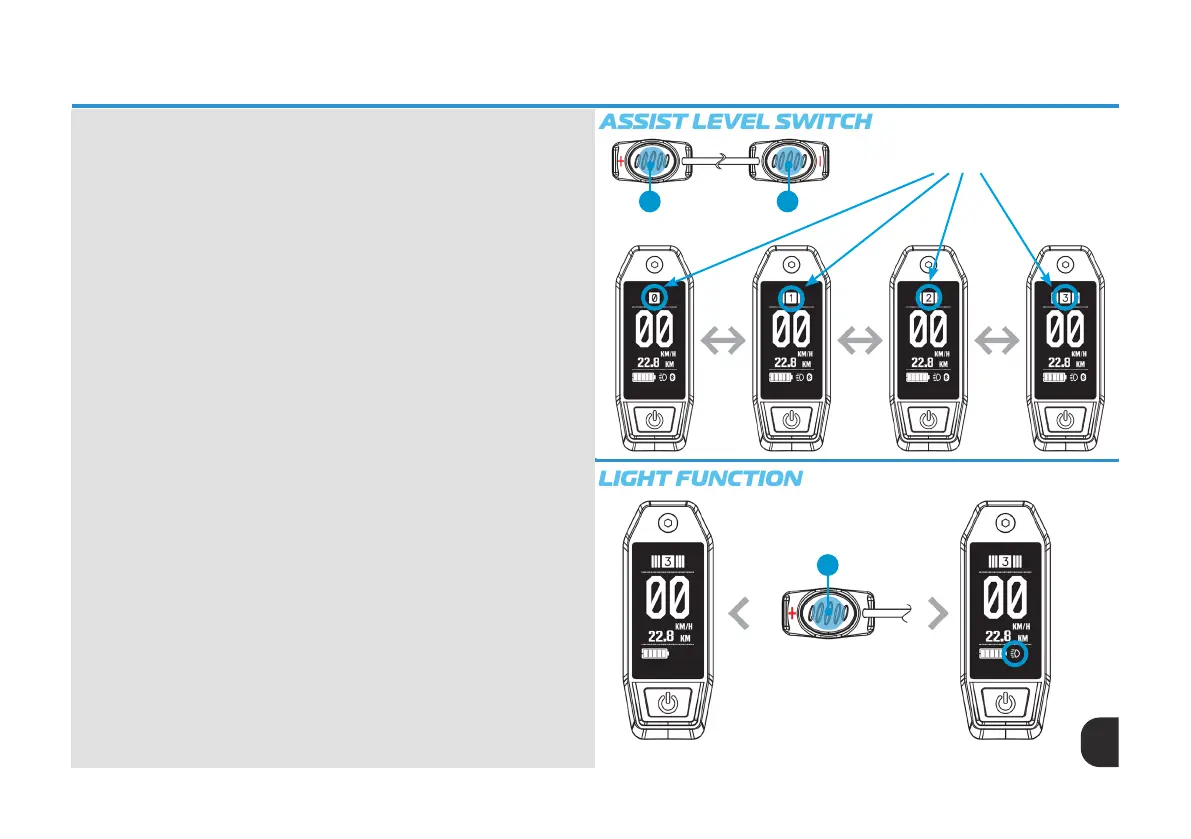
Assist Level Switch
In the normal operation, short press Up / Down button (3/4) to switch
increase and decrease assist level.
Level 0: No assistance is provided
Level 1-3: Provides incremental power with level 1 being the lowest power
mode and level 3 being full power mode. Take care riding in assist level 3 if
this is your rst time riding your eBike. Whyte recommends always starting
your ride in assist level 1. Please note, riding the bike in assist level 3 will drain
you eBikes battery much faster that assist level 1 or 2. Please refer to the
‘ASSIST LEVEL SWITCH’ illustration to the right.
Light Function
If the eBike is equipped with a front or rear light, from the home screen press
and hold the Up button (3) for 3 seconds to turn them on. A light icon on the
bottom-right corner of screen will appear when the light is on. To turn the
lights off, repeat the operation holding the Up button (3) for 3 seconds. The
light icon in the bottom right will disappear from HMI screen. Please refer to
the ‘LIGHT FUNCTION’ illustration to the right.
3 4
Assist Level 0, 1, 2, 3
Press & Hold Up Button (3)
for 3 seconds to activate
lights
3



 To Next Page