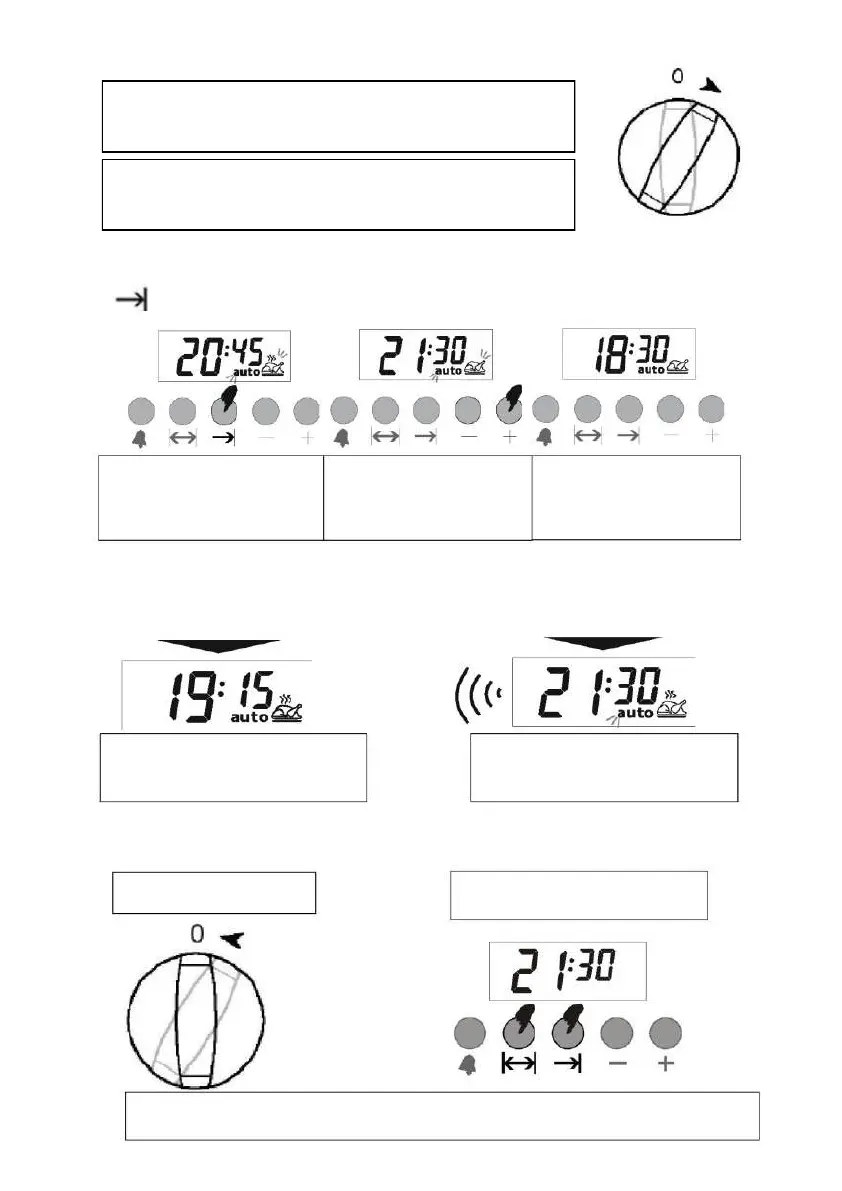
Note: When creating the baking program or when the program is running, it
is possible to cancel the program by switching to manual mode.
The oven timer is set to cook for 2 hours and 15 minutes from then on. Do not
forget to adjust other control switches on the oven to the correct positions
according to the function and temperature you wish to cook.
In the example above, we saw that you can start the cooking process immediately by entering the cooking time.
And you can also view and, if necessary, set the time when the food will be ready (cooking lead time) by pressing
the key. In the following example, the setting is selected so that the food will be ready at 9:30 PM.
As it is, we have programmed the furnace in such a way that the food will be ready at 21:30. Previously, we had
programmed the baking time as 45 minutes. And in this case, the furnace will start at 19:15 and bake the food for 2
hours 15 minutes and baking program will stop at 21:30.
Display shows the time
food will be ready, that is
say 18:30 + 2:15 = 20:45
You can set the cooking
lead time by help
of the + or - keys
After a few seconds the display
will start to
to show the time.
The display shows when the
cooking process starts.
The display shows when the
cooking process is complete.
Switch off the oven.
Note: The oven will remain turned off until you reset the oven timer.
Reset the above hours
When the cooking program is completed, the acoustic signal is activated for up to 7 minutes.



 To Next Page