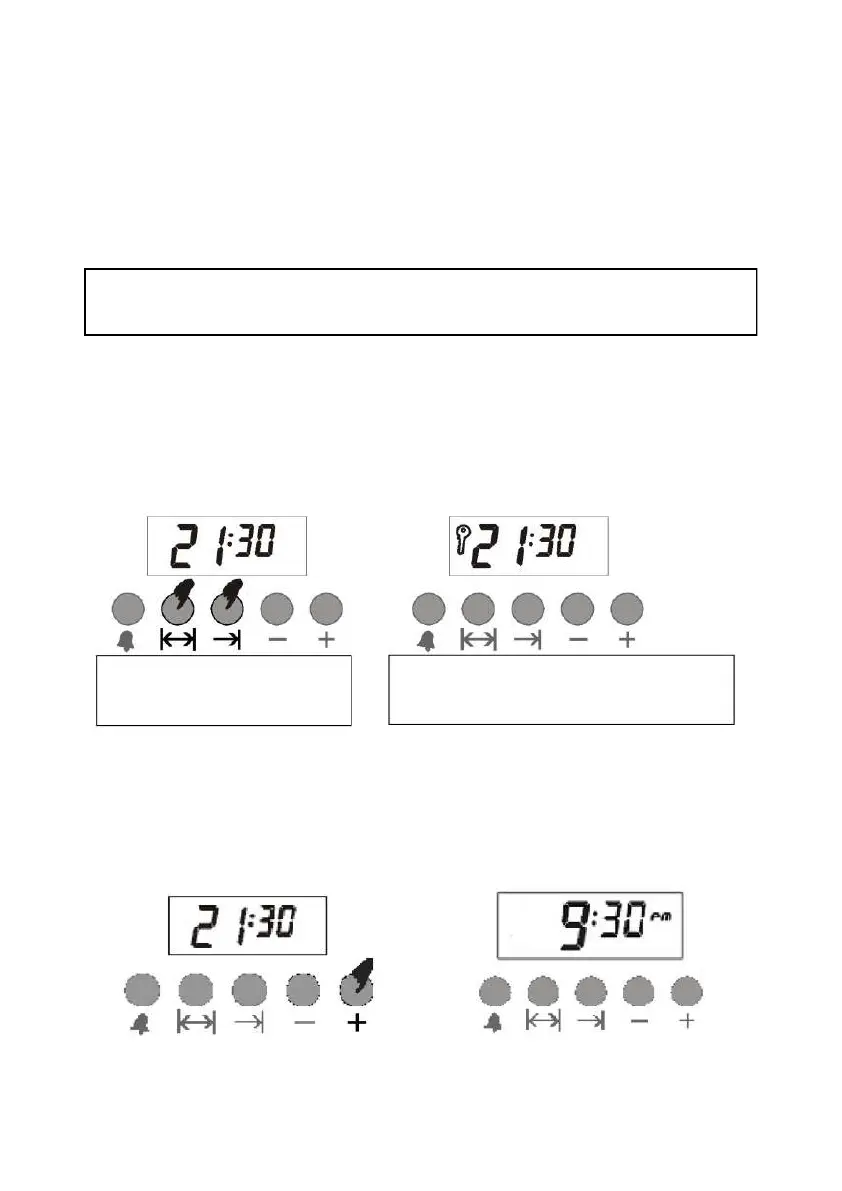
Hold the buttons for 3 seconds
for manual mode.
The Child Lock is active when the key
appears on the display.
CHILD LOCK FUNCTION
This feature prevents you from accidentally changing your settings on the oven timer. When the child lock is
activated, the keys will not work. If the key lock is enabled when a program is running, only the keys will be locked;
and if the lock key is activated when it is in the manual position, then the keys will be closed and the oven will be
deactivated.
Note: If the key lock is activated when there is no current baking program, then the oven will be deactivated for
safety. When the key lock is canceled the oven can be used again.
In the example given above, the cooking time was entered and the cooking lead time calculated automatically was
changed by us in the second stage. If desired, it is also possible to enter the preparation lead time; in this case, the
cooking time is calculated automatically and, if necessary, it is changed in the second phase.
In the event of a power failure, the oven will deactivate for safety. This situation will be expressed by the flashing
time and the characters on the display. Previously set program will be reset. The display shows the time as 0:00. To
reset e First switch to manual mode (See manual mode). And then you can set the timer using + or - keys. (Note. In
case of power failure for seconds, the system will keep the position) Note: If you do not intend to bake with the
oven, remember to turn the oven knob to 'off' -position.
IN CASE OF POWER OUTAGE
TIMER MODE (12/24 HOURS)
Note: To unlock, you need to press and hold manual mode keys for 3 seconds.
Note: If the alarm rings when the child lock is on, you can turn the alarm off by pressing manual mode.
The lock will remain locked .
This function allows you to change your timer according to 12-hour or 24-hour format.
For 24-hour format. Hold (+) button
Pressed for 3 seconds.
The timer is now in 12 hour
format.



 To Next Page