page 7
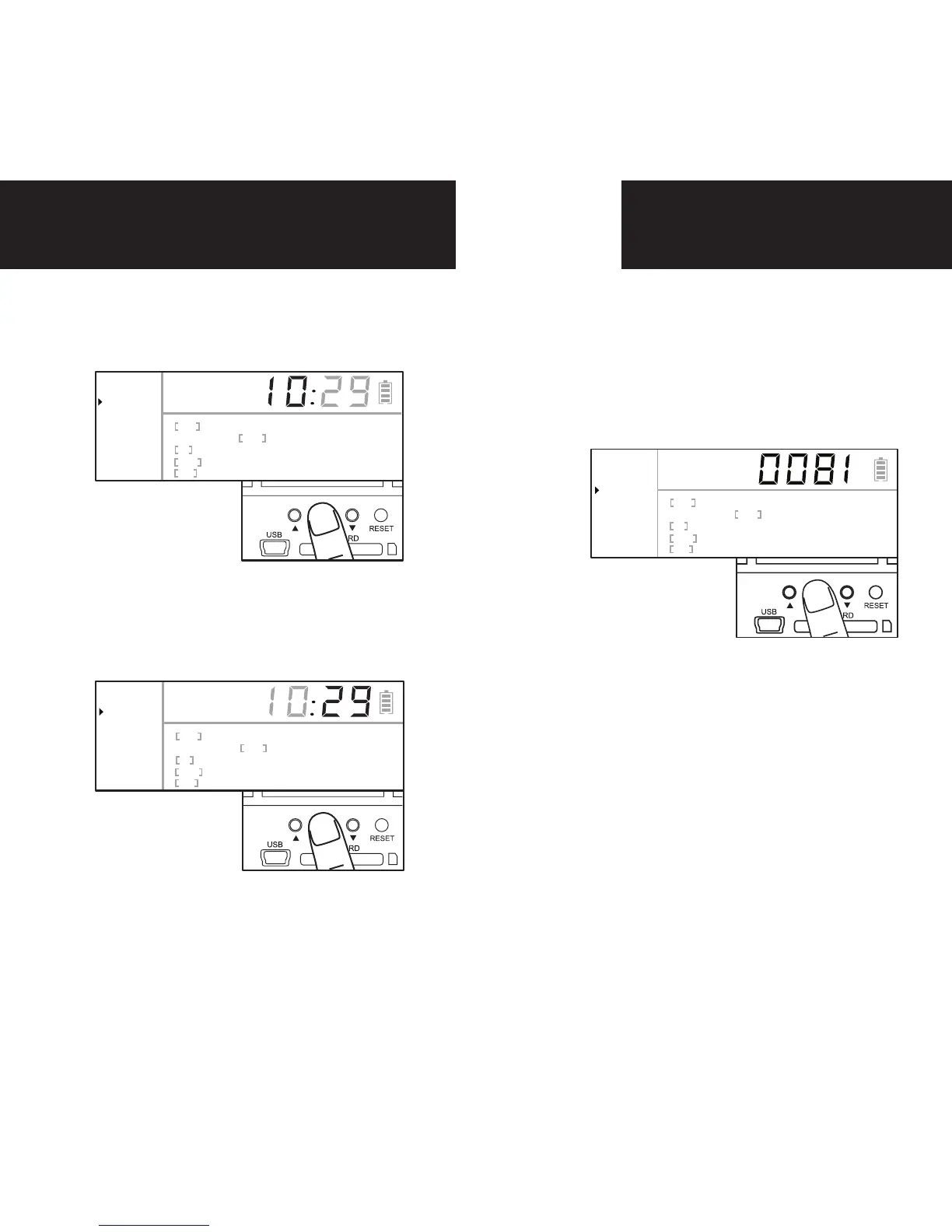
Setting Date
1.
Press the center navigation but-
ton after setting the minute to
change the Date.
2.
Press the up or down navigation
button to go up or down in se-
quence.
3.
When the DAY is set, repeat steps
1 and 2 to set the Month and Year.
Ready
Clock
Date
Photos
Image
PIR
Resolution
Active
Delay
Still Video
Hi Med Lo
Hi Med Lo
24Hr Day Night
15s 30s 1m 2m
MM
DD
Ready
Clock
Date
Photos
Image
PIR
Resolution
Active
Delay
Still Video
Hi Med Lo
Hi Med Lo
24Hr Day Night
15s 30s 1m 2m
MM
DD
Photos
1.
Press and release the center navi-
gation button to choose Photos.
The number displayed is the num-
ber of photos on your SD card. This
is not a programmable mode for
the camera.
Ready
Clock
Date
Photos
Image
PIR
Resolution
Active
Delay
Still Video
Hi Med Lo
Hi Med Lo
24Hr Day Night
15s 30s 1m 2m


 To Next Page