auto-het mode. This will constantly tune to the frequency with
the most energy above the Trigger Minimum Frequency
setting (see below) or a minimum of 10 kHz for EMT1 and
EMT2 Pro or 16 kHz for EMT2. Just drag the grey slider on the
left side to manually tune.
A bandpass filter is implemented based on the zoom level of
the frequency axis in all listening modes. If you zoom in
frequency, you will only hear the frequencies visible on the
screen. If there is a quite a bit of low frequency noise, or the
recorder is picking up its own output, you can zoom such that
the noise is not seen on the screen and filter for a cleaner
sound. You can also filter out the higher frequency noise of
the EMT2 if you do not have very high frequency bats.
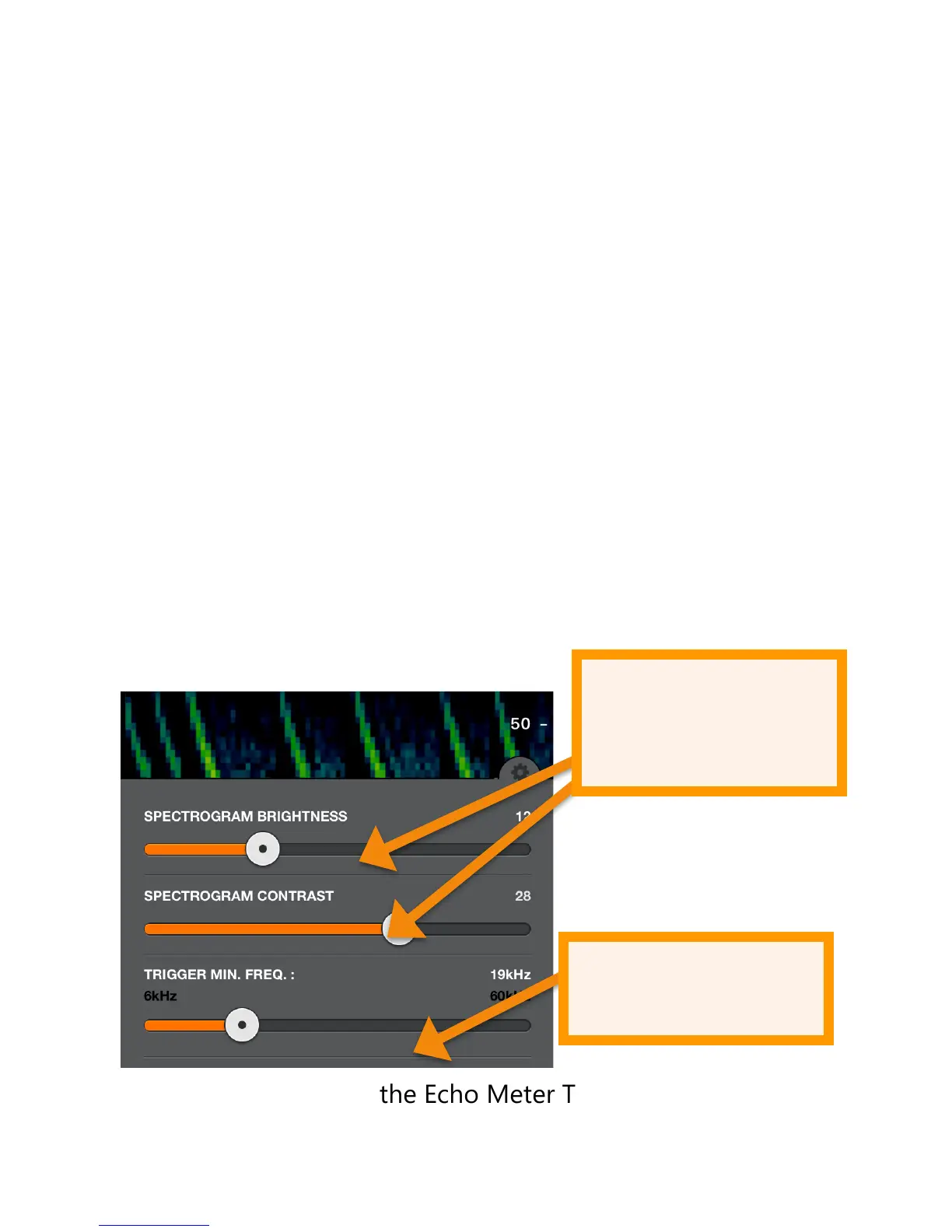
Tap the Settings icon to open the spectrogram settings
panel. Here you can adjust the brightness and contrast of the
spectrogram as well as adjust the minimum frequency to
trigger a recording. In portrait orientation, it appears as
shown; in landscape orientation it appears at the top right of
the screen.
In Compressed mode, the Echo Meter Touch only shows
spectrograms containing ultrasonic signals. The spectrogram
does not scroll unless there is a signal such as bat
echolocations. In Expanded mode, the spectrogram scrolls in


 To Next Page