2.Focus and Keystone Correction
(1)Adjust the keystone correction first.
How to Use Projection Settings
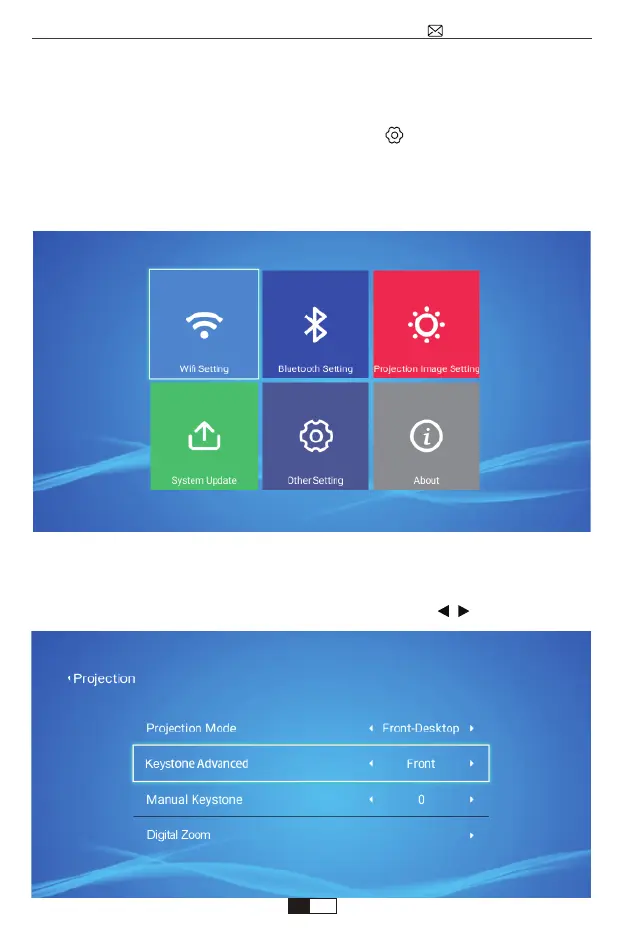
Select the settings icon in the upper right corner of the main interface, and
then press the "OK" key on the remote control to enter the settings interface and
select "Projection Image Setting". After entering the interface, select the mode
you want in the projection settings, then adjust the keystone as you want.
①Vertical Keystone
When you choose “Keystone Advanced: Front”, then you can ajust Manual
Keystone (Vertical )between : ±50°, just press the button to set the value.
support@wimius.com
EN
01 02 03 04 05 06 07 08 09 10 11 12 13 14 15 16 17 18 19 20
21 22 23 24 25 26 27 28 29 30 31 32 33 34 35 36 37 38 39 40
41 42 43 44 45 46 47 48 49 50 51 52 53 54 55 56 57 58 59 60
61 62 63 64 65 66 67 68 69 70 71 72 73 74 75 76 77 78 79 80
81 82 83 84 85 86 87 88 89 90 91 92 93 94 95 96 97 98 99



 To Next Page