Miracast
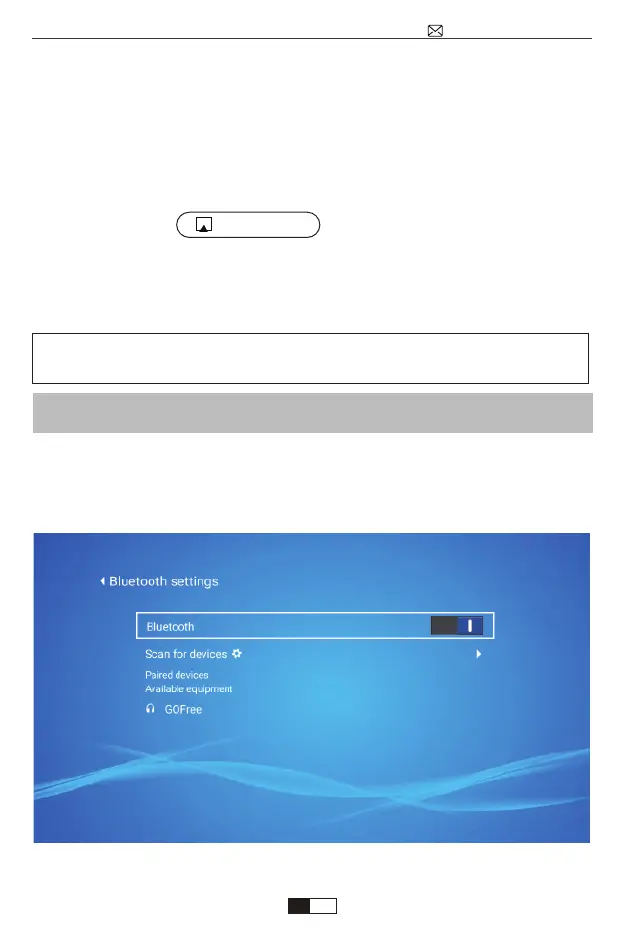
1.Turn on your Bluetooth Speaker.
2.Turn on the Bluetooth Setting of your projector.
3.Seclect your Bluetooth speaker to connect.
4.Succeed.
Compatible with Bluetooth speakers, Bluetooth Headphones, iPhone
Airpods,Bluetooth Earbuds,Bluetooth Earphones.
Connecting with Bluetooth Speaker
1.Turn on the WiFi Setting of your projector.
2.Choose your Home WiFi to connect and enter the right password, then click
“Done” to Connect, please wait 3-5 seconds to establish the connection. Once
connected, it will remember the password of the connected WiFi.
3.Turn on the WiFi setting of your Android mobile device, then connect the same
Home WiFi as the projector.
4.Select “MiraCast” as the Input Source of your projector.
5.Swipe up the screen of your Android mobile device and tap "Wireless Display"
(or trun on it in your setting)to search for the projector, then select
“WiMiUS-K1 Projector” from the searching results to connect.
6.Succeed.
Method 2: Setting with Home Wi-Fi.
If any questions during connection, email us at
support@wimius.com for solution.
support@wimius.com
EN
01 02 03 04 05 06 07 08 09 10 11 12 13 14 15 16 17 18 19 20
21 22 23 24 25 26 27 28 29 30 31 32 33 34 35 36 37 38 39 40
41 42 43 44 45 46 47 48 49 50 51 52 53 54 55 56 57 58 59 60
61 62 63 64 65 66 67 68 69 70 71 72 73 74 75 76 77 78 79 80
81 82 83 84 85 86 87 88 89 90 91 92 93 94 95 96 97 98 99



 To Next Page