54
Return To Defaults
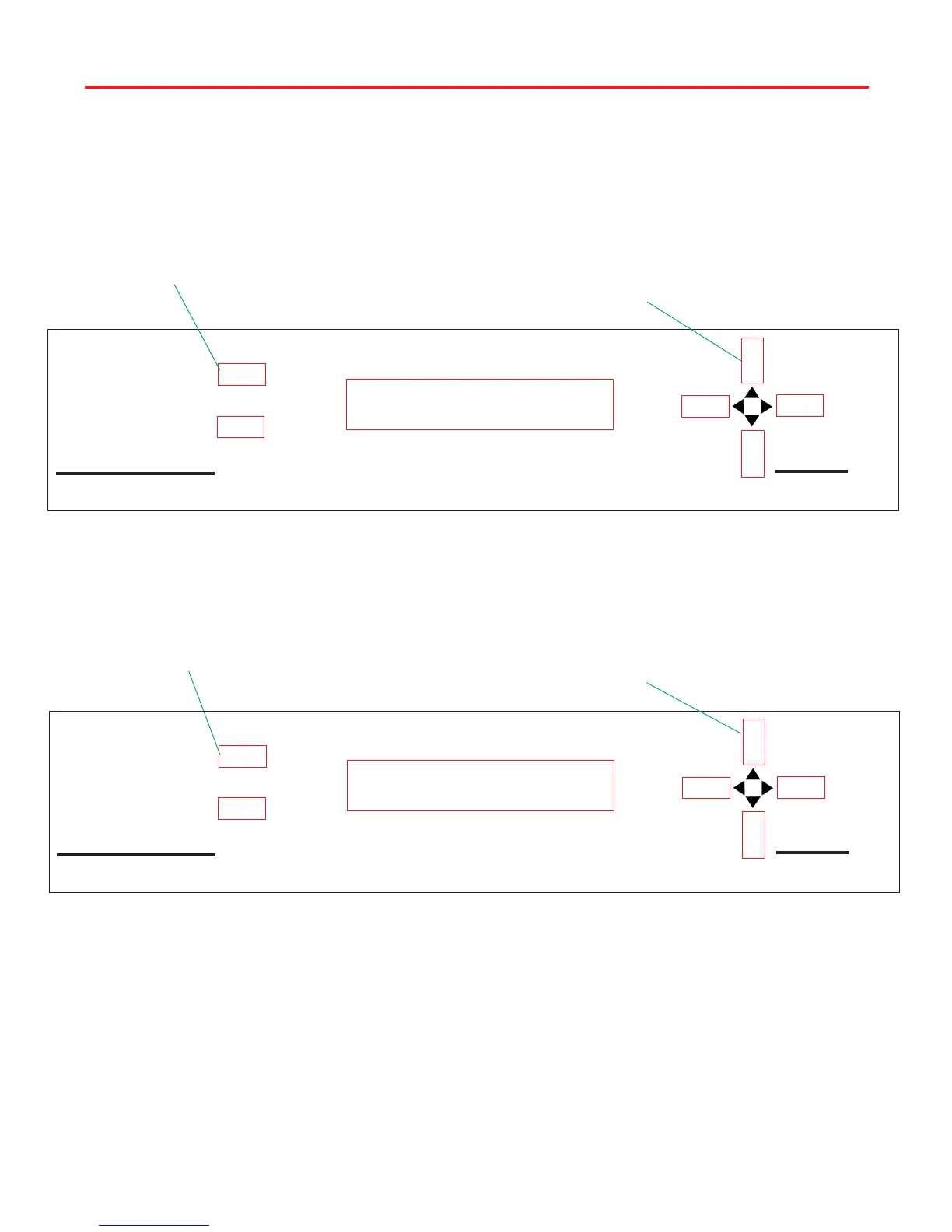
Perform the following commands to return the positioner to factory defaults:
1. Press [UP/DOWN] arrow until Edit is displayed on positioner. See
Figure 3.
2. Press [SELECT A or B] Edit, see Figure 3.
Model RD-9900
PINNACLE
POSITIONER
by WINEGARD
SELECT B
SELECT A
1. Press UP/DOWN arrow
buttons to get Edit on screen
2. Press SELECT A or B as
appropriate
Edit
Search DSS
Model RD-9900
PINNACLE
POSITIONER
by WINEGARD
SELECT B
SELECT A
3. Press UP button until
3000 is displayed
4. Press SELECT A to enter
code
Enter Code: 3000
3. Press [UP] arrow button until positioner display shows 3000. See
Figure 4.
Figure 4
Figure 3
4. Press [SELECT A] Enter Code: 3000 to access Edit Menu. See Figure
4.
NOTE: To exit Edit Menu, press [DOWN] arrow key, then [SELECT B] Quit
to exit Edit Menu.



 To Next Page