EasyManua.ls Logo

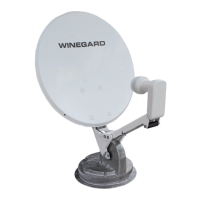
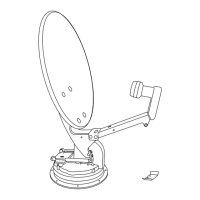
Winegard WB-2000 - User Manual

Winegard WB-2000
39 pages
Print Icon
To Next Page IconTo Next Page
Loading...
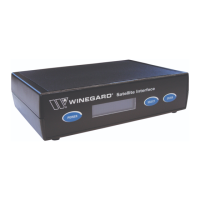
Satellite Interface
Installation/Operation Manual
Model WB-2700/WB-2000
Made in the U.S.A.
U.S. Patent Pending
Winegard Company • 3000 Kirkwood St. • Burlington, IA 52601-2000
800/288-8094 • FAX 319/754-0787 • www.winegard.com
Printed in U.S.A. © Winegard Company 2007 2452114
WINEGARD
®
Converter required for DIRECTV HD-
programming only. Sold separately.
T
O INTERF
ACE/DISH
T
O CONTRO
L
TO
R
E
C
E
I
V
E
R
M
a
d
e
in
U
S
A
W
I
N
E
G
A
R
D
C
O
M
PA
N
Y
B
U
R
L
I
N
G
TO
N
,
I
O
W
A
2
4
1
0
4
4
7
D
I
R
E
C
T
V
(1
1
0
)
H
D
C
O
N
V
E
RT
E
R
M
O
D
E
L
W
B
-
11
0
0
7
S
E
L
E
C
T
E
N
T
E
R
S
e
r v
i c
e
P
r o
v
i d
e
r
D
T
V
D
I
S
H
B
E
L
L
*
P
O
W
E
R
S
a
t
e
l
l
i
t
e
I
n
t
e
r
f
a
c
e

Questions and Answers

  • L
    lkingAug 21, 2025
    How to fix Winegard WB-2000 when satellite search failed?
    • J
      Jonathan BanksAug 21, 2025
      If the Winegard Satellite TV System displays 'Satellite Search Failed', ensure the antenna has a clear view of the desired satellites. Check the coax cable on the roof for 12VDC to 18VDC, and verify all coax connections are secure. Also, be aware that excessive moisture or poor weather may disrupt satellite reception.
  • A
    Aaron GreenSep 3, 2025
    What does 'LNB SHORT!' mean on my Winegard WB-2000 Satellite TV System and how to resolve it?
    • A
      Alan TorresSep 3, 2025
      If the Winegard Satellite TV System displays 'LNB SHORT!', check the coax cable running from the antenna to the satellite interface. The cable may have been incorrectly installed or damaged.
  • J
    johnsonstephenSep 1, 2025
    What to do if my Winegard WB-2000 Satellite TV System shows 'NO RECEIVER VOLTAGE!'?
    • R
      richardcookSep 1, 2025
      If your Winegard Satellite TV System displays 'NO RECEIVER VOLTAGE!', verify that the satellite receiver coax cable is connected to the correct port on the satellite interface. If it is, try replacing the receiver cable.
  • Q
    qjacobsonAug 31, 2025
    Why does my Winegard WB-2000 Satellite TV System antenna not begin searching when the interface powers on?
    • M
      Michael EricksonAug 31, 2025
      If the Winegard Satellite TV System interface powers on, but the antenna doesn't start searching, ensure the antenna's 12VDC power cable is connected to the correct port on the Satellite Interface and that the green power connector is correctly wired at both the Interface and inside the dome.
  • R
    rebeccareedAug 29, 2025
    What does 'IDU CONFIG' mean on my Winegard Satellite TV System and how to fix it?
    • P
      Pam CruzAug 29, 2025
      If your Winegard Satellite TV System displays 'IDU CONFIG', it means communication between the Satellite Interface and the antenna has failed. Try restarting the system and checking the communication cabling.
  • P
    Patrick SalazarAug 27, 2025
    What to do if pushing the power button on my Winegard WB-2000 Satellite TV System Interface does not power it up?
    • M
      Michael MontgomeryAug 27, 2025
      If the Winegard Satellite Interface doesn't power up when you push the power button, make sure it is connected to a working AC power source.
  • K
    Keith WeaverAug 27, 2025
    What to do if my Winegard Satellite TV System lost antenna communications?
    • A
      Anthony BaileyAug 27, 2025
      If your Winegard Satellite TV System has lost antenna communications, check the data and power cables connected to the antenna to ensure they are properly connected.
  • G
    gthompsonAug 25, 2025
    Why can't I access all channels on my Winegard WB-2000 Satellite TV System with Dish Network or DirecTV?
    • P
      pholderAug 25, 2025
      If you cannot access all channels on your Winegard Satellite TV System, you may need to wait for the guide for your service provider to fully download. Ensure the channel is available on the satellites accessible through the Satellite Interface. You might need to use Manual Mode for some programming. Verify the signal strength, as weather or location can affect availability. Also, confirm your receiver is activated for your programming.
  • S
    shannonclarkAug 23, 2025
    What to do if my Winegard Satellite TV System is waiting to acquire GPS?
    • K
      Kathryn HudsonAug 23, 2025
      If your Winegard Satellite TV System is stuck on 'Waiting to Acquire GPS,' first ensure the GPS antenna isn't obstructed. Note that after long trips, GPS acquisition can take up to 20 minutes. Also, check that the GPS antenna cable is fully connected to the electronics board connector.

Summary

2. SAFETY

2.1 Installation Safety

Outlines essential safety precautions and recommendations for installing the satellite system.

3. INSTALLATION

3.2 Route Cables (If Necessary)

Details the process of routing power and data cables for the system.

3.5 Connect Satellite Interface to Primary HD Receiver

Guides connecting the interface to the receiver, with specific instructions for different providers.

3.5.1 Connect Satellite Interface to Primary DirecTV HD Receiver

Details connecting the interface to a DirecTV HD receiver, including converter use.

3.5.2 Connect the Satellite Interface to Primary Dish Network or ExpressVU HD Receiver

Explains connecting the interface to Dish Network or Bell ExpressVU receivers.

4. DirecTV Operation

4.2 DirecTV First Time Setup

Details the initial configuration steps for using the interface with DirecTV.

5. Dish Network Operation

5.2 Dish Network First Time Setup

Guides through the initial setup process for Dish Network service.

6. Bell ExpressVU Operation

6.2 Bell ExpressVU First Time Setup

Details the initial setup procedure for Bell ExpressVU programming.

7. Satellite Interface Menu

8. Troubleshooting

8.1 LCD Error Messages

Lists common error messages displayed on the LCD and their solutions.

8.2 Solutions to Common Operating Issues

Provides solutions for frequently encountered operational problems and symptoms.

Appendix A Winegard HDTV Wiring Diagram

Winegard WB-2000 Specifications

General IconGeneral
Weight5.5 lbs
MaterialAluminum
Mount TypeNon-penetrating roof mount, tripod mount, or side mount
Mounting TypeMast
Warranty1-year limited warranty

Related product manuals