English ZERO Pro
INSTALLING THE FILTERS
④
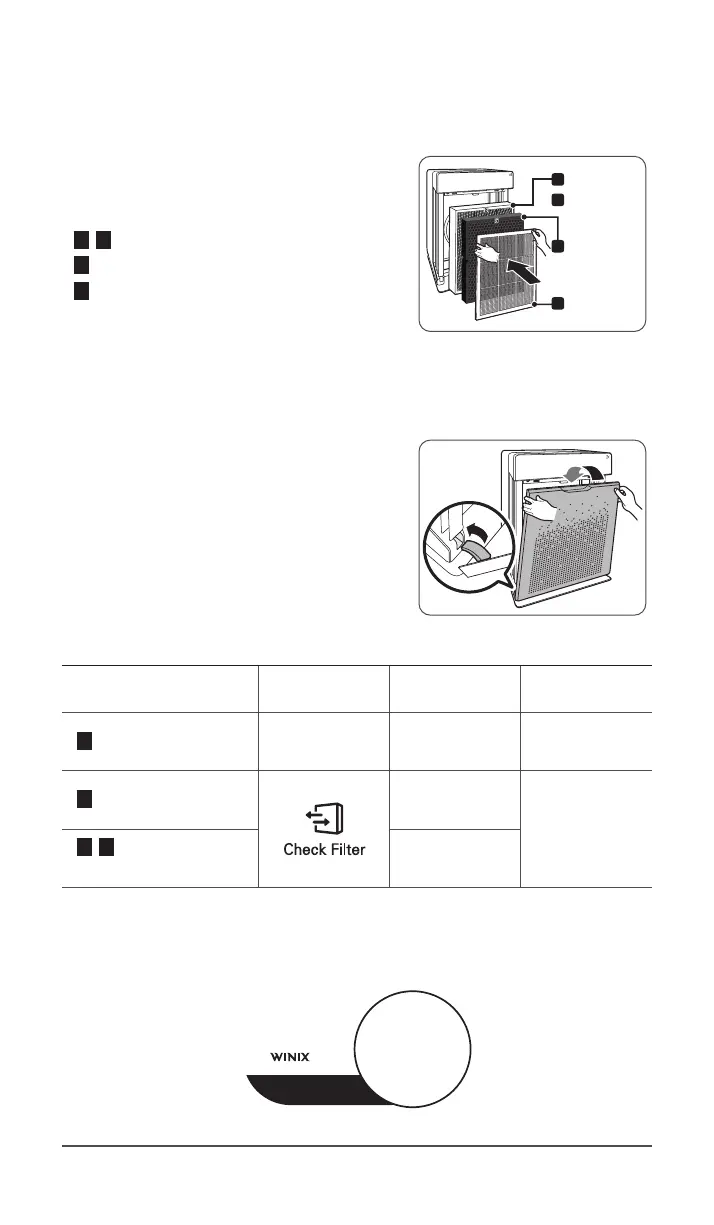
Install the filters until they fit securely in
place.
Filters must be installed in this order:
3 , 4 True HEPA filter with Cleancel™ (rear)
2 AOC™ Carbon Filter (middle)
1 Pre-filter (front)
ˍ
To install the pre-filter, insert bottom tabs
into the slots on either side of the lower part
of the unit, then rotate upward to insert the
upper tabs into the slots at the top part of
the unit until both sides audibly click into
place.
Pre-lter
True HEPA
lter with
Cleancel™
AOC
TM
Carbon
Filter
3
1
2
4
⑤
Replace the front panel by first inserting
the latch at the bottom edge into the
base of the unit, then rotate the panel
upward toward the top of the unit until it
magnetically snaps closed.
⑥
When to service and replace filters:
Filter Indicator Light
When to
service
When to
replace
1 Pre-filter none
Clean once every
14days
Permanent
2 AOC™ Carbon Filter
Clean once every
3months
Lasts up to
6~12months
3 , 4 True HEPA filter
with Cleancel™
Can NOT be
WASHED
※
Intervals between filter replacement may vary depending on environment.
※
For optimal use, Pre-filter can be cleaned every 14days which can extend the life of
other filters.
FILTER
ITEM: 1712-0093-01
This unit
is compatible
with
filter


 To Next Page