60708-162
4094-00
12
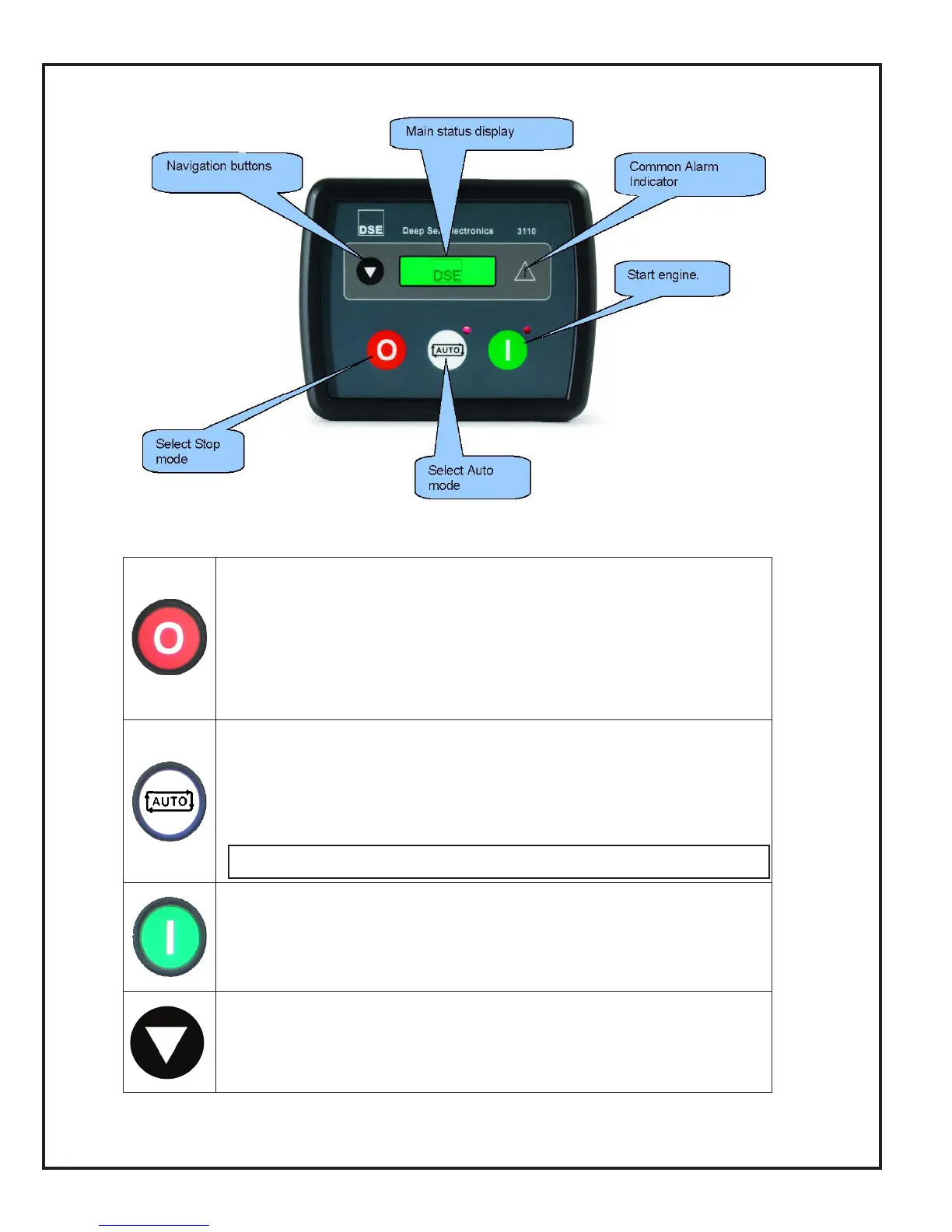
DSE 3110 CONTROLLER
STOP/RESET (Red Button) This button places the module into its “Stop/
Reset” mode. This will clear any alarm conditions for which the triggering
criteria have been removed. The fuel supply de-energizes and the engine
comes to a standstill. Should a remote start signal be present while operating
in this mode, a remote start WILL NOT occur.
AUTO (White Button) This button places the module into its “Automatic”
mode. This mode allows the module to control the function of the generator
automatically. The module will monitor the remote start input and once a start
request is made, the set will be automatically started and placed on load. The
module will then wait until the next start event.
START (Green button)
Pressing this button from STOP/RESET will start the engine and run off load.
PAGE
Pressing this button scrolls the display to show the various instruments.
AUTO is only available if the control has been rewired for AUTO start.
See Page 25 for rewiring instructions..


 To Next Page