18 19
Cleaning Your Wisewell
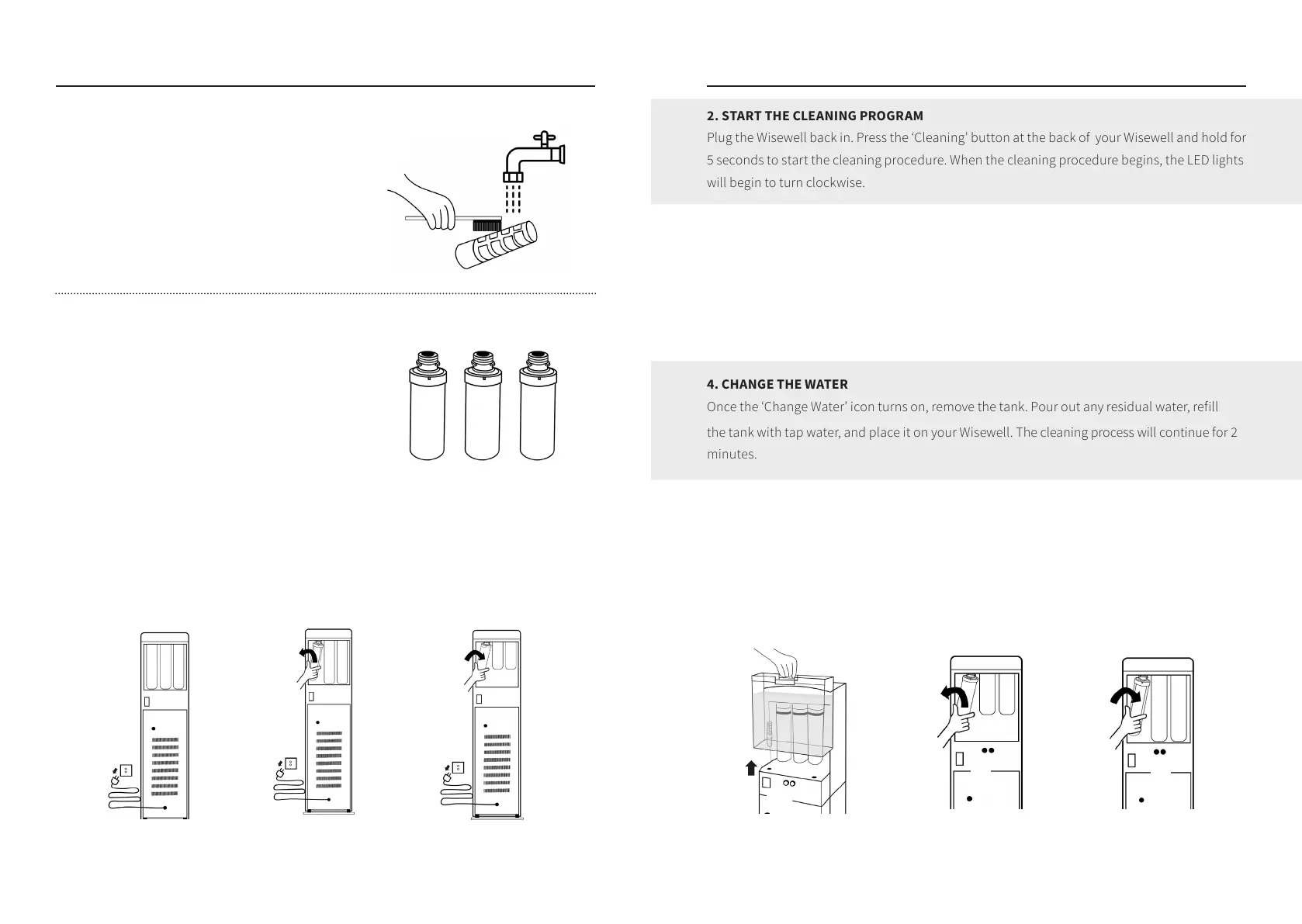
CLEANING THE PRE-FILTER IN THE WATER TANK
The function of the pre-filter in the water tank is
to isolate large particles in the water; it should be
cleaned every 4~6 months. To clean the pre-filter,
remove it from the water tank, wash it under the
faucet with a scrubbing brush, rinse it, and put it
back in the water tank.
CLEANING YOUR WISEWELL
When the front LED display of your Wisewell shows
three lights flashing, it means that your Wisewell
needs to be cleaned. The purpose of cleaning is to
remove any residue and descale the water tank and
pipeline. The cleaning filters that come with your
Wisewell are reusable. Do not dispose of them.
1. PREPARE YOUR WISEWELL
Drain the water from the Wisewell and unplug it. Remove all three filters and replace them
with the special cleaning filters. (Cleaning filter ‘2’ should be for RO. The ‘1’ or ‘3’ filters can be
used for either carbon or mineral filters, as indicated on the cleaning filter labels. The plastic
caps should be removed from the cleaning filters before installing).
1. Make sure the Wisewell is
unplugged, then remove the
water tank
2. Remove the filter in the
direction shown
3. Screw in the cleaning filter
in the direction shown
Cleaning Your Wisewell
2. START THE CLEANING PROGRAM
Plug the Wisewell back in. Press the ‘Cleaning’ button at the back of your Wisewell and hold for
5 seconds to start the cleaning procedure. When the cleaning procedure begins, the LED lights
will begin to turn clockwise.
3. ADD WATER
Mix two tablespoons of white vinegar with 2 liters of clean water (purified water is
recommended) to the empty water tank. Put the water tank back on Your Wisewell. The
‘Change Water’ icon will turn o, but the LED will continue to spin to show that the cleaning is
in process. The full cleaning process takes approximately 60 minutes.
4. CHANGE THE WATER
Once the ‘Change Water’ icon turns on, remove the tank. Pour out any residual water, refill
the tank with tap water, and place it on your Wisewell. The cleaning process will continue for 2
minutes.
5. COMPLETED
When the front LEDs stop spinning and the ‘Change Water’ icon appears, this indicates that
the cleaning process is complete. Unplug the Wisewell and reinstall the original filters.
Refill the tank with water and fix it back onto your Wisewell. Plug it back in. Filter and
drain one tank before drinking the water.
1. Make sure the Wisewell is
unplugged, then remove the
water tank as shown
2. Remove the cleaning filters 3. Install the original filters


 To Next Page