14 15
MAINTENANCE
Changing The Water
If your Wisewell has been idle for more than 3 days, empty the water
tank before using it again.
When the front LEDs start to pulse or the ‘Change Water’ icon appears on the touch control
panel, it means it is time to dispose of the residual water (usually around 1L) and refill the
water tank.
Before refilling your water tank with fresh tap water, be sure to empty the tank of all residual
water.
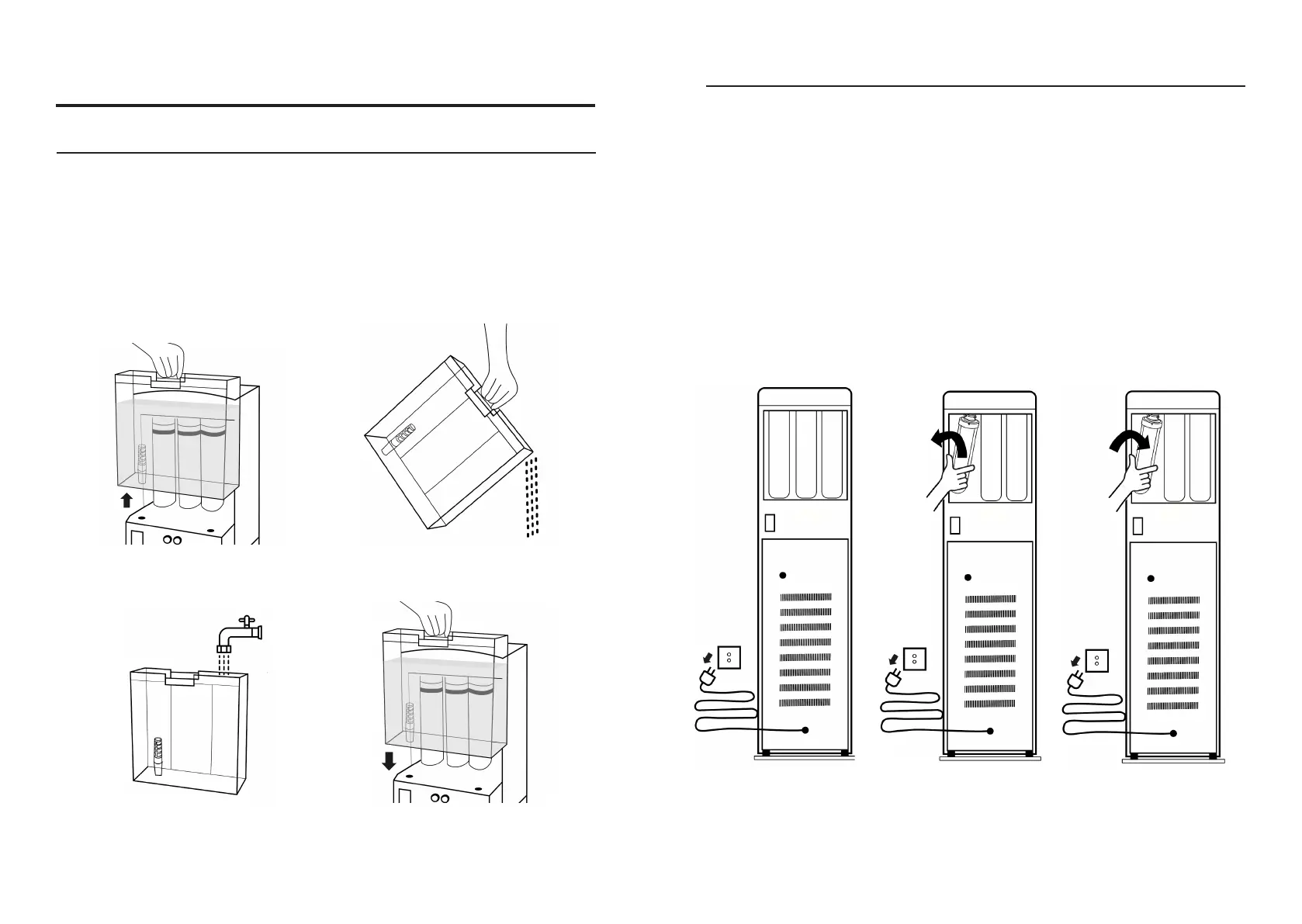
Remove the water tank
Fill with tap water
Empty the water tank
Put the water tank back
Filter Replacement
1. Make sure the Wisewell
is unplugged, then remove
the water tank
2. Remove the filter in the
direction shown
3. Aix the new filter in the
direction shown
1. REPLACE THE FILTERS
Your Wisewell will automatically inform you when a filter needs to be replaced by displaying
the corresponding filter number on the touch control panel.
Your Wisewell comes with a six month supply of filters already installed. Before
your supply of filters runs out, you will be invited to join the filter replacement
program, which uses your Wisewell app data to send you the filters that your
Wisewell needs so you don’t need to keep track.


 To Next Page