MRK16 16 channels ultra-wideband rack unit
4
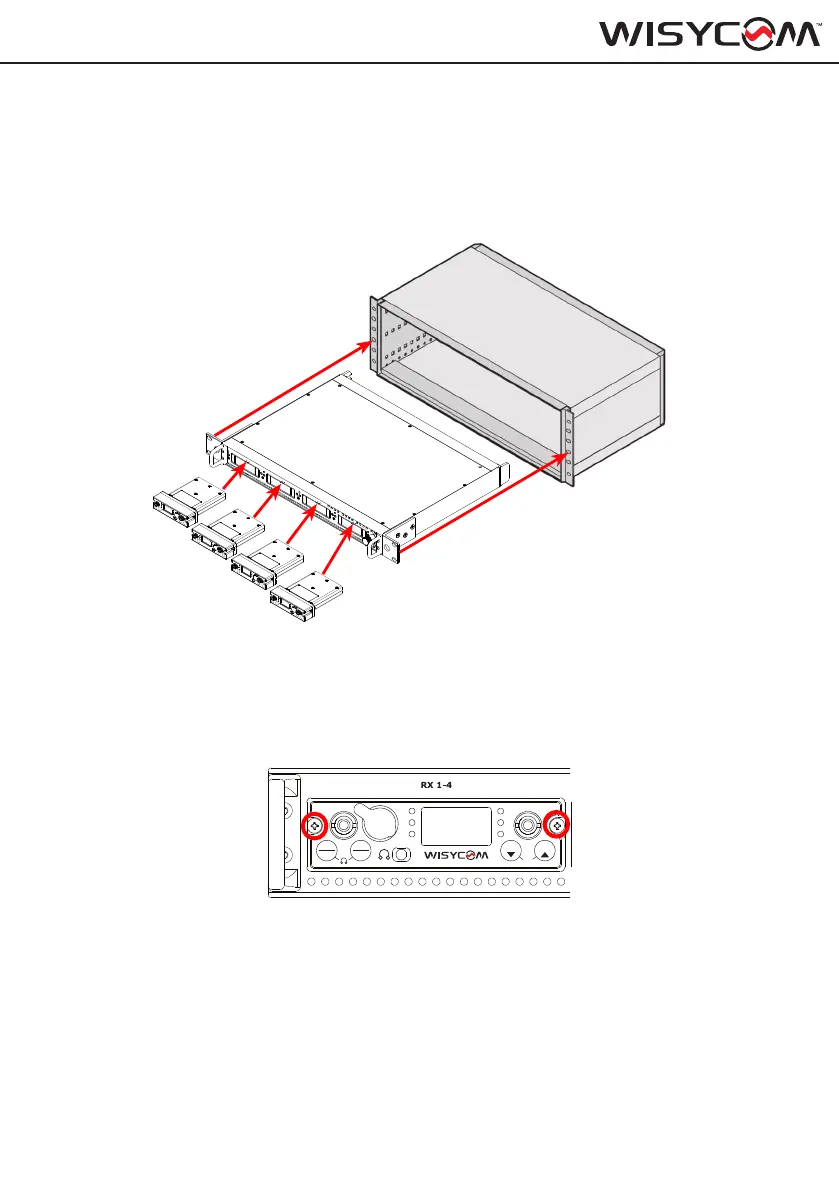
The MRK16 is designed to t into a standard 19” audio rack. Ensure the device is properly
secured to the rack frame before operating it, allowing unobstructed space for rear ventilation.
To insert the MCR54, push the receiver through the slot in the door until the top section is
ush with the MRK16 frame.
Once the receivers are properly inserted, hand-tighten the two screws on the sides of the
receivers into the dedicated holes in the MRK16 chassis. This will secure the MCR54 to the
rack frame and prevent possible disconnections, which could cause the MCR54 to switch off
and result in a loss of RF signal and audio. It is recommended to power off the MRK16 when
inserting or removing the MCR54.
A
B
ON
1
3
2
4
PWR
EXIT
MENU
SEL
SYNC
SCAN
fn
BT
A
B
ON
1
3
2
4
PWR
EXIT
MENU
SEL
SYNCSCAN
fn
BT
A
B
ON
1
3
2
4
PWR
EXIT
MENU
SEL
SYNCSCAN
fn
BT
A
B
ON
1
3
2
4
PWR
EXIT
MENU
SEL
SYNCSCAN
fn
BT
RF B
RF A
OPTICAL
3-4 5-6 7-8
AES3
IN
IN OUT
B
A
50 Ω 50 Ω
OUT OUT
A
B
ON
1
3
2
4
PWR
EXIT
MENU
SEL
SYNCSCAN
fn
BT
4-CHANNEL TRUE DIVERSITY RECEIVER
MCR54
IRUSB-C
A
B
ON
1
3
2
4
PWR
EXIT
MENU
SEL
SYNCSCAN
fn
BT
4-CHANNEL TRUE DIVERSITY RECEIVER
MCR54
IRUSB-C
A
B
ON
1
3
2
4
PWR
EXIT
MENU
SEL
SYNCSCAN
fn
BT
4-CHANNEL TRUE DIVERSITY RECEIVER
MCR54
IRUSB-C
A
B
ON
1
3
2
4
PWR
EXIT
MENU
SEL
SYNCSCAN
fn
BT
4-CHANNEL TRUE DIVERSITY RECEIVER
MCR54
IRUSB-C
MOUNTING INSTRUCTIONS


 To Next Page