MRK16 16 channels ultra-wideband rack unit
5
To switch on the MRK16, connect the PSP15V4A0-X power supply provided with the rack to
the DC-INPUT connector. The corresponding power LED on the front panel will illuminate.
- If the LED is blue, the power supply is connected and in use.
- If the LED is green, the PSU is detected but not in use.
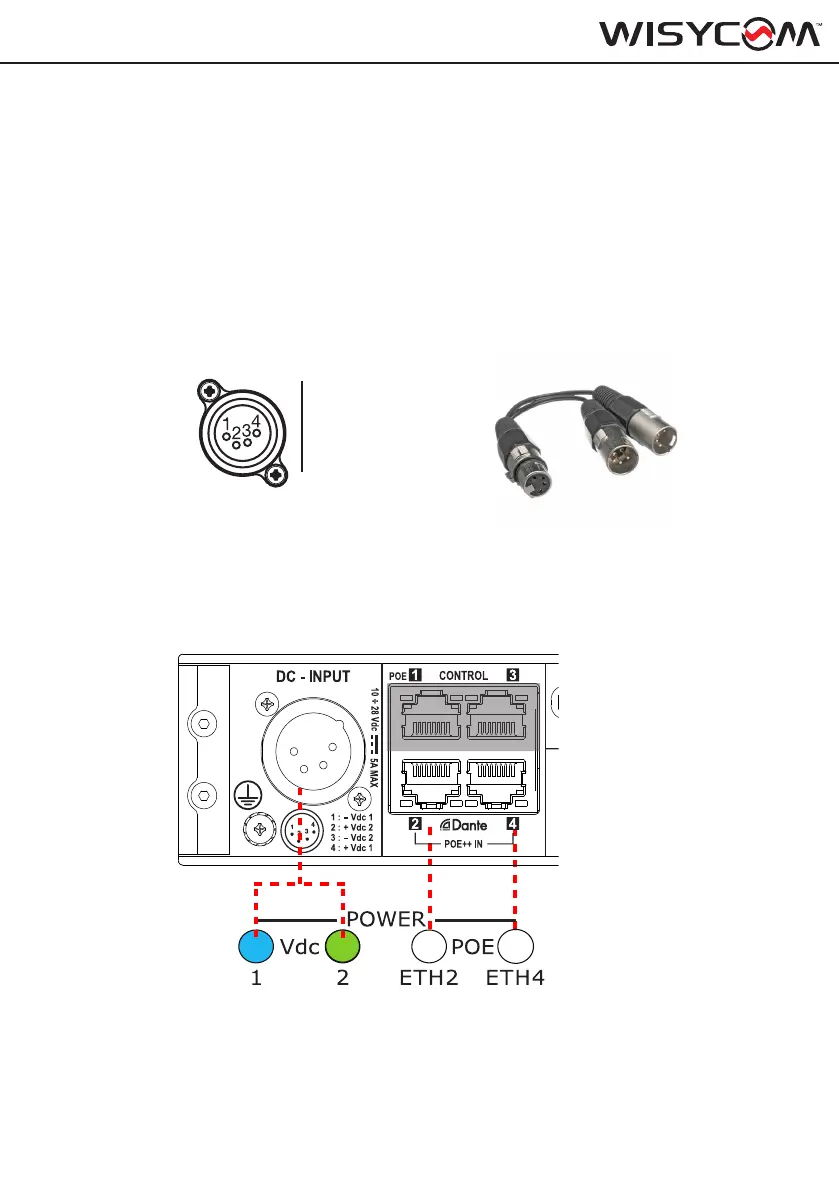
The MRK16 supports up to four different power supply sources:
- Two for the DC-INPUT connector, using a split 4-pin XLR cable (part number CDC06), allow-
ing connection to two independent power supplies: 10÷ 28 Vdc, 5A max
- Two Power over Ethernet (PoE) connections (optional) that can be made through Ethernet
ports 2 and 4 on the rear panel (ETH2 and ETH4).
CDC06
A
B
ON
1
3
2
4
PWR
EXIT
MENU
SEL
SYNC
SCAN
fn
BT
B
2
4
SYNC
SCAN
fn
T
A
B
ON
1
3
2
4
PWR
EXIT
MENU
SEL
SYNC
SCAN
fn
BT
B
2
4
SYNC
SCAN
fn
T
POWERING UP
(*)IEEE 802.3bt Type3 Class6 (51W minimun)
1: -Vdc1
2: +Vdc2
3: -Vdc2
4:+Vdc1


 To Next Page