MTP60 mul-band bodypack transmier
3
LED INDICATIONS
• LED 1 - audio indication
Green unit is modulating regularly
Red audio is peaking
OFF (grey) audio is muted
• LED 2 - RF and battery indication
Red when transmission is OFF
Green when transmission is ON
Red slow blink when battery is < 25%
Red fast blink when battery is < 12%
OFF (grey) when MTP60 is OFF
• LED 3 - recording
OFF (grey) when recording is OFF
Red when recording is active
• LED 4 - recharging status
OFF (grey) when no recharging
Orange blink when is recharging
Green when recharge is completed
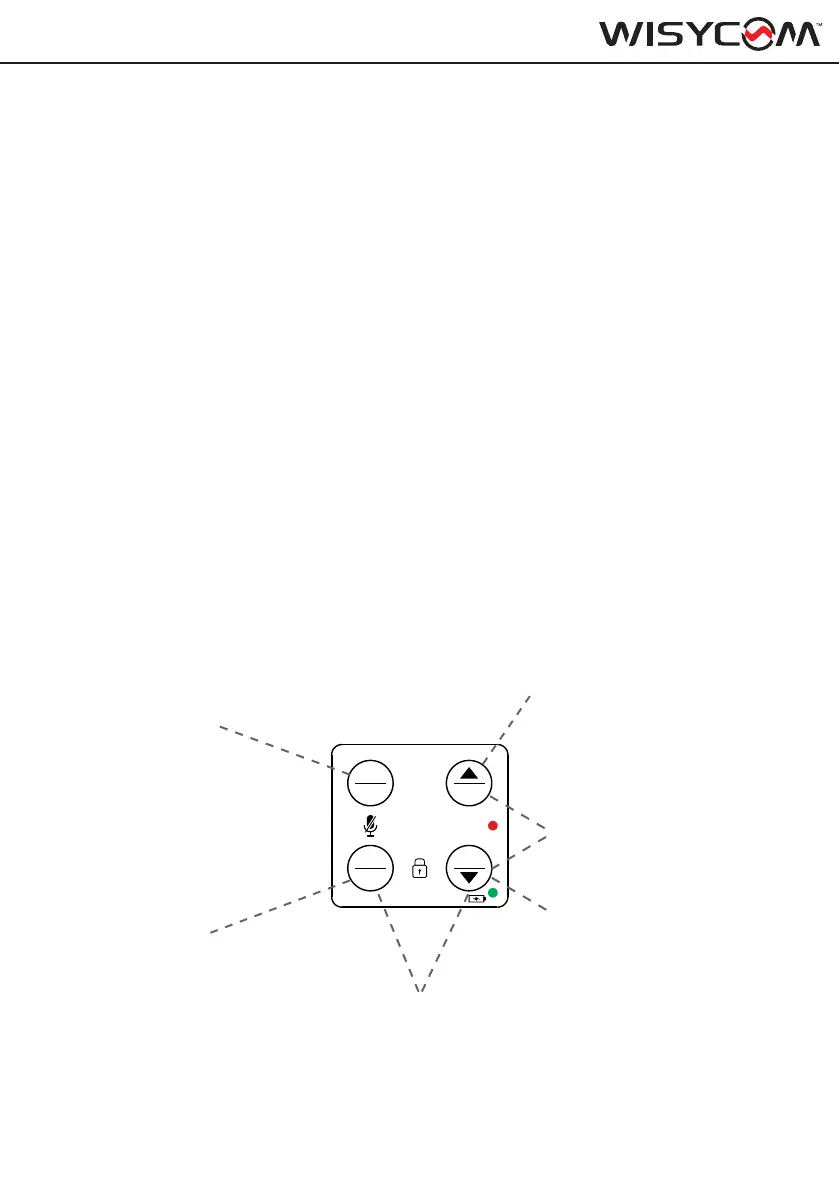
SETUP CONTROL
Use the 4 front buttons to navigate the menu and quickly setup:
SEL/ON:
• Hold to switch ON the device.
• Push together with GAIN/UP to enter the main
MENU.
• When in menu single push to save and confirm
selections.
SEL
EXIT
GAIN
CH
REC
ON
OFF
MENU
UP/GAIN:
• Push to scroll up while in the menu
• Short press for quickly access to GAIN
setup (from Home Screen)
EXIT/OFF:
• Long press to switch the unit OFF
• Short press to step back into menu
• Long press to switch ON the transmitter
without RF output enabled
EXIT + CH:
To lock/unlock
front panel
GAIN + CH:
To enter on RECORDING setup
DOWN/CH:
• Push to scroll down while into the menu
• Short press for quickly access to CHAN-
NEL setup (from STATUS menu)



 To Next Page