MTP60 mul-band bodypack transmier
4
POWERING UP
Push SEL/ON button for few seconds to switch on MTP60 and activate wireless transmission.(RF
Power has to be previosuly enabled).
Push EXIT/OFF button for few second to switch on MTP60 without the activation of wireless
transmission.
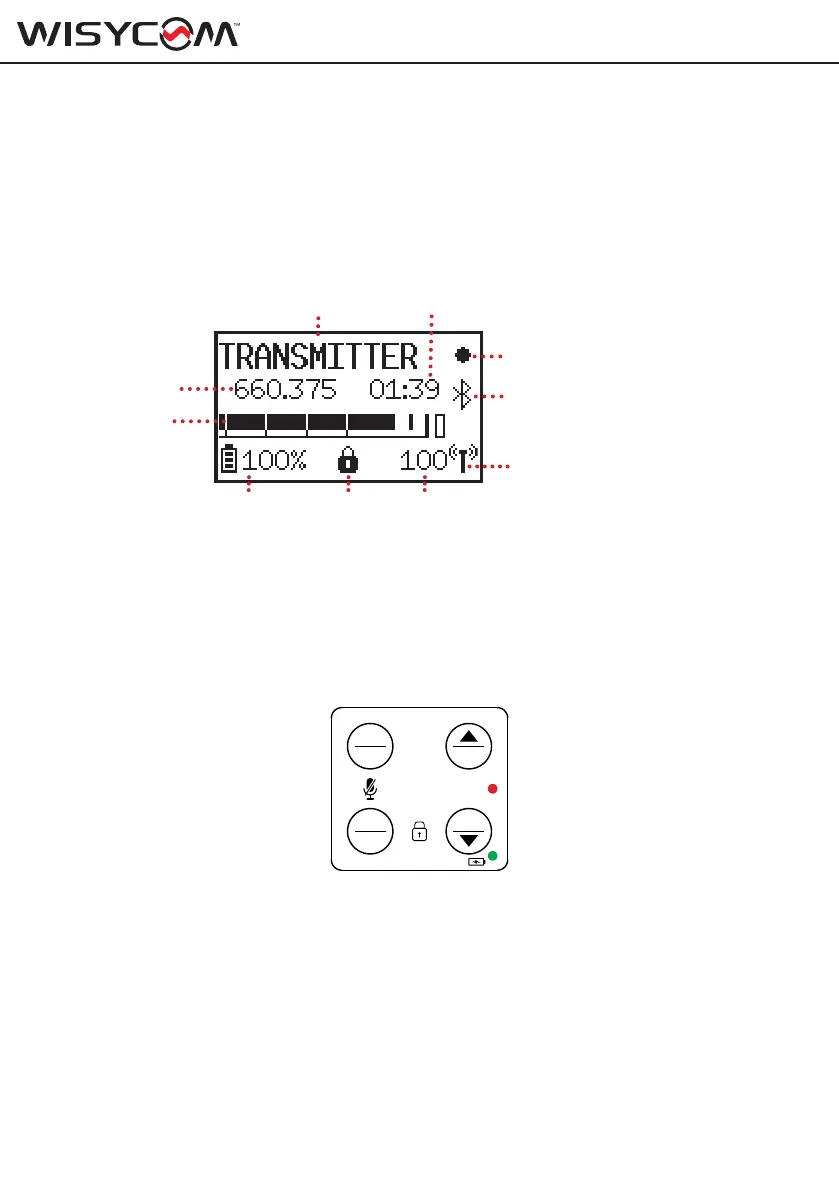
STATUS menu
After the power up phase, the Status menu is showed where major info are displayed:
Transmitter/Receiver name
Frequency
Audio bar
Tx PWR status
Battery
status
Locked
icon
RF level
in mW
Bluetooth Icon
Recording Icon
Group:Channel
From the status menu it is possible to access the main functions of the transmitter thanks to
the quick selection keys:
• GAIN to change the audio gain level
• CH to change group / channel / frequency
• UP+DOWN (REC) to start / stop recording or JAM external Timecode
• EXIT+DOWN (LOCK) to lock / unlock the display
• SEL+EXIT (MUTE) to mute the audio
SETUP menu
Push SEL+UP buttons to enter on the Setup menu.
Using UP/DOWN button all menus can be accessed in sequence and change the parameters
value. Each change is immediately set on MTP60, it is not necessary to confirm the modification.
Push EXIT button to exit from menu.
If no button is pressed for 60 seconds, the display is locked automatically to prevent accidental
changes and the locked icon appears at the bottom of the display (this setting can be changed
via the Settings> Display> Auto-lock menu).
To unlock the display push EXIT and DOWN buttons together.
SEL
EXIT
GAIN
CH
REC
ON
OFF
MENU



 To Next Page