6 Settings
In the Setup mode, the user is able to configure settings to achieve measurement re-
sults of the utmost accuracy. The following settings are possible:
P1.0: Select unit
P2.0: Entering the area of the air outlet
P3.0: RH offset
P4.0: Enter the air pressure (Wöhler FA 430 only).
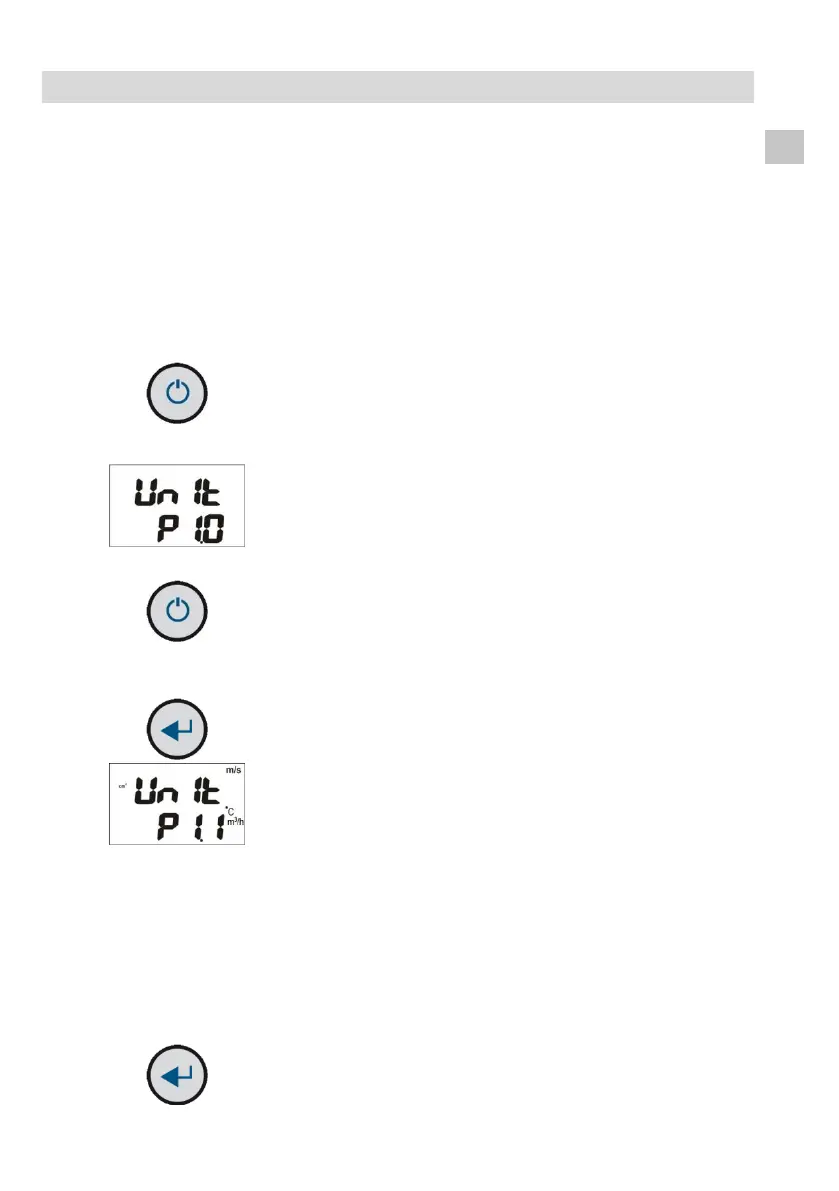
In the normal Measuring mode, press and
hold the On/Off key for 2 seconds to access
the Setup mode.
The P1.0 mode is displayed.
Press the Up or Down key to access the
modes P1.0 to P4.0.
To do settings, go immediatelyto chapter 6.1.
To return to the normal Measuring mode,
press and hold the On/Off key again for 2
seconds.
Fig. 14: Setting mode – selecting the unit
of measurement
In the P1.0 mode, press the HOLD/MIN/MAX
key to access the Unit of measurement mode.
Using the Up and Down keys, toggle between
the screen displaying metric (European) units
of measurement (m/s, °C, m
3
/h, cm
2
) and the
screen displaying theimperial (US) units of
measurement (fpm; °F, CFM and inch
2
).
It is possible to choose between the following
units:
Flow velocity: m/s and fpm
Temperature: °C and °F
Volume flow: m
3
/h and CFM
Area: cm
2
and inch
2
To return to the P1.0 mode, press the
HOLD/MIN/MAX key.



 To Next Page