Heat Recovery unit CWL-300(B) / CWL-400(B) with option PCB 9
The installer can modify more settings. When parameters are
set incorrectly, the appliance can no longer perform up to stan-
GDUGVRPDNHVXUHQRSDUDPHWHUVDUHPRGL¿HGLQFRUUHFWO\$OVR
refer to the menu structure diagram § 6.5.1 in the installation
instructions CWL-300/400. The following actions are required
to modify the settings from operational mode.
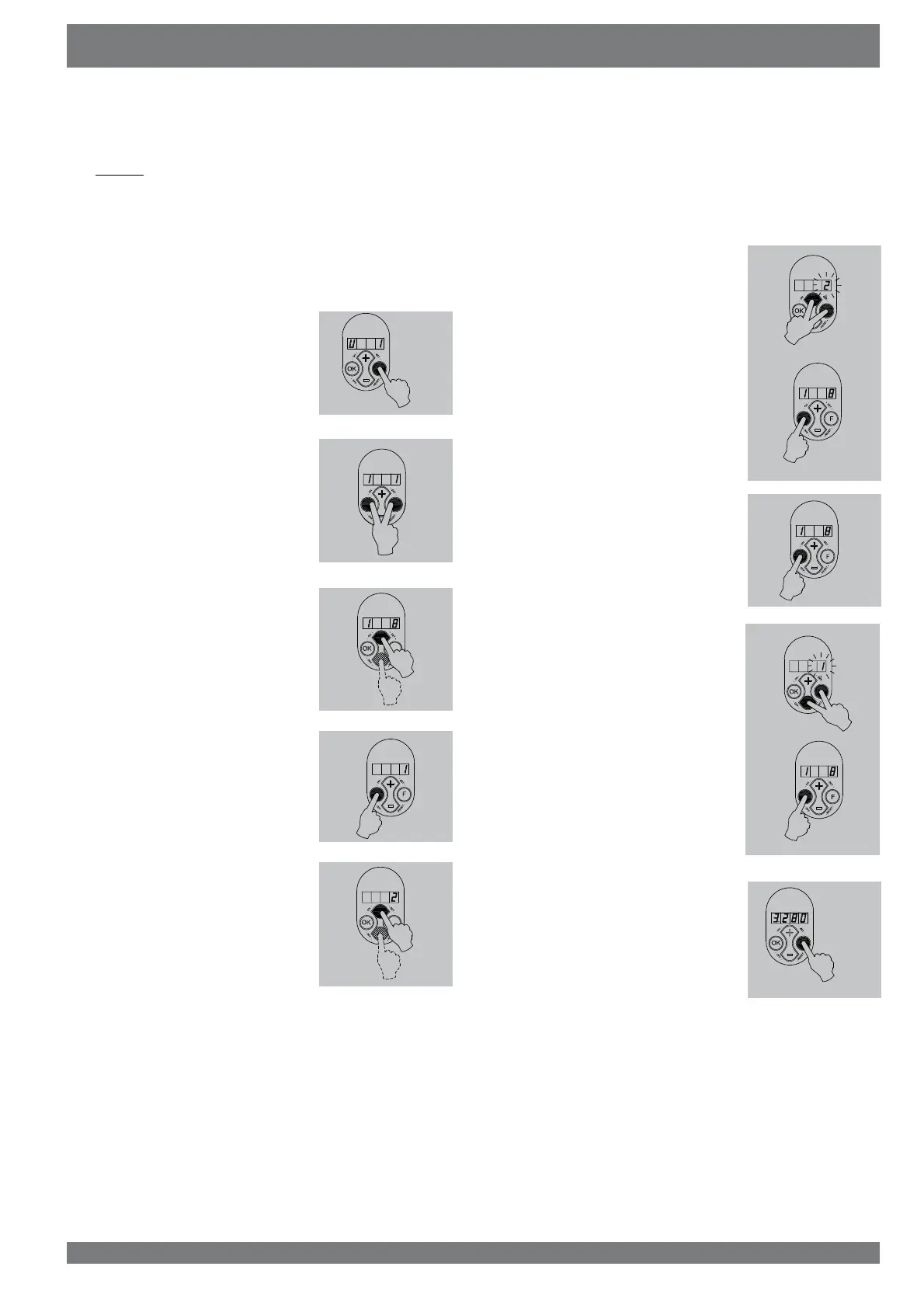
(By way of example parameter I8 is changed from 1 to 2.)
1. Press key “F” during 3 seconds
WRDFWLYDWHWKHVHWWLQJVPHQX
2. Press key “F” and “OK” for 3 se-
FRQGVWRDFWLYDWHWKHFRPSUHKHQ-
VLYHLQVWDOOHUSDUDPHWHUVVHW
3 The desired parameter can be
found with the aid of keys “+” and
“-”.
4. Pressing key “OK” calls up this
setting.
5 Use keys “+” and “ -” to modify
WKHYDOXH
7KHPRGL¿HGVHWWLQJFDQQRZEH
A saved and stored
B be removed
C restored to factory setting
A Simultaneously press keys “F”
and “+´¿UVW³F” and then “+” )
WRVDYHWKHPRGL¿HGVHWWLQJWKH
PRGL¿HGYDOXHZLOOQRZEOLQN[
DV FRQ¿UPDWLRQ WKH YDOXH UH-
mains on the display. Press key
“OK” to return to the settings
menu; if desired, more settings
can now be changed.
(see item 2 to 5)
Continue with step 7.
B Press key “OK” to go back
to the settings menu without
VDYLQJWKHPRGL¿HGVHWWLQJWKH
SUHYLRXVVHWWLQJZLOOEHPDLQWDL-
ned. Continue with step 7.
C Simultaneously press keys “F”
and “ -´¿UVWSUHVV³F” and then
“-“ ) to go back to the factory
setting. The factory setting will
blink 3 times and remain at that
YDOXH7KHPRGL¿HGVHWWLQJKDV
QRZEHHQUHPRYHG3UHVVNH\
“OK” to return to the settings
menu. Continue with step 7.
7 Press key “F” for 1 second to lea-
YHWKHVHWWLQJVPHQX
Settings Chapter 4
5423-0
>3s
>3s
4.2.2 Modifying settings by the installer



 To Next Page