WSP-W40 Rev. 3.2
http://www.woosim.com
14
2
2
.
.
5
5
.
.
3
3
.
.
R
R
e
e
c
c
h
h
a
a
r
r
g
g
i
i
n
n
g
g
t
t
h
h
e
e
b
b
a
a
t
t
t
t
e
e
r
r
y
y
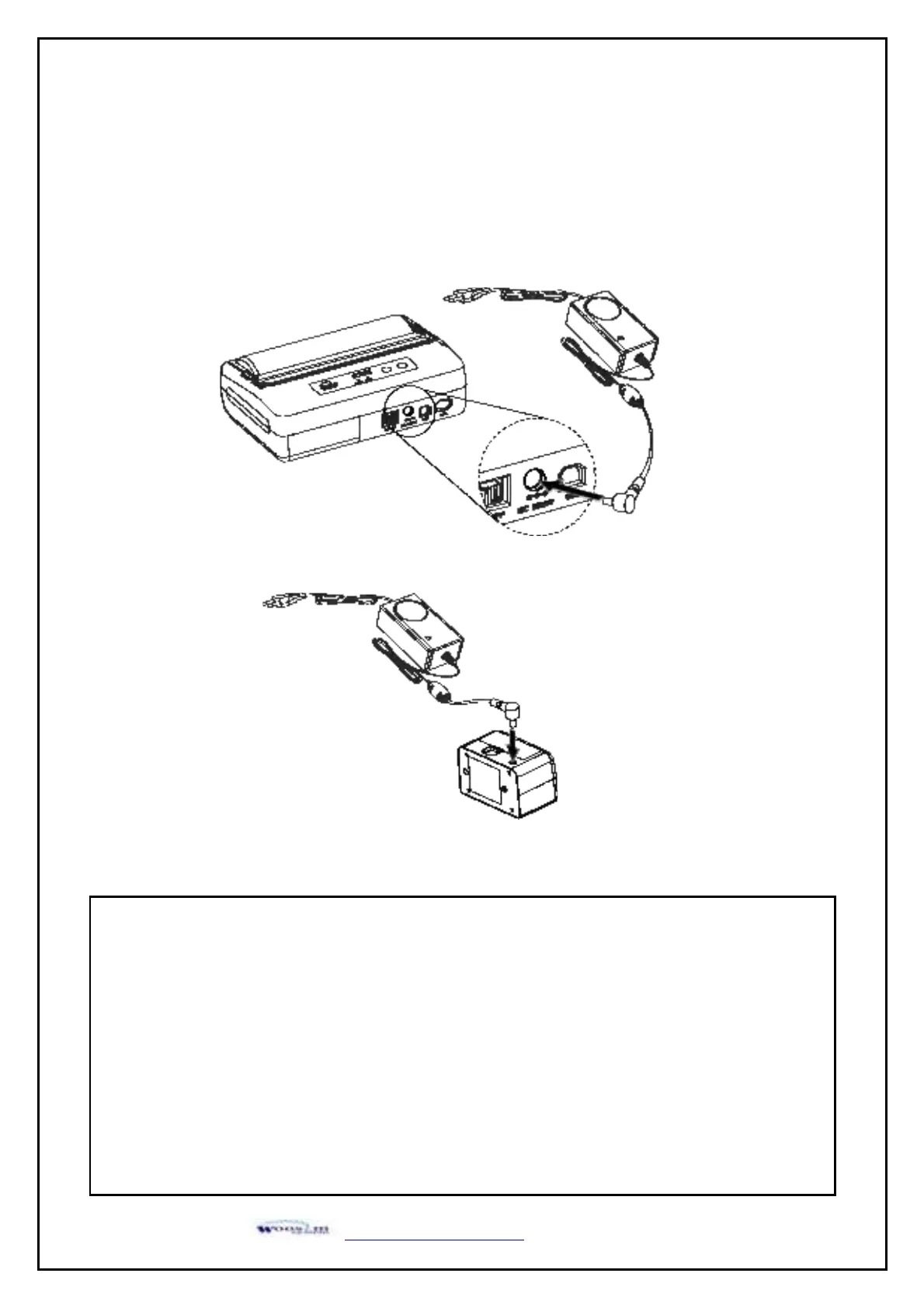
For recharging the battery pack, install the battery pack in the printer or the External Battery
Cradle.
Insert the battery charger to the charge connector of the printer or the External Battery Cradle.
NOTE : ● While charging the printer, turn off the printer power.
● Do not remove the battery during charging.
● The battery is consumable parts and when purchasing, compared to the use hour is gradually
decreases. (Warranty 6 month)
● If the printer is not used for a long time, unplug the power cord from the printer and outlet.
● The recharging time depends on the voltage level and ambient temperature of the battery.
Normally, if takes about 4 hours to recharge a battery pack.
● You must use only the supplied adapter.
● Red Lamp : charging the battery.
Green Lamp : charging is finished.


 To Next Page