WSP-W40 Rev. 3.2
http://www.woosim.com
17
3
3
.
.
I
I
n
n
t
t
e
e
r
r
f
f
a
a
c
c
e
e
3
3
.
.
1
1
.
.
U
U
S
S
B
B
3
3
.
.
2
2
.
.
B
B
l
l
u
u
e
e
t
t
o
o
o
o
t
t
h
h
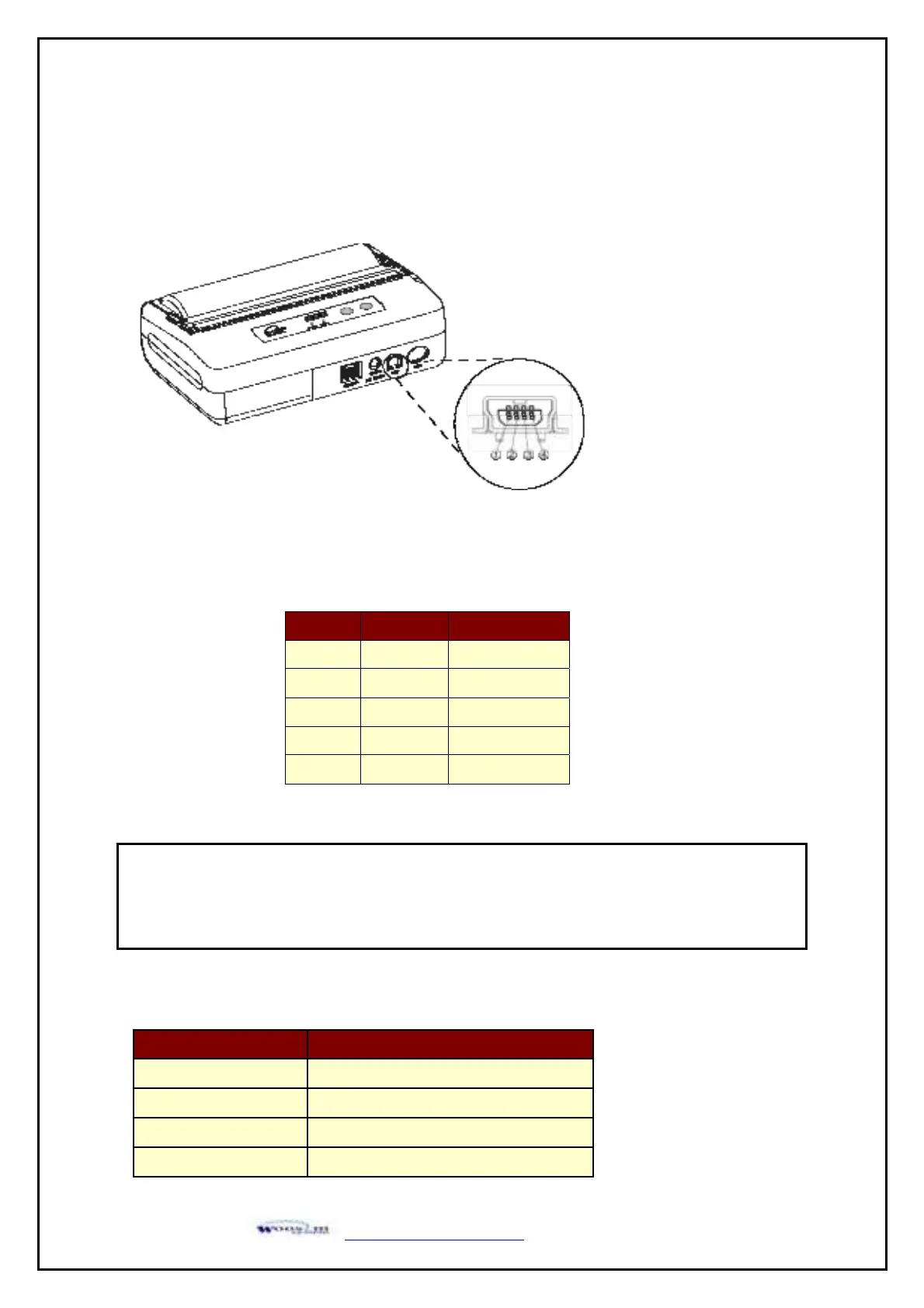
The WSP-W40 printer has a USB interface and is connected by means of a 5 pin mini USB socket.
In the following table, the signals present on the Mini- USB socket are listed:
Category Specification
Bluetooth Spec. Bluetooth Ver3.0 / Class2 (10m)
Frequency band 2402~2480 MHz
Protocol L2CAP, RFCOMM, SDP
Profile GAP, SDAP, SPP
NOTE :
● If you connect the printer interface cable is converted to USB mode.
● When data receiving, when it removes the communication cable, it loses a data.
(Fig.3.1)
Pin No. Name Function
1 VCC +5V
2 DM DATA “-”
3 DP DATA “+”
4 NC. -
5 GND Ground


 To Next Page